Pay As You Go - AI Model Orchestration and Workflows Platform



Running a small business often means juggling endless tasks, from managing emails to handling invoices. AI-powered workflow tools can help by automating these repetitive tasks, saving time, cutting costs, and boosting productivity.
Key Takeaways:
Quick Recommendations:
Each tool offers unique features, pricing, and integration capabilities. Start small, automate one task, and scale your workflows as your business grows.
Before diving into AI tools, ask yourself: What is your team's skill level? What’s your monthly budget? Which processes need automation? How quickly do you need results? These questions will help you identify your priorities and guide you toward a solution that fits your business needs.
Factor in both upfront costs and usage-based charges. Many AI tools operate on a pay-per-use model, charging per "token" or action rather than a flat monthly fee. For example, a tool that starts at $30/month could escalate to $300/month as usage increases. Solo businesses with 1-5 employees might spend $0-$100/month, while small businesses with 6-25 employees often allocate $100-$500/month. Be sure the time and effort saved by the tool justify these rising expenses.
Choose tools that match your team’s technical expertise. For teams with limited technical skills, opt for platforms offering visual, drag-and-drop interfaces that simplify workflow design without requiring coding knowledge. This ensures your team can get up and running quickly without extensive training.
Begin with one repetitive, low-risk task - such as sorting emails or generating meeting summaries - before automating more complex processes. Test the workflow on a smaller scale to identify and resolve any issues early on. Look for tools that include manual approval steps for sensitive tasks, allowing you to pause and review decisions before they’re finalized. This is especially critical for high-stakes areas like customer communication or financial transactions, where AI should never operate without oversight.
As your business grows, ensure the tool supports integration and robust security measures. Look for features like role-based access controls and compliance with standards such as GDPR or SOC2 if you handle customer data. Additionally, your AI workflow solution should integrate seamlessly with your existing systems - like your CRM - to maintain consistent and accurate data across your operations. Align these capabilities with your business objectives to create a scalable and efficient AI-driven workflow.
Prompts.ai is a comprehensive AI workspace tailored for small businesses, replacing the need for multiple fragmented apps. Instead of managing separate tools for tasks like email marketing, social media, SEO, and data analysis, Prompts.ai offers 12 specialized assistants. These include Seomi for SEO, Emmie for email, Soshie for social media, and Vizzy as an executive assistant. All these assistants draw from a shared Brain AI knowledge base, where businesses can store brand guidelines, key documents, and URLs. This ensures outputs are consistent with your brand and contextually accurate - an essential feature for small businesses aiming to maintain a cohesive identity. This unified platform simplifies workflows, aligning perfectly with the efficiency small businesses need.
Prompts.ai is built for users without technical expertise, offering a straightforward web interface that allows for quick onboarding. Tasks can be automated within minutes. Its Power-Ups feature simplifies processes like scheduling social media posts or running email campaigns. Additionally, proactive daily suggestions help teams save over 10 hours each week by automating both marketing and operational tasks.
The platform grows alongside your business through its role-based structure, making it easy to scale from basic email campaigns to more complex data analysis. Prompts.ai integrates with popular tools like Gmail and Instagram, allowing businesses to automate workflows across the platforms they already rely on. The Brain AI ensures that as new assistants or workflows are added, your brand’s voice and processes remain consistent across all channels.
By consolidating multiple subscriptions into one platform, Prompts.ai helps businesses cut software costs while reducing the time spent switching between tools. This makes it an appealing choice for businesses looking to maximize efficiency without overspending.
With its centralized Brain AI knowledge base, Prompts.ai secures sensitive information while reducing the risks associated with spreading data across various disconnected apps. While specific compliance standards like GDPR or SOC 2 aren’t explicitly mentioned, the platform’s enterprise-grade design suggests a strong focus on security. These features position Prompts.ai as a reliable option for small businesses aiming to streamline workflows while safeguarding their data.
Zapier connects nearly 8,000 apps, making it a powerful tool for automating tasks across platforms. Its "if-this-then-that" logic, referred to as Zaps, allows users to create automated workflows. For instance, if a lead submits a form in Google Forms, Zapier can automatically add them to your CRM, send a welcome email, and notify your sales team - all without manual intervention.
Zapier simplifies automation with its Copilot AI assistant and visual Canvas tool. Users can describe their needs in plain English, and the AI takes care of building the workflow. Pre-built templates for tasks like lead tracking or social media posting make it easy for small businesses to get started, while offering plenty of room for customization.
In December 2025, Remote's three-person IT team handled 1,100 support tickets monthly for over 1,800 employees using Zapier and AI. They created a workflow that triaged requests with ChatGPT and synced data to Notion, resolving 28% of tickets automatically and saving more than 600 hours each month. Marcus Saito, Head of IT and AI Automation at Remote, shared:
"Remote is a company of over 1700 employees and we have over 580 active Zaps to support those employees."
Zapier’s extensive app ecosystem and flexible pricing make it adaptable for growing businesses. Features like Zapier Tables, a database built for automation, and Zapier Interfaces, custom forms that trigger workflows, are included in every plan. Additionally, triggers and native tool actions don’t count toward monthly task limits, enabling businesses to create complex workflows without extra costs.
Vendasta used Zapier to implement an AI-powered engine for automating lead enrichment and CRM updates. This automation reclaimed $1 million in lost revenue and saved the sales team 20 hours of manual work daily. With AI tools like ChatGPT integrated for tasks such as sentiment analysis and content summarization, Zapier allows businesses to add intelligence to workflows without the hassle of managing separate API keys or technical setups.
Zapier’s pricing is based on "tasks" (successful actions), while triggers and data polling are free. Filters and Paths also don’t count toward task usage, letting users design advanced workflows without driving up costs. The free tier offers 100 tasks per month, while the Professional plan starts at $19.99/month (billed annually) with 750 tasks. Companies using automation report an average cost reduction of 20%, with some saving between $50,000 and $150,000 annually.
Premiere Property Group streamlined agent onboarding and marketing workflows for over 1,300 agents using Zapier Forms and Tables, saving $115,000 annually. If a company exceeds its task limit, Zapier seamlessly switches to pay-per-task billing at 1.25x the base rate, ensuring workflows continue uninterrupted. This pricing model strikes a balance between efficiency and affordability, making Zapier a standout choice for automation.
Zapier prioritizes security with TLS 1.2 encryption for data in transit and AES-256 encryption for data at rest. The platform is SOC 2 (Type II) and SOC 3 certified, and complies with GDPR, GDPR UK, and CCPA. Enterprise customers are automatically excluded from AI model training, while other users can opt out manually to safeguard their data. Hosted on AWS in the United States, Zapier also offers role-based access, SAML SSO (on Team and Enterprise plans), two-factor authentication, and real-time audit logs to support compliance and security needs.
Flowlu combines CRM, project management, invoicing, and finance tools into a single platform, eliminating the hassle of juggling multiple subscriptions. Once a sale is closed, the system takes care of everything - updating inventory, refreshing CRM records, and generating invoices. This automation allows small teams to efficiently manage larger workloads without needing to hire additional staff.
With its Business Process Module, Flowlu offers a no-code interface for mapping workflows and setting triggers like "Approve or Reject." Pre-built templates for common processes - such as PTO requests, hiring, and expense reimbursements - let businesses hit the ground running. The "Assign an Alternate" feature ensures tasks don’t stall by automatically assigning them to a backup when the primary person is unavailable, using data from the Leaves & Absences module.
Danijel Bićanic, Owner of Bićanić Consulting, shared his experience with Flowlu:
"We chose Flowlu because it centralizes our operations, sales, and project management in a single platform. It gives us a clear overview of events, deadlines, and tasks at a glance."
This streamlined approach not only boosts efficiency but also reduces costs.
Flowlu offers a Forever Free plan for up to 2 users, making it an excellent option for freelancers and small businesses. Paid plans start at $9 per user/month (billed annually), with a 25% discount for yearly payments. Users report cutting manual tasks by 30% and completing projects 15% faster. Antonio Thornton, CEO, expressed his satisfaction:
"Flowlu has replaced five applications and has made life better for me and 350 of my employees."
Flowlu’s automation features grow with your business. It integrates seamlessly with tools like Google Workspace, Mailchimp, PayPal, and Calendly. For custom needs, the platform provides an API, enabling tailored connections. Its scalability - from a free plan to advanced tiers - helps businesses cut internal communication inefficiencies by 25%.
Flowlu prioritizes security with TLS encryption and granular role-based permissions, offering levels like "Can run processes" and "Can view all processes." The secure client portal allows external collaboration without compromising internal systems. Additionally, a built-in knowledge base stores company policies and SOPs, ensuring workflows align with compliance standards and reference a single source of truth.
Nanonets is designed to turn disorganized documents into structured, usable data. For small businesses managing invoices, receipts, purchase orders, or contracts, this AI platform eliminates the hassle of manual data entry. Unlike rigid templates that fail when a vendor changes their invoice format, Nanonets employs Intelligent Document Processing (IDP) to interpret the context of documents. This means it can pinpoint the information you need, no matter where it appears on the page, setting the stage for quick and efficient automation.
With its no-code interface, Nanonets allows you to create workflows using simple building blocks and plain language. You can automate tasks like accounts payable, invoice processing, onboarding documents (e.g., W-9 and I-9 forms), or contract reviews - all without needing to write a single line of code. Setup is quick, and the platform delivers over 95% accuracy in data extraction.
For example, StarTex Software in Texas automated the digitization of complex, multi-page Safety Data Sheets. They cut processing time from 10 minutes per document to just 10 seconds - a 98% reduction. Similarly, GenesisONE in Illinois saved $52,000 annually by replacing a full-time employee with automated workflows.
Nanonets offers a pay-as-you-go pricing structure with no fixed fees. You’re only charged when a task is executed, making it perfect for businesses with fluctuating workloads. New users also receive $200 in free credits to test workflows before committing to a plan. On average, users see an 88.3% reduction in manual effort and achieve a 3.5x ROI within six months.
Ascend Properties in the United Kingdom, for instance, handled a fivefold increase in invoice volume without hiring additional staff. By implementing Nanonets, they now manage all invoices with just one part-time employee, reducing processing costs by 80%. David Giovanni, CEO of Happy Jewelers, shared:
"We have saved over 80% in costs for invoice processing. We're now exploring more opportunities with Nanonets."
Nanonets integrates effortlessly with popular tools like QuickBooks, Xero, Sage, NetSuite, SAP, Salesforce, HubSpot, Google Drive, Dropbox, SharePoint, and more. It also supports custom Python scripts, webhooks, and APIs. Hometown Holdings in Virginia achieved an 88% straight-through processing rate for property invoices, saving 4,160 employee hours annually and boosting Net Operating Income by $40,000.
The platform meets GDPR, SOC 2, HIPAA, and ISO 27001 standards, offering role-based access controls and detailed audit trails. For businesses with strict data residency needs, Nanonets provides on-premise deployment via Docker. Additionally, its human oversight feature allows you to flag exceptions or mandate reviews for all documents, ensuring precision in critical processes.
UiPath delivers enterprise-level Robotic Process Automation (RPA), making it a go-to solution for businesses looking to connect modern cloud tools with older software systems. Instead of relying on APIs to link applications, UiPath replicates human actions to automate tasks. This is particularly helpful for small businesses still dependent on legacy systems that lack modern integration capabilities.
While UiPath requires some technical setup, it shines in automating complex workflows that involve direct interaction with user interfaces. It can handle both front-office and back-office tasks, such as entering data into outdated accounting programs or processing forms in older CRM systems. By automating these processes, UiPath bridges gaps where traditional tools fall short, scaling effortlessly as your business grows.
Designed for expanding enterprises, UiPath offers advanced governance features alongside its automation capabilities. It integrates with systems that other platforms often cannot, ensuring seamless operation. With 99.9% service uptime for its Automation Cloud, UiPath provides the reliability businesses need as they scale their automation efforts.
Security is a top priority for UiPath, especially for businesses relying on older systems. It includes role-based access control (RBAC), real-time monitoring, and detailed audit trails. The platform supports multiple authentication methods, such as SAML 2.0, Microsoft Entra ID, and SSO. For companies with strict data residency requirements, UiPath offers per-tenant data location options. It also adheres to rigorous compliance standards, including SOC 1 Type 2, SOC 2 Type 2, ISO 27001, HIPAA, FedRAMP Moderate, and StateRAMP. Users can manage their own encryption keys and integrate with third-party vaults like CyberArk or Azure Key Vault. Additionally, audit logs can be retained for up to 5 years.
UiPath’s Basic tier starts at $25 per month for individual users. However, businesses often require the Standard or Enterprise tiers, with pricing provided upon request. For enterprise-grade RPA solutions, costs typically start at $2,000+ per month. While this represents a considerable investment, it’s well-suited for organizations needing automation for legacy systems and stringent compliance measures.
Activepieces offers an open-source approach to workflow automation, giving small businesses the ability to manage their data while keeping costs low. With over 625 pre-built integrations, it connects popular tools like HubSpot, Zoho, Slack, and Gmail through a user-friendly visual builder. For apps without native integrations, Webhooks and custom TypeScript pieces can handle unique requirements.
With its no-code vertical builder, Activepieces makes creating workflows as simple as dragging and dropping. This means even those without technical expertise can design automations without touching a single line of code. The AI Copilot further streamlines the process by suggesting steps based on natural language inputs, saving time during setup. For tasks that require human oversight, such as payment approvals or customer responses, the "Human-in-the-loop" feature pauses workflows for manual review before continuing. As Matthias L. put it:
Activepieces truly stands out.
This simplicity is enhanced by a strong user community and flexible integration options.
Activepieces is built to grow alongside your business. With over 41,000 users and 151 contributors, it thrives on community support. Developers can expand its functionality by creating custom integrations, while the Model Context Protocol (MCP) servers enable AI agents to interact with business tools in the right context. Additionally, the platform includes built-in Tables, functioning like Google Sheets but seamlessly integrated into workflows, providing a centralized data hub for your operations.
Activepieces prioritizes security with SOC 2 Type II compliance, ensuring small business data is protected. Credentials are encrypted with 256-bit keys and removed after processing, while data masking prevents sensitive information from appearing in logs. OAuth2 connections with limited scopes further reduce security risks. For industries with strict regulations, such as healthcare or finance, the Community Edition can be self-hosted using Docker, offering complete control over data location. The Ultimate plan adds advanced features like Single Sign-On (SSO), custom role-based access control (RBAC), and detailed audit logging.
Activepieces offers a per-active-flow pricing model, allowing unlimited runs without the typical per-task charges. The Standard Plan is free for up to 10 active flows, with additional flows costing $5 each per month. The Plus Plan, priced at $25 per month, includes unlimited tasks and AI agents, while the Business Plan costs $150 per month for 50 active flows and API access. For businesses seeking the lowest cost, the free, self-hosted Community Edition provides unlimited automation runs for the price of a basic VPS, typically $5–$20 per month, making it an economical choice for small businesses looking to automate effectively.
Lindy uses AI agents as virtual team members to autonomously handle operations, sales, and support tasks. These agents respond to context rather than rigid instructions, making them highly adaptable. With over 5,000 customers already on board, Lindy is helping small businesses grow without needing to expand their workforce. This streamlined approach makes automation accessible right from the start.
Setting up an AI agent takes less than 5 minutes using natural language prompts or a drag-and-drop interface. Pre-built templates make it easy to automate tasks like meeting notes, CRM updates, and lead follow-ups. For businesses managing large workloads, the Agent Swarms feature can process up to 1,000 items at once, tackling high-volume tasks with ease. As Maddie Weber, Business Ops & GTM Lead, put it:
Lindy felt like hiring a superhuman overnight.
The platform’s "Autopilot" technology allows agents to operate their own cloud-based computers, directly interacting with web apps and bypassing typical API restrictions.
Lindy is designed to grow with businesses, offering connections to over 7,000 integrations across 1,600+ apps, such as Gmail, Slack, HubSpot, Salesforce, Notion, and Google Calendar. For advanced automation, it also supports Puppeteer for web interactions and Apify for pulling data from more than 4,000 sources. With support for 30+ languages, Lindy is ideal for businesses serving diverse customer bases. Multiple agents can collaborate across departments to streamline workflows.
Lindy offers flexible pricing plans to suit different needs. The Free plan includes 400 tasks per month, while the Pro plan costs $49.99/month for 5,000 tasks. The Business plan, at $299.99/month, covers 30,000 tasks. AI calling is available for $0.19 per minute for U.S. calls. By automating repetitive tasks, teams can save 11–20 hours each month. Ken Aseme, CEO of VC CFO, shared:
It's like hiring a 24/7 ops teammate who never misses a deadline.
Lindy adheres to SOC 2, HIPAA, GDPR, and PIPEDA standards, ensuring robust protection of sensitive data. Its security measures safeguard multi-channel tasks like AI-driven phone calls, email management, and CRM updates. For high-stakes workflows, the "human-in-the-loop" feature allows business owners to review AI outputs before finalizing actions, balancing quality control with automation efficiency.
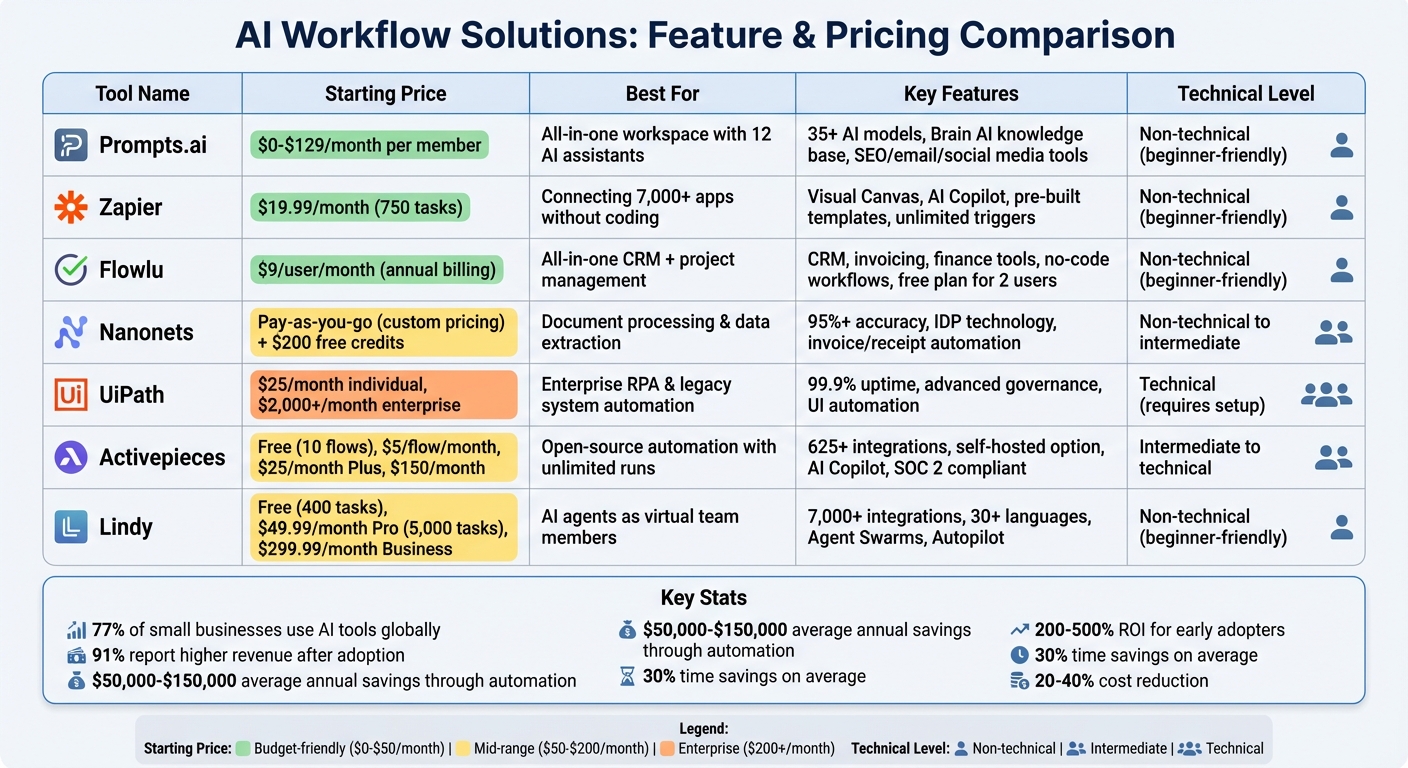
AI Workflow Solutions Comparison: Features and Pricing for Small Businesses
To help you make an informed decision, here’s a breakdown of the key features and pricing for several AI workflow solutions. Each option caters to different business needs, budgets, and technical expertise, ranging from free self-hosted tools to high-end enterprise platforms.
Prompts.ai offers a flexible pay-as-you-go pricing model. It starts at $0/month and goes up to $99–$129 per member/month for business plans. With access to 35+ AI models in one secure interface, it simplifies workflows, reduces tool sprawl, and can lower AI software costs by as much as 98%.
Zapier is ideal for connecting apps without coding, boasting over 7,000 integrations. Pricing starts at $19.99/month for 750 tasks, making it a great choice for teams needing seamless app connectivity.
Flowlu provides an all-in-one business management platform, combining CRM, project management, and automation. It’s priced at $9/user/month with annual billing, making it a cost-effective solution for smaller teams.
Nanonets specializes in AI-powered document processing. Pricing is customized based on usage, and new users receive $200 in free credits to explore its capabilities before committing.
UiPath focuses on enterprise-level robotic process automation. Individual plans start at $25 per month, but enterprise deployments can exceed $2,000 per month, reflecting its robust capabilities for large-scale automation.
Activepieces uses a per-active-flow pricing approach. Its Standard Plan is free for up to 10 active flows, with additional flows costing $5 each per month. The Plus Plan is $25 per month for unlimited tasks, while the Business Plan costs $150 per month for 50 active flows and API access. The self-hosted Community Edition allows unlimited automation runs at the cost of a basic VPS, typically $5–$20 per month.
Lindy focuses on AI agents that adapt to changing contexts. Its Pro plan is priced at $49.99/month for 5,000 tasks, while the free tier includes 400 tasks, making it accessible for smaller-scale operations.
When choosing a platform, consider your team’s technical expertise. Tools like Zapier and Lindy are user-friendly for non-technical teams, while Activepieces and UiPath are better suited for handling complex workflows. Don’t overlook hidden costs like implementation time or consultancy fees, especially for enterprise tools requiring longer setup periods.
For small businesses, the investment in automation often pays off significantly. Many report annual savings of $50,000–$150,000 and substantial productivity improvements, demonstrating the value of choosing the right solution for your specific needs.
When selecting an AI tool, focus on one that directly addresses your most pressing workflow issues. AI automation can save up to 30% of your time and reduce costs by 20–40%. These aren't just numbers - they represent real, measurable improvements in your business operations.
The first step is identifying the area where automation will have the most impact. Where does your team lose the most time? It could be customer support, data entry, invoicing, or content creation. Start by tackling your biggest bottleneck with a single tool before expanding. As Jordan, a small business owner, aptly noted:
"Every hour I spent on admin was an hour I couldn't grow my business."
Tools like Prompts.ai, Zapier, and Activepieces cater to different needs and budgets, making it easier to find the right fit for your business.
Your team’s technical expertise should also guide your choice. For non-technical teams, no-code platforms like Zapier or Lindy are user-friendly options. On the other hand, technically skilled teams might prefer tools like UiPath or Activepieces for greater customization. Integration capabilities are another critical factor - ensure the tool works seamlessly with your existing systems, such as your CRM, accounting software, or communication tools. This prevents data silos and eliminates duplicate tasks.
A targeted approach to automation ensures that your investment delivers measurable returns. Many early adopters are already seeing 200% to 500% ROI. However, as Riley wisely pointed out:
"Automation isn't magic - it's a process you have to own."
Start by auditing your tasks, test one tool, and refine your approach based on the results.
AI's growing importance for small businesses is undeniable. The real question isn't whether to automate but which solution aligns best with your workflow. Use the feature and pricing comparison above, evaluate your budget and technical needs, and begin with the platform that solves your most urgent operational challenge.
To find the right AI-powered workflow solution for your small business, start by pinpointing your specific goals and challenges. Consider the tasks you want to automate - whether it’s managing customer support, optimizing marketing, handling finances, or improving team communication. Focus on tools that excel in these areas and offer features like multi-app integrations to streamline your operations.
Check if the solution works well with the tools you already use, such as Gmail, Slack, QuickBooks, or Shopify. Seamless integration with your existing setup can save time and prevent disruptions. Many top solutions connect with thousands of apps, making it easier to enhance processes without the need for a complete system overhaul. Prioritize platforms that deliver measurable improvements quickly, helping you save time and increase efficiency.
When comparing options, evaluate features, pricing, and user-friendliness. Many platforms provide free trials or beginner-friendly resources, giving you a chance to test their value before making a commitment. By aligning your business needs with the right AI tools, you can boost productivity and achieve a solid return on investment.
When exploring AI-powered workflow tools, small businesses need to weigh both initial and recurring costs. Initial costs can range significantly based on the solution chosen. Off-the-shelf tools typically cost between $50 and $200 per user per month, while more advanced or custom platforms can climb to $500 to over $20,000 per month. Deciding between subscription-based, open-source, or cloud-based options depends on your budget and operational needs.
Ongoing expenses such as infrastructure, maintenance, and customization should also be part of the equation. Some tools may demand IT support or integration efforts, which could add to the overall cost. That said, automating repetitive tasks often leads to substantial savings - potentially cutting labor costs by 10% to 50%. By planning carefully and understanding your specific business requirements, you can position yourself for a strong return on investment (ROI).
To safeguard your AI workflows and ensure compliance, start by adopting effective access controls and monitoring mechanisms. Utilize tools like role-based permissions, activity logs, and access restrictions to keep sensitive workflows secure. Regularly audit access permissions and track user activities to maintain oversight.
Select solutions that align with key regulations such as GDPR, HIPAA, or SOC 2. Look for features like secure data handling practices, automated compliance checks, and comprehensive audit trails. Additionally, confirm that your data won’t be used to train AI models without explicit consent.
By integrating strong security protocols with regulatory compliance, you can protect sensitive data, uphold privacy, and minimize risks such as fines or damage to your reputation.