Pay As You Go - AI Model Orchestration and Workflows Platform


AI orchestration tools simplify how businesses manage and connect multiple AI systems, models, and workflows. By automating task sequences and ensuring smooth data flow, these platforms reduce manual effort and improve efficiency. This article compares four leading tools - prompts.ai, Zapier, LangChain, and Make - based on integration capabilities, scalability, governance, and pricing.
| Tool | Strengths | Weaknesses |
|---|---|---|
| prompts.ai | Unified LLM management, cost tracking, strong compliance | Limited third-party app automation |
| Zapier | Extensive integrations, user-friendly, SOC 2/GDPR compliance | Pricing escalates with usage, manual fixes needed |
| LangChain | Highly customizable, open-source, developer-friendly | Requires coding expertise, steep learning curve |
| Make | Visual workflow design, modular scalability, 3,000+ integrations | Enterprise pricing undisclosed, technical setup needed |
Each tool caters to different needs, from enterprise-grade governance to developer-focused customization. Choose based on your team’s technical skills, integration requirements, and budget.
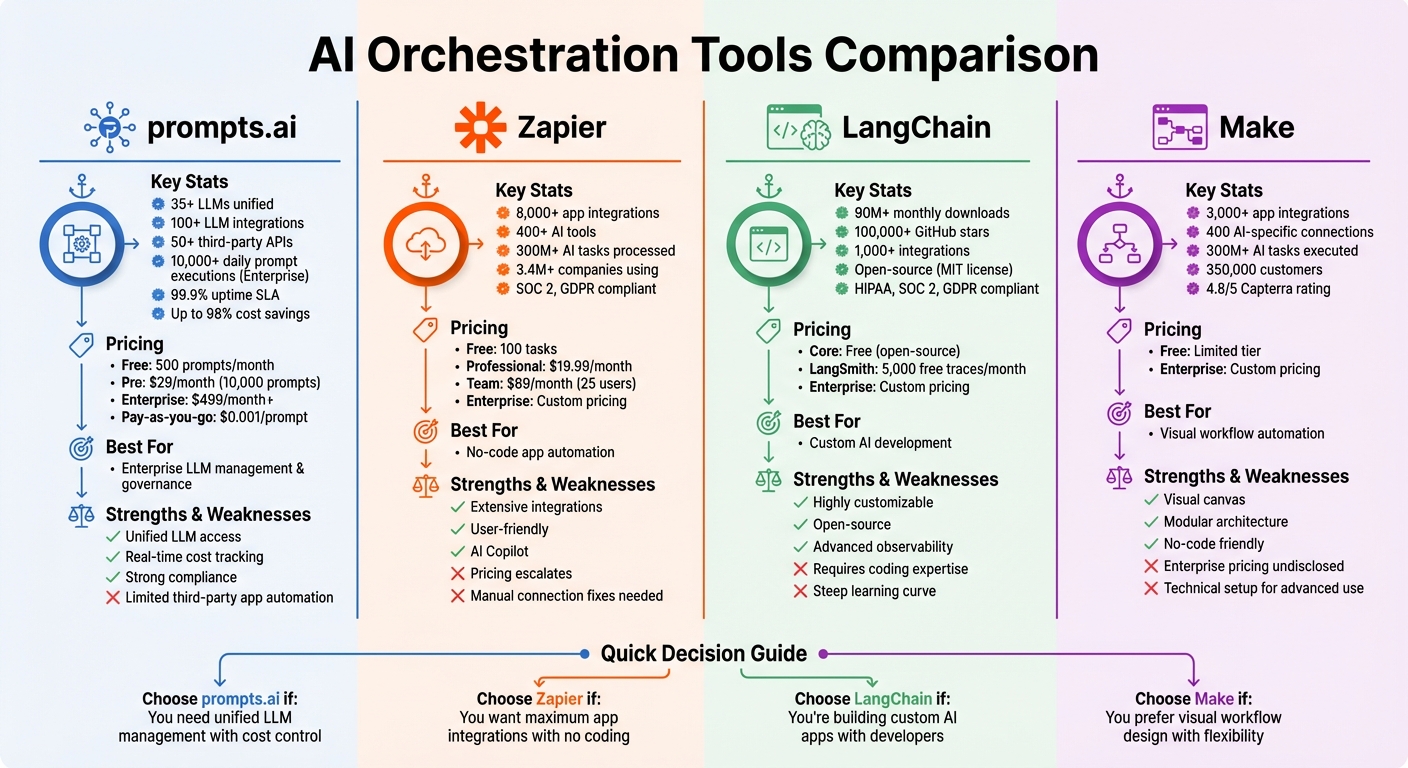
AI Orchestration Tools Comparison: Features, Pricing, and Best Use Cases
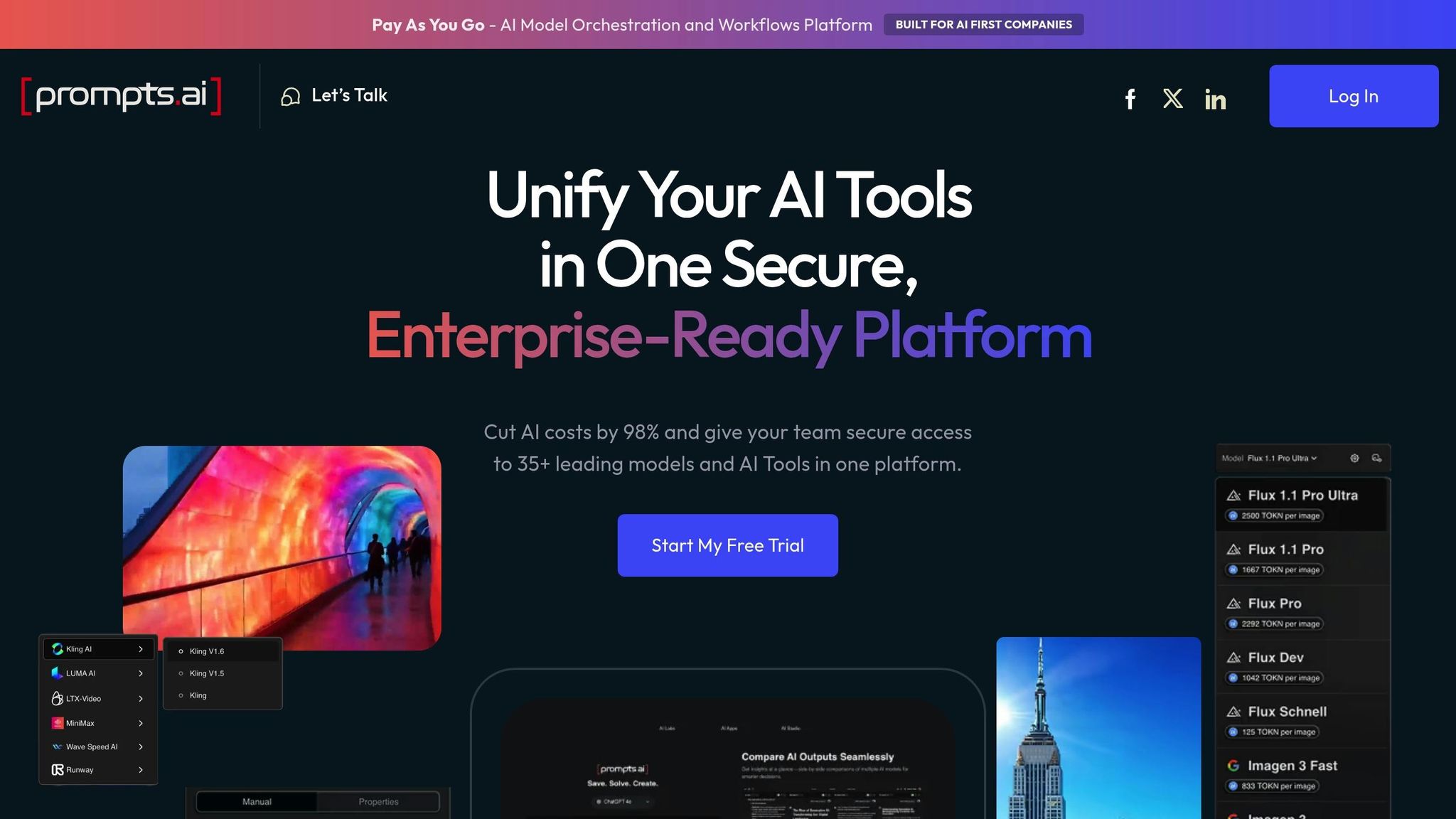
Prompts.ai is a centralized platform that provides access to over 35 top large language models, including GPT-5, Claude, LLaMA, and Gemini, all within a secure, unified interface. It allows teams to manage their AI interactions in one place, simplifying workflows and reducing the hassle of switching between tools. This streamlined approach is key to achieving smooth AI workflow integration. Below, we dive into its integration capabilities, scalability, governance features, and pricing.
Prompts.ai connects with more than 100 LLMs and integrates with 50+ third-party APIs and services, such as Zapier, Slack, and Google Workspace. This eliminates the need for custom coding, making it easier to automate tasks like content creation or customer support. For example, in support scenarios, prompts.ai combines Claude's analytical power with CRM tools like Salesforce to automate ticket routing and response generation, cutting manual steps by 70%. Whether it’s marketing, customer service, or operational workflows, these integrations ensure seamless functionality across platforms.
The platform is built on a serverless, auto-scaling cloud infrastructure, enabling it to handle demanding workloads with ease. Enterprise plans can support 10,000+ daily prompt executions, with simultaneous agent processing to maintain performance under heavy usage. For instance, users have scaled from 100 to 5,000 workflows per month while maintaining less than 1% downtime, backed by a 99.9% uptime SLA. In one e-commerce case, the platform processed over 1 million product recommendations daily, delivering a 40% cost savings compared to self-hosted solutions.
Prompts.ai prioritizes security and compliance, offering features like role-based access control (RBAC), prompt versioning, and detailed audit logs for every execution. It also includes workflow approval gates and templates for meeting standards like GDPR and SOC 2. A standout feature, "Prompt Guardrails", ensures runtime validation to minimize errors, achieving a 95% detection rate in internal tests. Financial services firms have used these capabilities to track agent decisions in fraud detection workflows, ensuring full regulatory compliance.
The platform offers a tiered pricing system, starting with a free plan that includes 500 prompts per month. The Pro plan, at $29 per month, provides 10,000 prompts and unlimited integrations, while Enterprise plans begin at $499 per month, featuring advanced governance tools. Additional usage is billed at $0.001 per prompt on a pay-as-you-go basis. This flexible pricing ensures organizations can scale their AI workflows efficiently and securely.
Zapier is a no-code automation platform designed to connect over 8,000 apps, including a collection of more than 400 AI tools like ChatGPT, Claude, Gemini, and Perplexity. With over 300 million AI tasks processed and the ability to link diverse apps, Zapier supports more than 3.4 million companies. Key features like Zapier Agents, which handle autonomous task execution, and Zapier Canvas, which enables visual workflow mapping, make it a standout tool for businesses aiming to streamline operations. These tools highlight Zapier's capabilities in integration, scalability, governance, and pricing.
Zapier’s extensive integration capabilities fuel efficient workflows across a variety of needs. The platform supports diverse AI workflows, including lead management, IT help desk automation, and sales enablement. Its MCP (Multi-Conditional Processing) feature allows direct action triggers from AI tools, while webhooks and private apps provide connectivity to on-premises services. For example, in 2025, Spencer Siviglia, Director of Operations at Toyota of Orlando, successfully used Zapier Agents to manage over 30,000 lead records. These agents flagged data inconsistencies and answered operational questions in plain language.
"With Agents, I'm getting insights I didn't even know to look for. They flag when something's off, answer questions in plain language, and save me hours every week." - Spencer Siviglia, Director of Operations, Toyota of Orlando
Zapier’s event-driven architecture ensures the platform can easily scale to meet growing demands. Features like intelligent throttling and outage detection maintain stability even at high volumes. In 2024, Marcus Saito, Head of IT and AI Automation at Remote, led a small team of three to support 1,700 employees. By automating 11 million tasks annually, they resolved 28% of IT support tickets automatically, saving an impressive 2,219 workdays each month.
Zapier prioritizes security and compliance, adhering to standards such as SOC 2 Type II, SOC 3, GDPR, and CCPA. Features like role-based permissions, centralized access management, and SAML-based SSO with SCIM provisioning help secure automated workflows. Enterprise users have the option to exclude their data from AI model training. Governance tools include audit trails, execution logs, and version history, offering full visibility into automated activities. Arden Insurance Services, for instance, reported saving over 34,000 work hours annually, reducing overhead costs by more than $500,000 thanks to these governance measures.
Zapier’s tiered pricing structure caters to businesses of all sizes. The free plan includes 100 tasks, while the Professional plan starts at $19.99 per month (billed annually) and offers features like multi-step Zaps, webhooks, and AI fields. The Team plan, priced at $69 per month (billed annually), supports up to 25 users with shared app connections and Premier Support. For larger organizations, Enterprise plans include custom pricing, advanced admin controls, unlimited users, and VPC Peering for secure data connections.
LangChain serves as an open-source orchestration framework designed to connect developers with a variety of AI models and tools. With over 90 million monthly downloads and more than 100,000 GitHub stars, it has become the most widely used agent framework globally. The platform’s ecosystem includes three core components: LangChain for high-level agent architectures, LangGraph for managing stateful application orchestration, and LangSmith for monitoring and evaluation. With over 1,000 integrations spanning models, tools, and databases, LangChain offers a robust solution for creating AI-driven workflows.
LangChain provides a standardized interface that simplifies interactions across various LLM providers, including OpenAI, Anthropic, and Google. This allows developers to switch between models without modifying core application logic, effectively avoiding vendor lock-in. The framework supports a range of orchestration patterns, such as prompt chaining, parallelization, routing, and evaluator-optimizer loops. Additionally, it incorporates Model Context Protocol (MCP), enabling real-time connections between documentation, tools, AI assistants, and IDEs. Trusted by top engineering teams, LangChain is built to handle enterprise-level integration demands, paving the way for scalable AI implementations.
LangChain is designed to help developers transition smoothly from simple prototypes to complex, production-ready workflows. LangGraph, a key component, ensures robust execution, allowing agents to recover from failures and resume long-running tasks at specific checkpoints. The platform also supports horizontal scaling of servers and task queues, making it ideal for managing large-scale workloads in production environments.
"LangGraph sets the foundation for how we can build and scale AI workloads and provides an out-of-the-box solution to iterate quickly." - Garrett Spong, Principal SWE
For example, in May 2025, LinkedIn used LangChain to improve its customer support workflows. By integrating multiple AI agents, the company reduced response times by 30% and saw a notable boost in user engagement metrics.
LangSmith, the platform’s integrated engineering tool, adheres to compliance standards such as HIPAA, SOC 2 Type 2, and GDPR, ensuring data security and privacy. The framework also includes native support for human-in-the-loop oversight, enabling manual review of agent actions when needed. Developers can use composable middleware hooks to strip sensitive data from workflows or implement custom approval logic without changing the core agent code. Additionally, detailed tracing capabilities provide visibility into every step of an agent’s reasoning, which is crucial for debugging and explaining AI behavior in regulated industries.
"LangGraph has been instrumental for our AI development. Its robust framework for building stateful, multi-actor applications with LLMs has transformed how we evaluate and optimize the performance of our AI guest-facing solutions." - Andres Torres, Sr. Solutions Architect
Both LangChain and LangGraph are available under an MIT license as open-source frameworks. LangSmith offers 5,000 free traces per month, with additional paid tiers and enterprise features available upon request. The LangGraph Platform is provided as a SaaS solution or can be deployed within a private VPC, with pricing tailored through consultation. This flexible pricing structure ensures accessibility for startups experimenting with AI orchestration, as well as large enterprises requiring advanced security and scalability.
Make stands out in the world of AI orchestration platforms with its visually-driven approach to combining no-code automation and advanced AI functionality. Once focused solely on workflow automation, Make has evolved into a full-fledged AI orchestration hub. With a customer base of 350,000 and over 300 million AI tasks executed, the platform seamlessly connects no-code automation with the deployment of sophisticated AI agents. Its signature visual canvas makes it possible for non-technical teams to create AI-powered workflows, bringing enterprise-level orchestration within reach.
Make supports an impressive array of over 3,000 verified app integrations, including 400 AI-specific connections to tools like OpenAI, Anthropic Claude, Google Vertex AI, and Mistral AI. The platform also incorporates the Model Context Protocol (MCP) in both server and client modes, allowing users to link internal and external services through a centralized orchestration hub - without the headache of managing infrastructure. Beyond its pre-built integrations, Make offers HTTP/Webhooks and a custom app builder for connecting proprietary APIs. Its visual agentic automation system enables users to design AI agents directly on the canvas, leveraging existing scenarios as tools. These integrations provide a solid framework for building scalable and efficient workflows.
The Make Grid offers real-time mapping of agents, apps, and workflows, giving users a clear view of all elements and helping to pinpoint bottlenecks. Its modular AI agent architecture allows developers to scale by simply adding or expanding tool-based scenarios, eliminating the need to rebuild core agents. The platform’s stateless execution model ensures tasks remain independent and modular. Additionally, a centralized Analytics Dashboard provides real-time insights into workflow performance and long-term utilization trends.
"Make really helped us to scale our operations, take the friction out of our processes, reduce costs, and relieved our support team."
– Philipp Weidenbach, Head of Operations, Teleclinic
As the platform scales, it also prioritizes strong operational safeguards through comprehensive governance measures.
Make incorporates role-based access control (RBAC), empowering administrators to establish execution limits and enforce operational guardrails for team environments. The platform is fully compliant with GDPR and SOC 2 Type II standards, offering built-in data encryption and Single Sign-On (SSO) for enhanced security.
Make provides a free tier for users to experiment with building and testing automations, while enterprise plans cater to larger-scale operations with advanced security needs and dedicated support. The platform is highly rated by users, with scores of 4.8/5 on Capterra, 4.7/5 on G2, and 4.6/5 on Gartner. These ratings reflect its ease of use and ability to handle complex automations without requiring coding expertise.
AI orchestration tools come with their own sets of strengths and limitations, and understanding these can help organizations choose the right platform for their needs. Here's a closer look at the trade-offs of some popular options:
prompts.ai brings together over 35 large language models into a single, secure platform. It offers real-time cost tracking through its FinOps layer and uses a pay-as-you-go system, potentially cutting costs by up to 98%. This makes it ideal for organizations prioritizing cost transparency and governance. However, its focus on model orchestration may feel too narrow for teams requiring extensive third-party integrations.
Zapier stands out for its vast library of more than 8,000 app integrations and its AI Copilot, which allows users to create workflows using natural language. This makes it particularly user-friendly for non-technical teams. The platform has already handled over 300 million AI-related tasks. On the downside, its free plan offers limited functionality, and task-based pricing can grow quickly as automation needs increase. Additionally, connection timeouts often require manual intervention to restore app credentials when security policies expire.
LangChain is a powerful open-source framework designed for developers building complex, stateful AI systems. It supports over 1,000 integrations and offers advanced observability . However, it has a steep learning curve and requires expertise in coding languages like Python or JavaScript, which can be a barrier for less technical teams.
Make provides a visual interface for designing AI-powered workflows, along with over 3,000 verified app integrations and 400 AI-specific connections. Its modular design allows for scalable solutions. The platform has received high ratings - 4.8/5 on Capterra, 4.7/5 on G2, and 4.6/5 on Gartner . That said, enterprise pricing is not publicly disclosed, and advanced use cases may require some technical setup.
Here’s a quick comparison of the key strengths and weaknesses:
| Tool | Main Strengths | Main Weaknesses |
|---|---|---|
| prompts.ai | Centralizes multiple LLMs; real-time FinOps tracking; up to 98% cost savings; enterprise governance; pay-as-you-go credits | Limited focus on third-party app automation |
| Zapier | 8,000+ app integrations; AI Copilot for natural language workflows; SOC 2/GDPR compliance | Limited free plan; escalating task-based pricing; manual fixes required for connection timeouts |
| LangChain | Highly customizable; open-source; 1,000+ integrations; advanced observability | Steep learning curve; requires coding expertise |
| Make | 3,000+ integrations; visual workflow canvas; modular architecture | Enterprise pricing not disclosed; may need technical setup for advanced scenarios |
Choosing the right AI orchestration tool depends on your team's technical expertise, integration requirements, and budget. Each option outlined here has been evaluated for its integration capabilities, scalability, governance features, and pricing to help streamline your AI-driven workflows.
Zapier stands out with its extensive library of over 8,000 integrations and a no-code interface, making it a go-to solution for connecting various apps. Companies like Popl and UltraCamp showcased its ability to automate workflows and minimize manual tasks in 2025, reinforcing the operational advantages covered in the Zapier section.
While Zapier simplifies app-to-app integration, prompts.ai takes a different approach by focusing on unified LLM management. It brings together 35+ large language models under a flexible pay-as-you-go model, complete with real-time FinOps tracking. By cutting AI software expenses by up to 98% and offering enterprise-grade security and audit trails, it provides a comprehensive solution for managing AI costs and compliance.
For teams building custom, stateful AI applications, LangChain is a strong choice. It caters to engineering teams developing intricate workflows but requires proficiency in Python or JavaScript. Meanwhile, Make offers a visual canvas interface, making workflow automation more accessible without deep coding knowledge.
The AI orchestration tools covered here each bring unique strengths, catering to different needs and priorities. For instance, Apache Airflow is a standout choice for teams seeking custom, code-first workflows with a wide range of plugin options. On the other hand, Kubeflow shines for Kubernetes users, offering a modular framework to manage the entire MLOps lifecycle with precision.
For those prioritizing simplicity and flexibility, Prefect Orion delivers a lightweight, cloud-agnostic platform with advanced error-handling capabilities. Meanwhile, Flyte is tailored for research-grade workflows, providing detailed data tracking that’s especially beneficial for academic and scientific projects.
If your focus is on coordinating diverse AI models, CrewAI simplifies collaboration across multi-agent AI systems. Lastly, IBM watsonx Orchestrate offers a solution for industries that demand strict compliance, combining strong governance, security, and hybrid deployment options. Each tool excels in specific scenarios, enabling organizations to select the one that aligns with their unique objectives.
AI orchestration tools simplify and streamline workflows by connecting various models, data sources, and applications into a single, automated system. By automating tasks such as data routing, preprocessing, and enforcing governance, they eliminate the need for manual intervention or custom integration code. This reduces delays, errors, and overall operational complexity.
These tools are designed to manage tasks automatically - triggering downstream processes, handling retries, and scaling resources as needed. The result? Faster cycle times, reduced overhead, and smoother operations. Teams can concentrate on delivering actionable insights more efficiently, all while cutting costs and ensuring secure, scalable deployments.
When choosing an AI orchestration tool, focus on features that deliver smooth integration, cost control, and strong data security for your workflows.
Evaluate how well the tool can connect to various AI models and services without requiring intricate configurations. This adaptability makes it easier to combine or switch between models as needed. Look for platforms with clear pricing structures and tools for real-time cost tracking, helping you keep expenses in check as your AI operations expand. Equally important are security and compliance capabilities, such as role-based access controls and data privacy protections, to ensure your workflows meet regulatory standards.
Additional considerations include the tool's ability to scale with growing demands, intuitive workflow design features to streamline development, and flexible deployment options - whether in the cloud, on-premise, or hybrid setups - to fit your IT strategy. By zeroing in on these critical aspects, you can select a platform that boosts efficiency, manages costs effectively, and supports your AI initiatives seamlessly.