Pay As You Go - AI Model Orchestration and Workflows Platform



AI tools are transforming workflows, saving time, cutting costs, and improving efficiency across industries. Businesses are now leveraging advanced platforms to automate tasks, reduce errors, and boost productivity. By 2025, AI-driven workflows are expected to handle 25% of enterprise processes, with adoption rates growing 35% annually. Here's a quick overview of leading platforms:
| Platform | Key Features | Starting Price | Best For |
|---|---|---|---|
| Prompts.ai | Unified LLMs, pay-as-you-go, governance tools | Free (personal); $29/mo | AI scaling, cost reduction |
| Zapier | 8,000+ app integrations, no-code workflows | $19.99/month | Small teams, simplicity |
| Make | Visual builder, advanced routing, 3,000+ apps | $9/month | Technical teams, complex workflows |
| UiPath | AI agents, RPA, document processing | $25/month (basic) | Enterprise, legacy systems |
| Power Automate | Microsoft ecosystem, natural language workflows | $15/user/month | Microsoft users, desktop RPA |
| Workato | Enterprise integrations, real-time triggers | Custom pricing | Cross-department automation |
| Nintex | Document processing, AI workflow generator | $650/month | Document-heavy workflows |
These platforms cater to diverse needs, from no-code solutions for small teams to enterprise-grade tools for large-scale automation. Start with one high-impact workflow to see measurable results and scale from there.
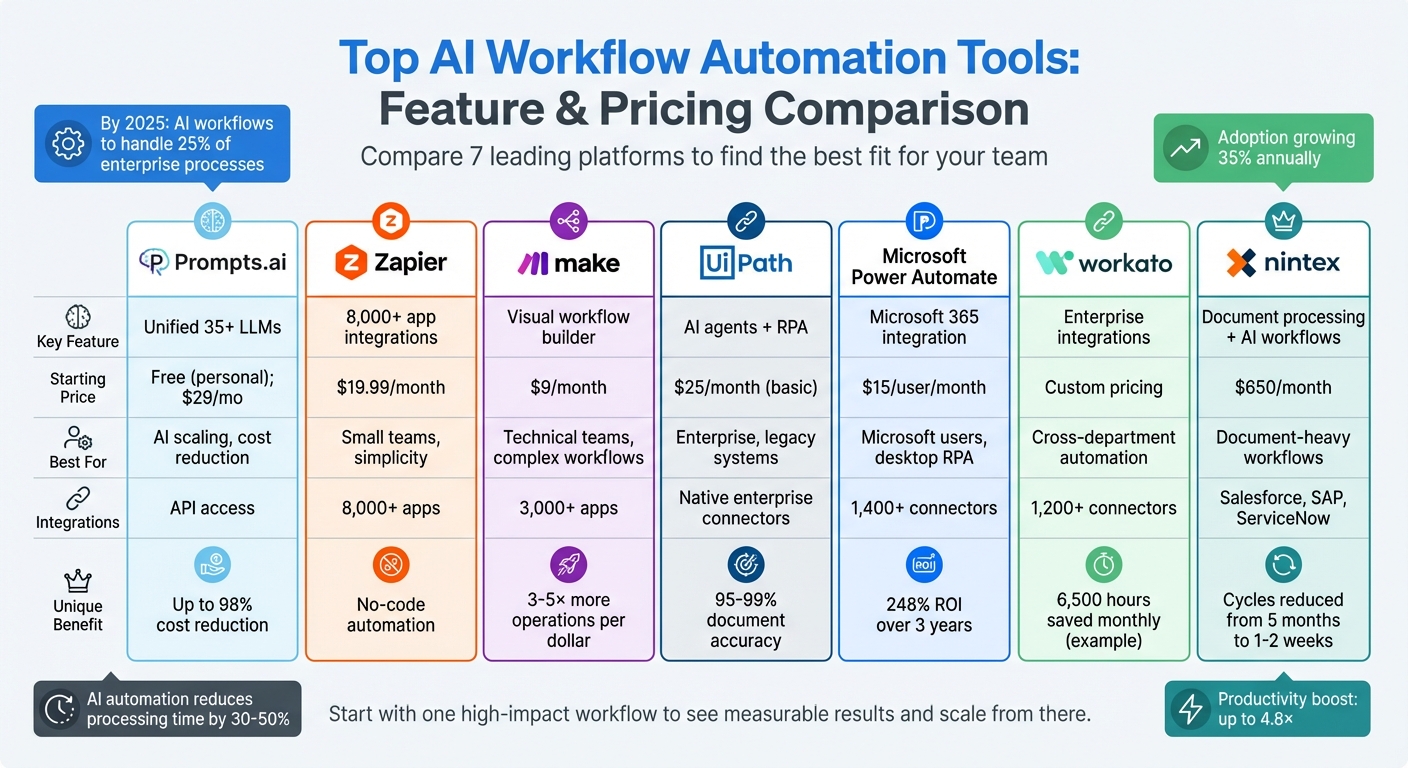
AI Workflow Automation Tools Comparison: Features and Pricing
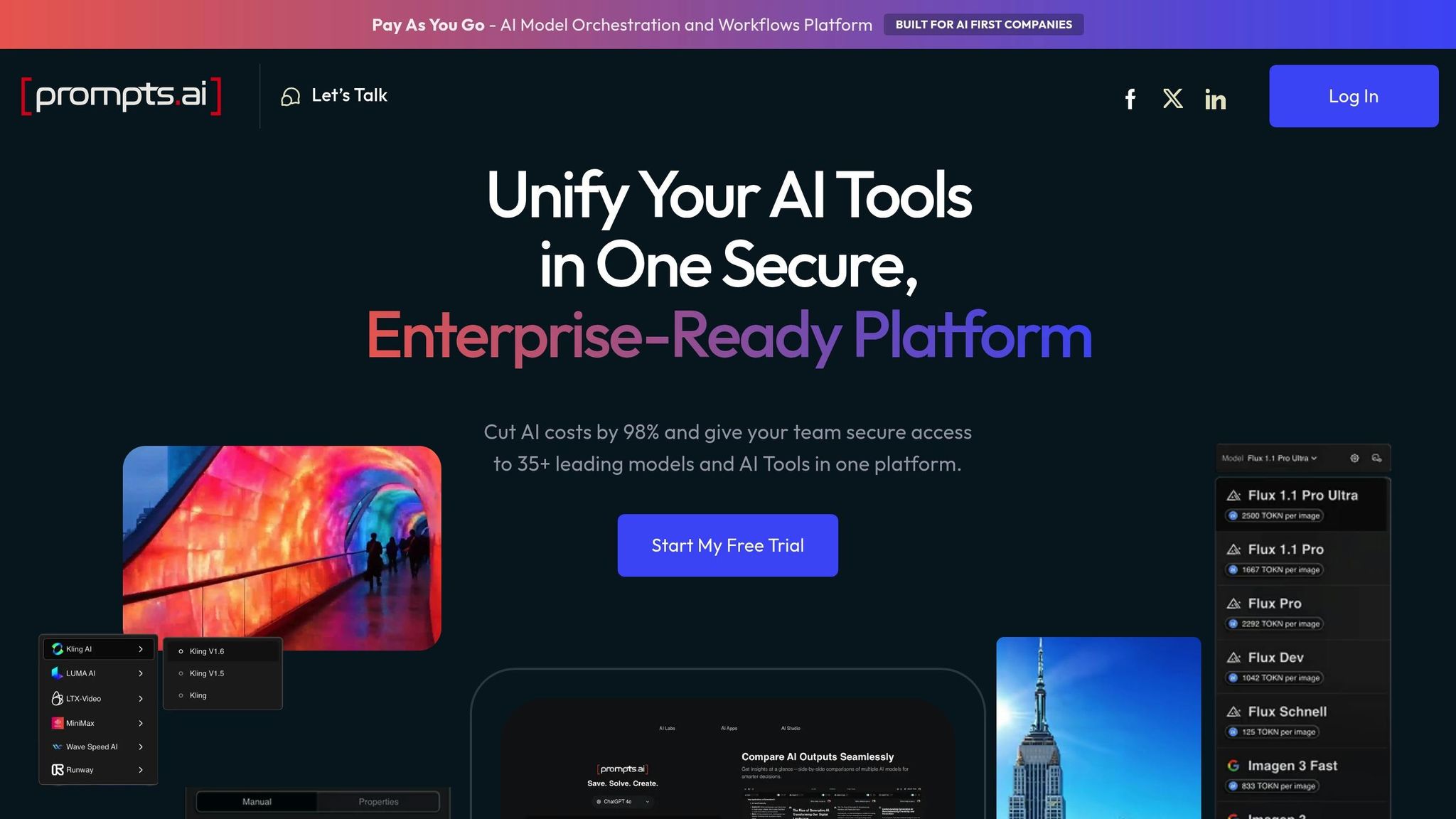
Prompts.ai brings together over 35 top large language models - including GPT‑5, Claude, LLaMA, Gemini, Grok‑4, and Flux Pro - within a secure, unified platform. Founded by Emmy Award-winning Creative Director Steven P. Simmons, the platform simplifies AI management by eliminating tool sprawl, enforcing strong governance, and reducing AI software costs by up to 98%. This makes it a powerful solution for organizations looking to streamline their AI operations and boost their return on investment.
Prompts.ai is designed to turn experimental AI tasks into structured, compliant workflows. Teams can use pre-tested prompt templates created by certified prompt engineers to ensure automation processes are both effective and customized to their needs. The platform also includes a side-by-side model comparison tool, enabling users to evaluate language models in real time. For example, you can compare Claude for summarizing customer feedback with GPT‑5 for crafting marketing content, helping you choose the best tool for each task.
Prompts.ai is built for quick deployment and works seamlessly with existing workflows. Developers can access the platform via direct APIs, while non-technical users can take advantage of no-code prompt chaining. This flexibility caters to a wide range of teams, from creative agencies to large enterprises. The platform also supports adding new models, users, and workflows, ensuring that organizations can scale AI adoption efficiently. Hands-on onboarding and enterprise training further simplify the integration process.
Prompts.ai uses a pay-as-you-go TOKN credit system, linking costs directly to usage and eliminating recurring fees. Personal plans start free, with Creator plans at $29 per month and Family plans at $99 per month. Business plans begin at $99 per member and go up to $129 per member monthly. A built-in FinOps layer tracks token usage in real time, offering full transparency and allowing businesses to align AI spending with their goals.
The platform’s enterprise-grade governance framework ensures secure data handling and compliance with strict standards, protecting sensitive information without relying on external APIs. Its API access enables smooth integration with existing tools like CRMs, project management platforms, and data repositories. By consolidating AI operations into one platform, Prompts.ai enhances workflow efficiency and simplifies AI management for organizations. This interoperability demonstrates how Prompts.ai can centralize and optimize AI-driven processes.
Zapier links over 8,000 apps into streamlined workflows, allowing users to connect tools like Gmail, Slack, Salesforce, and Airtable without needing to write code. With over 350 million AI tasks completed and 500 AI app integrations, Zapier is a solid option for combining traditional automation with AI-driven capabilities.
Zapier's Model Context Protocol (MCP) converts outputs from AI models like ChatGPT and Claude into actionable tasks across apps, enabling over 30,000 specific actions. The Copilot feature simplifies creating workflows, tables, and chatbots using natural language prompts. For instance, Remote’s IT team of three used these AI tools to automate help desk operations, saving 600 hours monthly and avoiding $500,000 in staffing costs. When workflows encounter issues, Zapier’s AI troubleshooting tool provides instant solutions, eliminating the need to dig through technical logs. These features ensure smooth integration with existing systems.
Zapier’s drag-and-drop interface is ideal for non-technical users, while advanced tools like Filters, Paths, and Formatter are included in paid plans. AI responses can be tied directly to live company data sources like Google Drive, Notion, and Confluence. Vendasta, for example, automated lead enrichment and CRM updates using Apollo and ChatGPT, recovering $1 million in revenue and saving 20 hours daily. For enterprise users, the platform offers API change management and centralized access controls, making it easier to manage thousands of automated tasks.
Zapier uses task-based pricing, charging only for successful third-party actions. The Free plan includes 100 tasks per month with unlimited Zaps. The Professional plan, starting at $19.99/month (billed annually), provides 750 tasks, multi-step Zaps, and access to premium apps. The Team plan, priced at $69/month, covers 2,000 tasks and 25 users, offering shared folders and SAML SSO. Custom pricing is available for Enterprise plans, which include unlimited users and advanced admin permissions. Premiere Property Group leveraged Zapier Forms and Tables to automate onboarding and marketing for 1,300 agents, saving $115,000 annually.
Zapier supports enterprise-grade interoperability with features like shared app connections, centralized access management, and SOC 2 compliance with AES-256 encryption. Missing integrations? Users can create custom AI-driven actions without coding. The platform’s pay-per-task buffer system (1.25x the base task cost) ensures workflows continue running even if task limits are exceeded. On G2, Zapier holds a 4.5-star rating from over 1,397 reviews, with users frequently praising its reliability and extensive integration options. These capabilities make Zapier a dependable choice for scalable, cost-efficient automation.
Make supports over 500,000 organizations with a user-friendly visual flowchart builder that transforms complex tasks into drag-and-drop diagrams. This approach simplifies troubleshooting and tracking data flows across more than 3,000 apps. The platform handles billions of operations each month, offering 3–5× more operations per dollar compared to many alternatives.
Make's Routers allow workflows to split into parallel paths, while Iterators process data arrays, and Aggregators merge multiple items into single outputs. These advanced tools address scenarios that go beyond basic "if this, then that" logic. For example, FranklinCovey used Make to automate workflows, resulting in hundreds of thousands of dollars saved and freeing up hundreds of staff hours.
Additionally, Make includes robust error-handling capabilities, enabling users to configure retries, rollbacks, or alternative workflows in case of rate limits or outages.
"Make drives unprecedented efficiency within our business in ways we never imagined. It's having an extra employee (or 10) for a fraction of the cost."
These features make it easy to integrate Make into a wide range of business systems.
Make's visual interface makes debugging straightforward. When pre-built integrations aren’t available, its HTTP and Webhook modules can connect to any public API, allowing users to configure headers and authentication details. The platform also supports protocols like SFTP, IMAP/SMTP for email, and databases such as MySQL and PostgreSQL.
For example, GoJob leveraged Make alongside AI tools to automate core processes, resulting in a 50% boost in yearly net revenue. For AI workflows, Make’s cloud-hosted Model Context Protocol (MCP) server allows seamless access to scenarios from various AI interfaces without manual server management. With over 400 pre-built AI app integrations, Make is well-equipped for modern AI-driven tasks.
Make’s pricing is based on module executions, such as fetching data or sending emails. Here’s a breakdown of its plans:
Paid plans allow unused operations to roll over for one month, offering flexibility during fluctuating workloads. Additionally, using webhooks instead of polling can save credits - polling a folder every 5 minutes can use up to 8,640 credits monthly, even if no files are found. This pricing model ensures users get the most out of their investment.
Make integrates effortlessly with platforms like Google Workspace, Slack, Salesforce, and HubSpot, thanks to its library of over 3,000 pre-built apps. Its data manipulation tools allow users to parse and transform formats like JSON, XML, CSV, and arrays, ensuring smooth communication between systems.
For instance, #makeitfuture used Make to triple their AI support resolution rate, enhancing customer service efficiency. On G2, Make has a 4.7-star rating from 238 reviews, with many users praising its visual interface for simplifying complex workflows.
"Make really helped us to scale our operations, take the friction out of our processes, reduce costs, and relieved our support team."
UiPath brings together AI agents, robots, and human oversight through agentic automation - a system where AI makes decisions, and robots carry them out. This setup allows businesses to automate complex, end-to-end processes that traditional tools often can't handle. The platform's AI Center simplifies deployment and management of machine learning models, offering over 25 pre-built options for tasks like document analysis, language processing, and image recognition.
UiPath offers tools designed to streamline workflow automation:
Real-world results back up these features. For example, a Fortune 500 company cut legal review times by 60% and improved contract compliance by 40% across over 900 contracts monthly using document understanding AI. In healthcare, one organization saved 11,000 nursing hours and nearly US$800,000 by processing medical documents with 99% accuracy.
"Leveraging agentic automation in our UiPath integration is providing massive ROIs. Exploring applications in sales and customer service is proving especially promising." - Akash Rana, Senior Manager IT Digital Automation, Regal Rexnor
These tools integrate seamlessly into larger system architectures, enhancing automation across various sectors.
UiPath supports both UI-based automation for older systems and API-based connections for modern cloud applications. It offers native integration with platforms like Salesforce, Microsoft 365, Azure, Google Cloud, Snowflake, and Databricks. The UiPath Maestro serves as a central control system, coordinating AI agents, robots, and humans across complex, long-running workflows. Additionally, the UiPath Marketplace provides ready-made connectors for popular combinations, such as Workday with Azure Active Directory and ServiceNow with Microsoft Outlook 365.
Practical applications showcase the platform's capabilities. An electronics manufacturer used computer vision to improve circuit board quality control, achieving 99.2% accuracy while reducing quality control costs by 35%. Meanwhile, a financial services firm utilized GenAI and IDP for merchant classification, saving US$10–12 million and eliminating 12,000 hours annually with a 98% end-to-end automation rate.
UiPath offers flexible pricing to suit various business needs:
The platform uses a Unified Pricing Plan based on "Platform Units", which allows businesses to allocate resources across services as their needs evolve. To help organizations explore its capabilities, UiPath provides a 60-day free trial for its Automation Cloud and AI Center, ensuring users can test the platform before committing to a paid plan.
Microsoft Power Automate stands out as a robust platform for workflow automation, offering seamless integration with widely used enterprise tools. Designed with organizations already using the Microsoft ecosystem in mind, it combines cloud automation with desktop robotic process automation (RPA). With over 1,400 prebuilt connectors, it links effortlessly to platforms like SAP, Salesforce, Dynamics 365, and Oracle.
One of its standout features, Copilot, leverages natural language processing to create workflows from plain English instructions, cutting development time by 20%. By simply describing the desired automation, users can let the AI construct the initial workflow structure. Additionally, Process Mining tools help identify inefficiencies in existing processes before automation begins, while AI Builder offers ready-to-use models for tasks like document processing and sentiment analysis. The platform’s generative actions further streamline operations, automatically sequencing tasks across systems based on user inputs.
"It used to take over 100 people to validate and standardize data to and from carriers. With generative AI and Power Automate, this same process can be managed by just a few people." - John Haisch, VP of AI and Automation, Nsure
Companies like Nsure and CoreLogic have seen significant benefits, reporting up to 60% time savings, 50% cost reductions, and in some cases, a fivefold decrease in expenses. Nokia’s Care Program Management team, for instance, reduced reporting preparation time from two weeks to just 20 minutes using Power Automate connectors. These capabilities not only simplify automation but also ensure compatibility with existing infrastructures.
Power Automate’s native integration with Microsoft 365 applications enables users to trigger workflows directly from Excel, Teams, and SharePoint. For older systems without APIs, the platform uses desktop RPA to automate interactions through user interfaces. The on-premises data gateway securely bridges cloud workflows with on-site data sources, and developers can create custom connectors for proprietary REST APIs. Uber, for example, has saved 3,400 hours and $30 million annually by leveraging the Power Platform for process mining and automation.
The platform’s pricing begins at $15 per user/month, covering essential cloud flows and attended RPA. Flexible payment models include process-based or pay-as-you-go options. Organizations using Power Automate have reported a 248% ROI over three years, with employees in high-impact RPA roles saving an average of 200 hours annually.
Workato serves as a powerful integration platform tailored for managing complex, multi-system environments. With a library of over 1,200 pre-built connectors, it seamlessly links modern cloud platforms like Salesforce and Workday with older on-premise systems such as SAP and Oracle. Its On-Prem Agents (OPA) enable secure connections between cloud-based automations and internal databases, ensuring sensitive data remains protected and compliant with industry certifications. This makes Workato a valuable tool for organizations aiming to automate workflows across diverse systems, including AI-driven processes.
Workato’s workflows, referred to as "recipes," are triggered by real-time events, polling intervals, or webhooks, allowing actions to be executed as soon as data changes. The platform’s AI assistant, AIRO, simplifies the creation, optimization, and documentation of these recipes, making it easier for users to build and refine automations. Additionally, Workbot integrates these workflows directly into Slack and Microsoft Teams, enabling users to initiate automations from within their communication tools. For more complex use cases, the platform supports custom code, while its structured error-handling features ensure failed actions can retry or follow alternative paths. These capabilities allow Workato to blend automation seamlessly into existing business systems.
Workato’s design supports smooth integration across a wide range of tools and systems. Its intuitive drag-and-drop interface enables both technical and non-technical teams to design multi-step workflows with ease. For systems lacking native connectors, the platform offers Universal Connectors that work with HTTP, OpenAPI, GraphQL, and SOAP protocols. Additionally, the Connector SDK allows for the creation of custom integrations tailored to proprietary APIs. For example, Stanley Toh, Head of Enterprise Services & Experience at Broadcom, shared that his team runs over 300 automations, handling 105,000 to 120,000 jobs monthly, which saves approximately 6,500 human hours each month. Workato’s Recipe Lifecycle Management (RLCM) further enhances reliability by providing separate environments for development, testing, and production, ensuring updates are deployed safely.
Workato uses a usage-based pricing structure, combining a base edition fee with charges for each successful task. The platform offers four editions - Standard, Business, Enterprise, and Workato One - with pricing based on factors like task volume, advanced connector usage, and the number of users. Every edition includes unlimited connections, workflows, and collaborators. For specific pricing, businesses are encouraged to contact sales directly. One organization reported a 98% faster processing time for employee relocation requests after adopting Workato, showcasing significant efficiency improvements despite the higher costs often associated with enterprise integration solutions. This pricing model aligns with companies’ goals of achieving measurable time savings and a strong return on investment.
Nintex is a versatile automation platform combining AI-driven workflow creation with comprehensive document processing. Trusted by over 8,000 organizations across 90 countries, it focuses on streamlining enterprise operations through integrated AI tools. This approach addresses a critical challenge - 95% of organizations fail to achieve expected AI returns without automation.
Nintex offers a range of tools designed to simplify and enhance workflow automation. The AI Workflow Generator creates complete workflows from simple natural language inputs, while the AI Xtensions Generator enables on-the-fly development of custom API connectors by describing third-party systems in plain text. Additionally, the platform includes Intelligent Document Processing (IDP) for extracting data from invoices and reports, and Document Generation (DocGen) for automatically creating tailored Word or PDF contracts.
"The new AI-enabled capabilities we've introduced today allow teams to easily capture the process complexity within their organizations to build and expand an automation program that helps increase productivity across their teams." - Niranjan Vijayaragavan, Chief Product Officer at Nintex
The Solution Studio provides pre-built feature packs, such as approval workflows and e-signatures, reducing deployment timelines from months to just days. For teams working remotely or in the field, the Nintex Mobile App enables users to complete forms and approvals on the go, addressing common productivity bottlenecks. These tools ensure smooth integration with existing systems and processes.
Nintex is designed to work seamlessly with major enterprise tools. It integrates natively with platforms like Salesforce, Microsoft Teams, SharePoint, SAP, ServiceNow, and Box. It also features a Microsoft Power Platform connector, allowing workflows to be triggered directly from Power Automate and Copilot Studio. For organizations with specific data sovereignty needs, Nintex supports both cloud-based deployment via Nintex CE and on-premises installation through Nintex Automation K2.
"The value of K2 Software is that it allows us to present end users with a very easy and guided way to raise ServiceNow tickets." - Steve Collins, Technical Consultant
Nintex offers flexible pricing options based on consumption and user needs. The Standard Edition starts at around $650 per month, while the Enterprise Edition is priced at approximately $950 per month. For larger deployments, the Nintex Automation Cloud begins at $15,000 annually. A free trial is available for businesses to evaluate the platform. However, organizations should be mindful of potential overage fees for workflow executions, which could lead to unpredictable costs as usage scales. Despite this, many companies have reported significantly shorter business cycles - dropping from five months to just one or two weeks in some cases - thanks to Nintex’s automation capabilities.
This breakdown of features and pricing highlights the strengths of each platform, helping you determine which one aligns best with your needs, budget, and technical expertise. Zapier, for instance, offers access to over 8,000 integrations, making it a user-friendly choice for non-technical teams. Its Starter plan costs $19.99 per month and includes 750 tasks. On the other hand, Make caters to technical teams with its adaptable visual logic and branching workflows, starting at about $9 per month for 10,000 operations.
Microsoft Power Automate works seamlessly within the Microsoft ecosystem, using Copilot to create flows through natural language. Its pricing, however, depends on your Microsoft 365 subscription. UiPath focuses on solving legacy system challenges with advanced robotic process automation (RPA) and intelligent OCR tools, though it generally requires a higher upfront investment. Workato is geared toward enterprises, offering secure, cross-departmental automation recipes with governance tools and "Copilots" to ensure reliability for complex infrastructures. For document-heavy workflows, Nintex combines workflow automation with intelligent document processing to streamline operations.
Prompts.ai takes a different approach with its flexible pay-as-you-go pricing model, aligning costs directly with usage. By unifying 35+ leading large language models into one secure platform, it eliminates the need for multiple subscriptions. Its built-in FinOps layer tracks every token, helping reduce software expenses while simplifying AI task management. This approach ensures efficient operations, reflecting the growing demand for scalable and streamlined workflows.
Efficiency metrics underline the value of automation. Studies reveal AI automation can reduce manual processing time by 30–50% and enhance productivity by up to 4.8×. Still, nearly 40% of initial AI automation efforts fail due to unreliable connectors or data conflicts, emphasizing the need for dependable platforms with strong integration capabilities.
When comparing platforms, consider not just subscription costs but also potential overage fees. Task and operation limits can quickly drive up expenses. Prompts.ai's usage-based model, however, ties costs directly to actual usage, avoiding unexpected overage charges and offering greater cost predictability.
AI workflow automation tools can make a noticeable difference when tailored to your team’s specific needs. By reducing coordination hurdles, processing unstructured data, and enabling teams to focus on strategic goals, these tools drive efficiency and deliver tangible results.
When selecting a platform, it’s important to consider your team’s skill set and existing technology. Whether you need a simple no-code interface or a more advanced RPA solution for older systems, aligning the tool with your infrastructure is key to achieving measurable returns and smoother operations.
Start by identifying bottlenecks and setting clear goals, such as reducing errors, cutting costs, or saving time. Begin with a single high-impact workflow to demonstrate ROI quickly, rather than attempting large-scale rollouts from the start. Testing with real business data - rather than isolated sandbox environments - helps uncover potential issues early on.
Be mindful of pricing structures, especially as automation scales. Monthly subscriptions may seem straightforward, but task limits can lead to unexpected costs. Usage-based pricing often offers better control over expenses. With AI workflow adoption growing by 35% annually, investing in a scalable solution today can help you avoid costly migrations down the road.
The most effective automation doesn’t replace human judgment - it enhances it. Look for platforms that incorporate human-in-the-loop checkpoints, allowing your team to review AI-driven decisions before finalizing actions. This balance between automation and oversight ensures reliability while keeping your team in control. These strategies reflect our dedication to delivering AI solutions that produce meaningful business outcomes.
To demonstrate ROI from workflow automation effectively, focus on automating high-frequency, repetitive tasks that are straightforward and deliver measurable outcomes within 30–60 days. Tasks like invoice approvals, HR paperwork, or customer support triage are excellent starting points. Automating these processes not only saves time and reduces errors but also generates quick cost savings, making them perfect for highlighting early wins before tackling more complex workflows.
To keep your automations running smoothly and prevent data conflicts or broken connectors, it's crucial to implement error-handling and validation mechanisms. Include steps like data validation, redundancy, and fallback procedures as part of your workflows. Regular monitoring and updates to connectors are equally important, along with setting up alerts for failures to address problems quickly. These measures ensure your automation remains dependable, even when dealing with API changes or unpredictable AI behavior.
To keep AI automation costs under control as usage scales, consider strategies like pay-as-you-go models, such as token-based systems, to prevent surprise expenses. Manage spending by fine-tuning models, using caching, and refining prompts - steps that can cut token usage by up to 50%. Strengthen governance by setting quotas and implementing access controls. Additionally, consolidating vendors and optimizing operations regionally can help balance costs with demand while maintaining efficiency.