Pay As You Go7 दिन का फ़्री ट्रायल; किसी क्रेडिट कार्ड की आवश्यकता नहीं


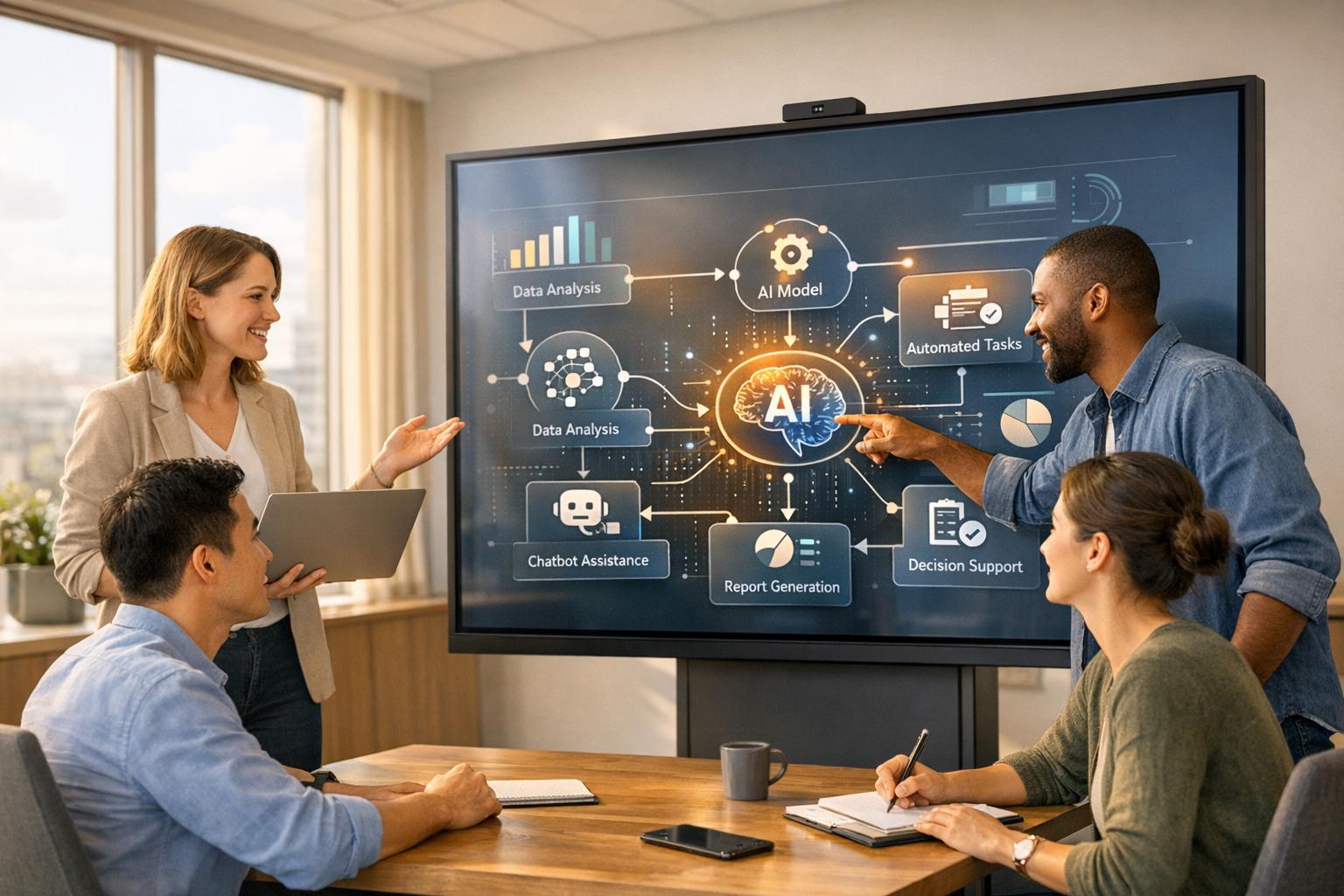
AI टूल समय की बचत करके, अक्षमताओं को कम करके और वर्कफ़्लो को स्वचालित करके टीम वर्क को बदल रहे हैं। रियल-टाइम मीटिंग ट्रांसक्रिप्शन से लेकर वर्कफ़्लो ऑटोमेशन और कॉस्ट ट्रैकिंग तक, ये प्लेटफ़ॉर्म मौजूदा टूल जैसे मौजूदा टूल के साथ मूल रूप से एकीकृत होते हैं माइक्रोसॉफ्ट 365, स्लैक, और गूगल वर्कस्पेस। आपकी टीम को बेहतर तरीके से काम करने में मदद करने के लिए शीर्ष सहयोगी AI समाधान नीचे दिए गए हैं:
प्रत्येक टूल टीम की अलग-अलग ज़रूरतों के अनुरूप अद्वितीय सुविधाएँ प्रदान करता है। चाहे आप परियोजनाओं का प्रबंधन कर रहे हों, कार्यों को स्वचालित कर रहे हों, या संचार को सुव्यवस्थित कर रहे हों, ये प्लेटफ़ॉर्म व्यर्थ समय को कम करने और दक्षता में सुधार करने में मदद कर सकते हैं। आज से समय बचाना शुरू करने के लिए उसे चुनें जो आपके मौजूदा टूल और बजट के अनुरूप हो।
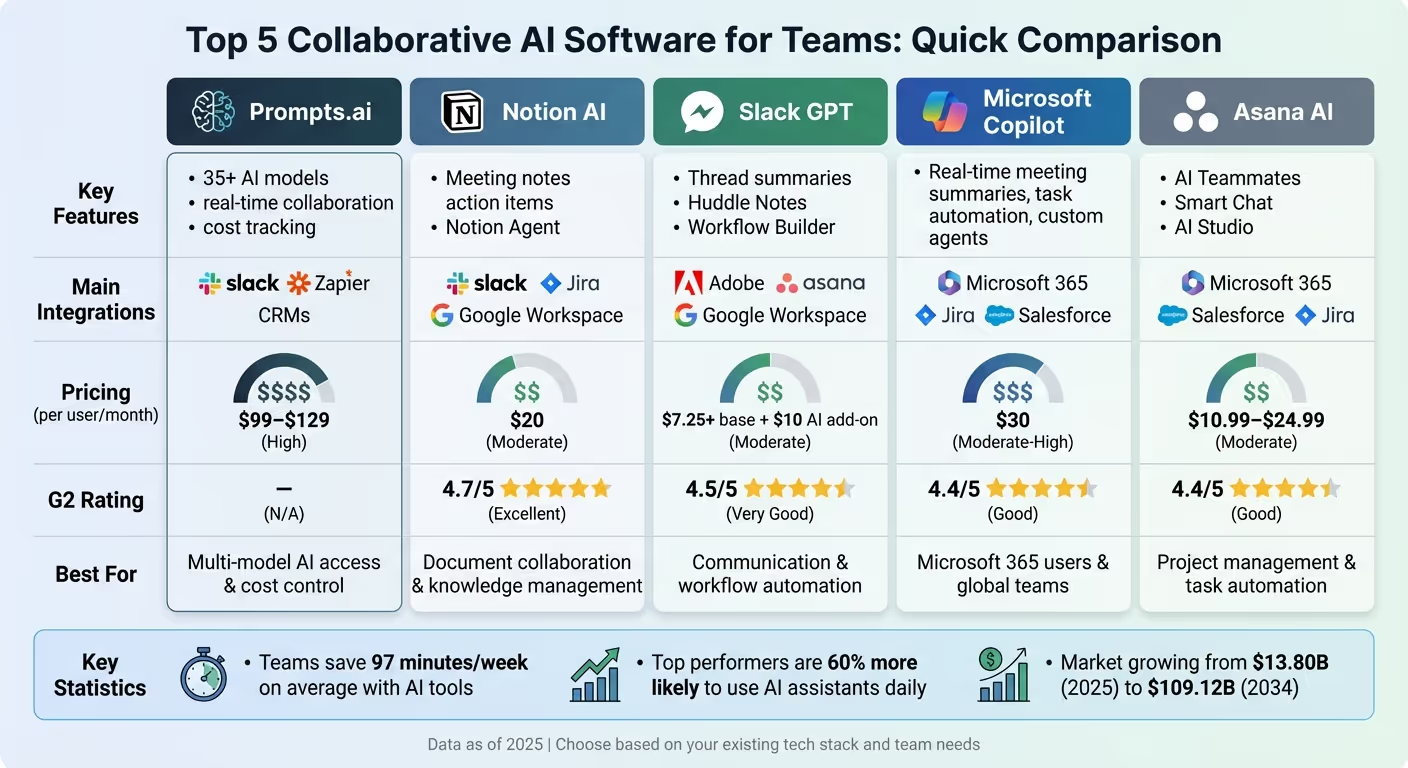
सहयोगात्मक AI सॉफ़्टवेयर तुलना: सुविधाएँ, एकीकरण और मूल्य निर्धारण
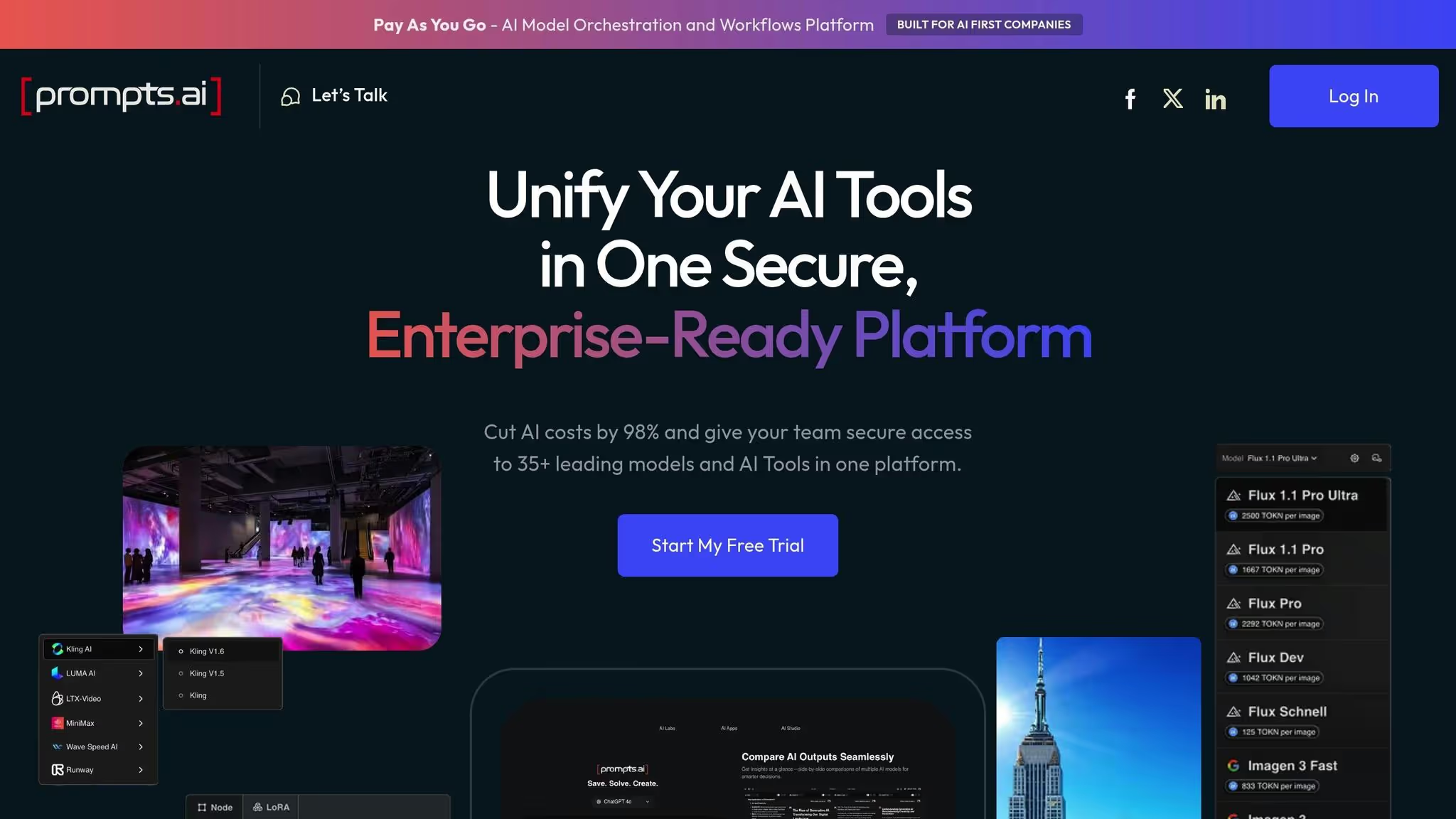
Prompts.ai है 35 से अधिक शीर्ष स्तरीय बड़े भाषा मॉडल को एक साथ लाने के लिए डिज़ाइन किया गया एक सहयोगी मंच (GPT-5, क्लाउड, लामा और जेमिनी सहित) एक सुरक्षित कार्यक्षेत्र में। यह एकीकरण टीमों को अपने वर्कफ़्लो को कारगर बनाने, स्वचालन को बढ़ाने और लागतों को प्रभावी ढंग से प्रबंधित करने का अधिकार देता है।
Prompts.ai टीमों को एक ही प्लेटफ़ॉर्म के भीतर, प्रॉम्प्ट वर्कफ़्लो पर निर्बाध रूप से सहयोग करने की अनुमति देता है। टूल के बीच स्विच करने या परिवर्तनों का ट्रैक खोने की परेशानी को भूल जाइए - यह एकीकृत इंटरफ़ेस टीमों को एक साथ प्रॉम्प्ट को परिष्कृत करने, आउटपुट का परीक्षण करने और सभी विभागों में सुधार साझा करने में सक्षम बनाता है। चाहे आप किसी Fortune 500 कंपनी का हिस्सा हों या एक रचनात्मक एजेंसी का, यह सहयोगी सेटअप संस्करण नियंत्रण सिरदर्द को कम करता है और सभी को एक साथ रखता है।
एआई प्रयोग के रूप में जो शुरू होता है वह तेजी से विकसित हो सकता है संरचित, दोहराने योग्य वर्कफ़्लो Prompts.ai के साथ। नियमित कार्यों को स्वचालित करें और अनुपालन और दक्षता सुनिश्चित करने के लिए मानकीकृत टेम्पलेट तैनात करें। प्लेटफ़ॉर्म एक प्रॉम्प्ट इंजीनियर सर्टिफिकेशन प्रोग्राम भी प्रदान करता है, जो टीमों को संगठन भर में AI के उपयोग को बढ़ाने के लिए सर्वोत्तम प्रथाओं से लैस करता है। ये ऑटोमेशन टूल इसकी सहयोगी विशेषताओं के पूरक हैं, जिससे AI को बड़े पैमाने पर अपनाना आसान हो जाता है।
Prompts.ai आपके मौजूदा तकनीकी स्टैक के साथ हाथ से काम करता है, उन टूल से संदर्भ खींचता है जिन पर आपकी टीम पहले से निर्भर है। AI इंटरैक्शन को केंद्रीकृत करके, यह अतिरिक्त, डिस्कनेक्ट किए गए एप्लिकेशन की आवश्यकता को समाप्त करता है, जिससे शीघ्र संचालन आसान और अधिक कुशल हो जाता है।
बिल्ट-इन के साथ FinOps लेयर, टीमें टोकन के उपयोग को ट्रैक कर सकती हैं और लागत में 98% तक की कटौती कर सकती हैं। जैसे-जैसे आपकी टीम बढ़ती है, बैलूनिंग सदस्यता शुल्क से निपटने के बजाय, Prompts.ai पे-एज़-यू-गो TOKN क्रेडिट सिस्टम का उपयोग करता है, यह सुनिश्चित करता है कि आप केवल उसी चीज़ का भुगतान करें जो आप उपयोग करते हैं। रीयल-टाइम डैशबोर्ड परियोजना, उपयोगकर्ता और मॉडल के अनुसार लागतों के बारे में विस्तृत जानकारी प्रदान करते हैं, जिससे वित्त और तकनीकी दोनों टीमों को वह स्पष्टता मिलती है जिसकी उन्हें आवश्यकता होती है। कोर टियर के लिए प्लान $99 प्रति सदस्य प्रति माह से शुरू होते हैं, जिसमें एलीट प्लान - रचनात्मक टीमों के लिए तैयार किया जाता है - प्रति माह $129 प्रति सदस्य पर उपलब्ध होता है।
100 मिलियन से अधिक उपयोगकर्ताओं के साथ, जिनमें फॉर्च्यून 100 कंपनियों के 62% शामिल हैं, Notion AI एक विश्वसनीय कार्यक्षेत्र समाधान बन गया है। इसकी AI क्षमताओं को टीम परियोजनाओं के पूर्ण संदर्भ को समझने के लिए डिज़ाइन किया गया है, जिससे यह सहयोग और उत्पादकता के लिए एक आवश्यक उपकरण बन जाता है।
नोशन एआई मीटिंग नोट्स फीचर बातचीत को उनके होने पर ट्रांसक्रिप्ट करता है, एक्शन आइटम की पहचान करता है और उन्हें सीधे प्रोजेक्ट डेटाबेस से जोड़ता है। इसका उपयोग करके इसे आसानी से किया जा सकता है /म िटिंग ब्लॉक। जैसे औजारों के साथ जोड़े जाने पर माइक्रोसॉफ्ट टीम्स या स्लैक, यह पिछले साल की टीम चर्चाओं को अनुक्रमित करके एक कदम आगे बढ़ता है। नए संदेश केवल 30 मिनट के भीतर खोजे जा सकते हैं, जिससे यह सुनिश्चित होता है कि कोई भी महत्वपूर्ण जानकारी खो न जाए।
“जो डिबगिंग में घंटों लग जाते थे, उसे अब केवल Notion AI से पूछकर मिनटों में हल किया जा सकता है।”
— जॉन एलार्ड, इंजीनियरिंग, ओपनएआई
डेटा पुनर्प्राप्ति के लिए, एंटरप्राइज़ सर्च सुविधा सब कुछ एक साथ एक ही स्थान पर लाती है। चाहे वह स्लैक, गूगल ड्राइव, गिटहब, या जीरा हो, यूज़र सटीकता के लिए “फाइंड इन” टॉगल के साथ बढ़ाए गए एकल खोज बार के माध्यम से जानकारी देख सकते हैं।
सहयोग से परे, Notion AI अपने ऑटोमेशन टूल के साथ वर्कफ़्लो को सरल बनाता है, समय बचाता है और मैन्युअल प्रयास को कम करता है।
सितंबर 2025 में पेश किया गया, नोशन एजेंट 20-मिनट के अंतराल में स्वायत्त रूप से जटिल, बहु-चरणीय वर्कफ़्लो करता है। डेटाबेस बनाने से लेकर वर्कस्पेस कंटेंट को अपडेट करने तक, यह टूल टीमों के लोड को हल्का करता है। कस्टम एजेंट को पुनरावर्ती कार्यों को संभालने के लिए भी कॉन्फ़िगर किया जा सकता है, जैसे कि IT अनुरोध ट्राइएजिंग, साप्ताहिक प्रोजेक्ट अपडेट, या शेड्यूल या विशिष्ट ईवेंट द्वारा ट्रिगर किए गए दैनिक उपयोगकर्ता फ़ीडबैक को संकलित करना।
“नोशन में आप जो कुछ भी कर सकते हैं, आपका एजेंट भी कर सकता है। आपका दिन भर देने वाला व्यस्त काम अब मिनटों में पूरा किया जा सकता है।”
— अक्षय कोठारी, सह-संस्थापक, नोशन
अन्य सुविधाएं जैसे रिसर्च मोड आंतरिक और वेब-आधारित स्रोतों का विश्लेषण करके अपडेट, ब्रीफ़ और रिपोर्ट के लिए ड्राफ़्ट जनरेट करें। इस बीच, AI ऑटोफिल प्रासंगिक जानकारी के साथ डेटाबेस गुणों को स्वचालित रूप से पॉप्युलेट करके डेटा प्रविष्टि को सुव्यवस्थित करता है।
Notion AI व्यापक रूप से उपयोग किए जाने वाले टूल के साथ समेकित रूप से एकीकृत होता है, जिसमें Slack, Jira, GitHub, Google Workspace, Microsoft Teams शामिल हैं, शेयरपॉइंट, वन ड्राइव, आउटलुक, और सेल्सफोर्स। इसके माध्यम से AI कनेक्टर्स, यह तृतीय-पक्ष प्लेटफ़ॉर्म से प्रासंगिक संदेशों या फ़ाइलों तक सीधी पहुँच प्रदान करता है, जबकि यह सुनिश्चित करने के लिए सख्त अनुमति नियंत्रण बनाए रखता है कि यूज़र केवल वह सामग्री देखें जिसे वे एक्सेस करने के लिए अधिकृत हैं।
मई 2025 में, फिनटेक कंपनी रैंप प्रत्येक कर्मचारी को व्यक्तिगत AI एजेंट से लैस करने के लिए Notion AI को अपनाया। इस कदम ने कंपनी के ज्ञान को केंद्रीकृत किया, संदर्भ-स्विचिंग को कम किया, और खोज, नोट लेने और लिखने के लिए टूल के लिए अलग-अलग सदस्यता की आवश्यकता को समाप्त कर दिया। नतीजा क्या है? सुव्यवस्थित वर्कफ़्लो और बेहतर लागत दक्षता।
नोशन एआई की कीमत $20 प्रति उपयोगकर्ता प्रति माह है, जो व्यवसाय और उद्यम योजनाओं में शामिल है। अन्य कार्यस्थान सीमित परीक्षण संस्करण तक पहुँच सकते हैं। यह सरल मूल्य निर्धारण संरचना कई टूल सब्सक्रिप्शन को एक में समेकित करती है, जो अपने तकनीकी स्टैक को अनुकूलित करने का लक्ष्य रखने वाली टीमों के लिए महत्वपूर्ण बचत प्रदान करती है।
स्लैक जीपीटी स्लैक को एक मैसेजिंग ऐप के रूप में अपनी भूमिका से परे ले जाता है, इसे एक शक्तिशाली उत्पादकता उपकरण में बदल देता है जो टीमों को औसतन प्रति सप्ताह 97 मिनट की प्रभावशाली बचत करने में मदद करता है। संचार को सुव्यवस्थित करने और सांसारिक कार्यों को स्वचालित करने से, यह टीमों के वास्तविक समय में सहयोग करने के तरीके को बढ़ाता है। Slack GPT टीम इंटरैक्शन को कैसे नया रूप देता है, इस पर करीब से नज़र डालें।
साथ में हडल नोट्स, टीमें लाइव ऑडियो वार्तालापों से महत्वपूर्ण बिंदुओं को कैप्चर कर सकती हैं और उन्हें एक सहयोगी कैनवास पर स्वचालित रूप से साझा कर सकती हैं। व्यस्त चैनलों के लिए, चैनल एक्सपर्ट एजेंट वर्कफ़्लो या नीतियों के बारे में सामान्य प्रश्नों के तत्काल उत्तर देने के लिए ऐतिहासिक टीम वार्तालापों का उपयोग करता है। इसके अतिरिक्त, Slack GPT चैनल और थ्रेड सारांश प्रदान करता है, जिससे टीम के सदस्यों के लिए व्यापक संदेश इतिहास को देखे बिना चर्चाओं को पकड़ना आसान हो जाता है।
स्लैक जीपीटी दक्षता के बारे में है। इसका वर्कफ़्लो बिल्डर और जल्द ही लॉन्च होने वाला एजेंटफोर्स यूज़र को नो-कोड ऑटोमेशन बनाने में सक्षम बनाता है। ये उपकरण संदेशों को कार्यों में परिवर्तित कर सकते हैं या जटिल क्रियाओं को ट्रिगर कर सकते हैं जैसे चैनल सेट करना या साझा किए गए कैनवस को संपादित करना।
स्लैक का एंटरप्राइज़ सर्च वार्तालापों और कनेक्टेड ऐप्स के डेटा को समेकित करके, निर्णय लेने में 37% की तेजी लाने और ग्राहकों की प्रतिक्रिया समय में 36% की सुधार करके एक कदम आगे बढ़ता है।
Slack GPT मूल रूप से OpenAI जैसे प्रदाताओं के तृतीय-पक्ष AI टूल से जुड़ता है, एंथ्रोपिक, और Google अपने रियल-टाइम सर्च (RTS) API और मॉडल कॉन्टेक्स्ट प्रोटोकॉल (MCP) के माध्यम से, प्रासंगिक डेटा तक सुरक्षित पहुंच सुनिश्चित करता है। यह मूल रूप से उत्पादकता प्लेटफ़ॉर्म जैसे उत्पादकता प्लेटफ़ॉर्म के साथ भी एकीकृत होता है अडोब एक्सप्रेस, आसन, बॉक्स, कोहेर, कार्यदिवस, और लेखक। जैसा कि नोशन के सह-संस्थापक अक्षय कोठारी ने उपयुक्त रूप से कहा है:
“सबसे अच्छा काम तब होता है जब संदर्भ और निष्पादन अलग-अलग नहीं होते हैं। नोशन एआई और स्लैक के साथ मिलकर, टीमें हर बातचीत को एक्शन में बदल सकती हैं।” - अक्षय कोठारी, सह-संस्थापक, नोशन
एंटरप्राइज़ उपयोगकर्ताओं के लिए, एजेंटफोर्स सेल्स यह सुविधा टीम साइडबार के भीतर ग्राहक रिकॉर्ड और AI अंतर्दृष्टि तक सीधी पहुंच प्रदान करती है। यह सख्त अनुमति नियंत्रणों के साथ किया जाता है ताकि यह सुनिश्चित किया जा सके कि केवल अधिकृत यूज़र ही संवेदनशील डेटा तक पहुँच सकें।
स्लैक एआई सभी भुगतान किए गए स्लैक प्लान के लिए ऐड-ऑन के रूप में उपलब्ध है, जिसमें प्रो (सालाना बिल किए जाने पर प्रति माह $7.25 प्रति उपयोगकर्ता से शुरू), बिज़नेस+ और एंटरप्राइज़+ सब्सक्रिप्शन शामिल हैं। यह सरल मूल्य निर्धारण मॉडल संगठनों को अप्रत्याशित खर्चों के बिना अपनी AI क्षमताओं का विस्तार करने की अनुमति देता है। वार्षिक बिलिंग के लिए छूट के साथ, प्रति-उपयोगकर्ता, प्रति-माह मूल्य निर्धारण से बड़ी टीमों को लाभ होता है।
महत्वपूर्ण बात यह है कि स्लैक सुनिश्चित करता है कि ग्राहक डेटा निजी रहे - इसका AI संचालन विशेष रूप से सुरक्षित AWS अवसंरचना पर चलता है और SOC 2 और HIPAA जैसे मानकों का अनुपालन करता है। कुछ प्रदाताओं के विपरीत, स्लैक बड़े भाषा मॉडल को प्रशिक्षित करने के लिए ग्राहक डेटा का उपयोग नहीं करता है।
Microsoft Copilot Microsoft 365 के भीतर सहयोग बढ़ाता है, जिससे उपयोगकर्ताओं को औसतन प्रति माह 8 घंटे से अधिक की बचत करने में मदद मिलती है और 10-महीने की पेबैक अवधि के साथ 100% + ROI का प्रभावशाली लाभ मिलता है।
Copilot Pages सहयोगात्मक रूप से AI- जनरेट की गई सामग्री को बनाने और परिष्कृत करने के लिए एक गतिशील, संपादन योग्य कैनवास प्रदान करता है [34,36]। मीटिंग्स के दौरान, Copilot रीयल-टाइम सारांश डिलीवर करता है, एक्शन आइटम को स्वचालित रूप से कैप्चर करता है, और 40 से अधिक भाषाओं में लाइव अनुवादित कैप्शन और ट्रांसक्रिप्ट प्रदान करता है, जिससे दुनिया भर में संचार बाधाएं दूर हो जाती हैं [2,35]। इसका फैसिलिटेटर एजेंट मीटिंग नोट्स और अनुत्तरित प्रश्नों पर नज़र रखता है, जबकि चैनल एजेंट यह सुनिश्चित करता है कि समय सीमा और स्थिति अपडेट टीम चैनलों के भीतर प्रबंधित किए जाएं।
एंडी मैकडोनाल्ड, कॉर्पोरेट सेवाओं के कार्यकारी निदेशक एबरडीन सिटी काउंसिल, साझा किया गया:
“स्टाफ क्षमता निर्माण हमेशा मेरे लिए ड्राइवर है, और कोपिलॉट अपनाने से मैं इसे वित्तीय बचत में भी बदल सकता हूं।”
2025 में कोपिलॉट को अपनाने के बाद से, परिषद ने 241% का अनुमानित ROI हासिल किया है, जिससे प्रशासनिक कार्यों को स्वचालित करके सालाना अनुमानित $3 मिलियन की बचत होती है।
ये सहयोगी उपकरण अधिक सुव्यवस्थित और कुशल स्वचालन के लिए मंच तैयार करते हैं।
वर्कफ़्लो एजेंट Outlook, SharePoint, Teams और Planner में कार्यों को सरल बनाता है। अधिक जटिल ज़रूरतों के लिए, विशिष्ट एजेंट बहु-चरणीय अनुसंधान और डेटा विश्लेषण को संभालते हैं, जिससे जटिल वर्कफ़्लो अधिक प्रबंधनीय हो जाते हैं। इस बीच, कोपिलॉट स्टूडियो टीमों को कस्टम एजेंट बनाने का अधिकार देता है जो व्यावसायिक डेटा से जुड़ते हैं और उन्नत प्रक्रियाओं को निष्पादित करते हैं - सभी कोडिंग विशेषज्ञता की आवश्यकता के बिना [34,37]।
2024 में, सिनेप्लेक्स ने 100 से अधिक कर्मचारियों को विकसित करने में सक्षम बनाया एआई-संचालित समाधान Microsoft Power Automate और जनरेटिव AI का उपयोग करके, सालाना 30,000 घंटे से अधिक की बचत होती है। सिनेप्लेक्स में टैक्सेशन एंड ट्रेजरी के उपाध्यक्ष बो वांग ने कहा:
“Microsoft Power Automate हमारे स्वचालन प्रयासों को लगातार बढ़ा रहा है। इसकी जनरेटिव AI क्षमताएं और Microsoft Copilot Studio जैसे अन्य Power Platform उत्पादों के साथ एकीकरण वास्तव में Power Automate को प्रतिस्पर्धी समाधानों से अलग करता है.”
इसी तरह, वोडाफोनकी लीगल एंड बिज़नेस इंटीग्रिटी टीम ने कॉन्ट्रैक्ट समीक्षाओं को कारगर बनाने के लिए Copilot का उपयोग किया, जिससे प्रत्येक सप्ताह प्रति व्यक्ति 4 घंटे की बचत होती है।
कोपिलॉट 100 से अधिक तृतीय-पक्ष प्लेटफार्मों के साथ सहजता से जुड़ता है, जिसमें जीरा भी शामिल है, सर्विस नाउ, गूगल ड्राइव, और सेल्सफोर्स [34,37]। इसकी एंटरप्राइज़ खोज सुविधा उपयोगकर्ताओं को प्राकृतिक भाषा प्रश्नों [37,34] का उपयोग करके Microsoft 365, ऑन-प्रिमाइसेस डेटा और एकीकृत अनुप्रयोगों में जानकारी का पता लगाने की अनुमति देती है। का लाभ उठाकर माइक्रोसॉफ़्ट ग्राफ़, कोपिलॉट मीटिंग्स, चैट, ईमेल और दस्तावेज़ों से संदर्भ खींचता है, जिससे सहज और कुशल सहयोग सुनिश्चित होता है। कनेक्टिविटी का यह स्तर पूरी तरह से एकीकृत डिजिटल वर्कस्पेस में एक महत्वपूर्ण उपकरण के रूप में कोपिलॉट की स्थिति को मजबूत करता है।
Microsoft 365 Copilot वार्षिक रूप से बिल किए जाने पर प्रति माह $30 प्रति उपयोगकर्ता या मासिक बिलिंग के लिए $31.50 प्रति उपयोगकर्ता प्रति माह पर उपलब्ध है। छोटे और मध्यम आकार के व्यवसायों के लिए, दिसंबर 2025 और मार्च 2026 के बीच अधिकतम 300 यूज़र के लिए प्रति माह $18 प्रति उपयोगकर्ता (वार्षिक बिल) से शुरू होने वाली रियायती दरें ऑफ़र की जाती हैं। IT प्रशासक AI परिनियोजन की निगरानी करने, अपनाने के रुझान को ट्रैक करने और विस्तृत रिपोर्टिंग [34,37] के माध्यम से ROI को मापने के लिए कोपायलट कंट्रोल सिस्टम और एनालिटिक्स का उपयोग कर सकते हैं। इसके अतिरिक्त, सभी संकेत और प्रतिक्रियाएँ संगठन की Microsoft 365 सेवा सीमा के भीतर रहती हैं, जो डेटा सुरक्षा और गोपनीयता सुनिश्चित करती हैं, बिना मूलभूत मॉडल [35,34] को प्रशिक्षित करने के लिए उपयोग किए बिना।
Asana AI आपके वर्कफ़्लो के हर चरण में कृत्रिम बुद्धिमत्ता को एकीकृत करके उत्पादकता को अगले स्तर तक ले जाता है। 170,000 से अधिक ग्राहकों द्वारा भरोसा किया गया, जिनमें शामिल हैं अमेज़न और एक्सेंचर, आसन एआई फिर से परिभाषित करता है कि जटिल परियोजनाओं को प्रभावी ढंग से प्रबंधित करने के लिए मनुष्य और एआई कैसे सहयोग करते हैं।
साथ में AI टीम के साथी, Asana AI आपकी आवश्यकताओं के अनुरूप एक विशेष सहायक के रूप में कार्य करता है, चाहे वह अभियान रणनीतिकार हो या बग अन्वेषक। ये AI टीम के साथी कस्टम वर्कफ़्लो के अनुकूल होते हैं, जो प्रमुख चौकियों पर चरण-दर-चरण स्पष्टीकरण देते हैं ताकि टीमें कार्यों को अंतिम रूप देने से पहले अपनी प्रगति को ठीक कर सकें।
मॉर्निंगस्टार, एक प्रमुख वित्तीय सेवा फर्म, ने अपनी शोध और समीक्षा प्रक्रियाओं को कारगर बनाने के लिए 2025 में AI Teammates को लागू किया। एलिना लैमी, सीनियर प्रोजेक्ट मैनेजर, ने साझा किया:
“जो एक सप्ताह में एक बार लगता था, AI टीममेट घंटों में पूरा करता है।”
मॉर्निंगस्टार के सीआईओ लॉरा कोहल ने इस एकीकरण के मूल्य पर जोर दिया:
“आसन एआई टीम के साथी हमें अपने कार्य डेटा के भीतर संस्थागत ज्ञान को सुरक्षित रूप से अनलॉक करने में मदद करते हैं, जिससे महत्वपूर्ण व्यावसायिक निर्णयों को सूचित करने वाली डेटा-संचालित अंतर्दृष्टि उत्पन्न होती है।”
इसके अतिरिक्त, स्मार्ट चैट यह सुविधा टीम के सदस्यों को प्रोजेक्ट की स्थिति की तुरंत जांच करने या प्रोजेक्ट के इतिहास से खींचे गए तत्काल, डेटा-समर्थित उत्तरों के साथ ब्लॉकर्स की पहचान करने की अनुमति देती है। यह रीयल-टाइम सहयोग आसान कार्य स्वचालन के लिए आधार तैयार करता है।
आसन एआईज़ AI स्टूडियो एआई-संचालित वर्कफ़्लो को डिज़ाइन करने के लिए एक नो-कोड बिल्डर प्रदान करता है, जो दोहराए जाने वाले कार्यों के स्वचालन को सरल बनाता है। टीमें इससे पहले से निर्मित टेम्प्लेट का उपयोग कर सकती हैं स्मार्ट वर्कफ़्लो गैलरी या विशिष्ट भूमिकाओं और Google Drive और SharePoint जैसे टूल तक पहुंच के साथ कस्टम AI टीममेट बनाएं।
मॉर्निंगस्टार में कार्यक्रम प्रबंधन के निदेशक बेलिंडा हार्डमैन ने इस प्रभाव पर प्रकाश डाला:
“पहले, एक अनुरोध की समीक्षा करने में दो सप्ताह लगते थे। अब हम मैन्युअल रूप से आगे-पीछे बिताए गए समय को समाप्त कर सकते हैं क्योंकि Asana AI सीधे हमारे वर्कफ़्लो में अंतर्निहित है।”
प्लेटफ़ॉर्म का AI कनेक्टर्स बाहरी AI टूल को सीधे आसन से जोड़कर, अन्य अनुप्रयोगों में बातचीत को कार्रवाई योग्य कार्यों और परियोजनाओं में बदलकर कार्यक्षमता को और बढ़ाएं।
Asana AI Microsoft 365, Google Workspace, Slack, Jira और Salesforce जैसे टूल के साथ आसानी से एकीकृत हो जाता है। यह है वर्क ग्राफ़® डेटा मॉडल सभी टीमों में स्पष्टता सुनिश्चित करता है, जो इस बात की जानकारी प्रदान करता है कि कार्यों, समय सीमा और निर्णयों के पीछे के तर्क के लिए कौन जिम्मेदार है। वैश्विक टीमों के लिए, बहुभाषी सिमेंटिक सर्च सुविधा उपयोगकर्ताओं को भाषा की परवाह किए बिना, इरादे और संदर्भ को समझकर प्रासंगिक कार्य और कनेक्शन खोजने में सक्षम बनाती है।
आसन एआई की विशेषताएं सभी सशुल्क योजनाओं में शामिल हैं, जिनकी कीमत $10.99 से $24.99 प्रति उपयोगकर्ता प्रति माह है। द AI स्टूडियो यह सुविधा स्टार्टर, एडवांस्ड, एंटरप्राइज और एंटरप्राइज+प्लान पर उपलब्ध है। व्यवस्थापक व्यवस्थापक कंसोल के माध्यम से उपयोग सीमा और दृश्यता सेटिंग सेट करके लागतों को नियंत्रित कर सकते हैं। इसके अलावा, आसन के AI पार्टनर सख्त डेटा नीतियों का पालन करते हैं, प्रत्येक क्वेरी के बाद डेटा हटाते हैं और अपने मॉडल को प्रशिक्षित करने के लिए ग्राहक डेटा का उपयोग करने से बचते हैं।
यह खंड वास्तविक समय के सहयोग, एकीकरण क्षमताओं और लागत प्रबंधन पर ध्यान केंद्रित करते हुए सहयोगी AI टूल के बीच महत्वपूर्ण अंतरों को रेखांकित करता है।
सही AI सहयोग प्लेटफ़ॉर्म का चयन इस बात पर निर्भर करता है कि यह रीयल-टाइम टीमवर्क, टास्क ऑटोमेशन, सहज एकीकरण और लागत दक्षता का कितना अच्छा समर्थन करता है। प्रत्येक टूल टेबल पर अद्वितीय खूबियां लाता है।
माइक्रोसॉफ्ट कोपिलॉट लाइव ट्रांसक्रिप्शन, ऑन-डिमांड सारांश, और वैश्विक टीमों के लिए तैयार किए गए रीयल-टाइम अनुवाद जैसी सुविधाओं के साथ सबसे अलग दिखता है। स्लैक जीपीटी थ्रेड सारांश और हडल्स के साथ बातचीत को सरल बनाता है, जबकि नोशन एआई लचीले, दस्तावेज़-केंद्रित सहयोग पर जोर देता है। ये विशेषताएं इस बात पर प्रकाश डालती हैं कि प्रत्येक प्लेटफ़ॉर्म टीम वर्क तक कैसे पहुंचता है, लेकिन एकीकरण और मूल्य निर्धारण वे हैं जहाँ वे और अधिक अंतर करते हैं।
जब इंटरऑपरेबिलिटी की बात आती है, सह-पायलट OneDrive, Outlook, Word और Teams जैसे Microsoft टूल के साथ गहराई से एकीकृत होता है। स्लैक व्यापक अनुकूलता प्रदान करता है, जो हजारों तृतीय-पक्ष ऐप्स से जुड़ता है। आसन एआई क्रॉस-डिपार्टमेंटल संदर्भ को बनाए रखने के लिए AI कनेक्टर्स और इसके वर्क ग्राफ़ का उपयोग करता है। इस बीच, Prompts.ai स्लैक या टिकटिंग सिस्टम से ट्रिगर किए गए कस्टम AI एजेंटों को सक्षम बनाता है, जो परिणाम जैपियर के माध्यम से CRM तक पहुंचाता है। ये एकीकरण विकल्प विविध संगठनात्मक आवश्यकताओं को पूरा करते हैं।
मूल्य निर्धारण मॉडल भी इन प्लेटफार्मों को अलग करते हैं। नोशन एआई और आसन एआई मौजूदा सब्सक्रिप्शन में AI फीचर्स जोड़ें, जिनकी लागत क्रमशः $8-$10 और $10.99—$24.99 प्रति उपयोगकर्ता प्रति माह है। माइक्रोसॉफ्ट कोपिलॉट, Microsoft 365 के हिस्से के रूप में, प्रति माह $6 प्रति उपयोगकर्ता से शुरू होता है, हालांकि उन्नत सुविधाओं के लिए उच्च-स्तरीय लाइसेंस की आवश्यकता होती है। स्लैक एआई प्रति माह $7.25 प्रति उपयोगकर्ता से शुरू होने वाली आधार योजनाओं में प्रति माह लगभग $10 प्रति उपयोगकर्ता जोड़ता है। Prompts.aiदूसरी ओर, TOKN क्रेडिट का उपयोग करके पे-एज़-यू-गो सिस्टम को अपनाता है, यह सुनिश्चित करता है कि लागत वास्तविक उपयोग के साथ संरेखित हो।
पहले से ही Microsoft टूल का उपयोग करने वाले संगठनों को मिल सकता है सह-पायलट सबसे उपयुक्त, नए साइलो पेश किए बिना मौजूदा डेटा का लाभ उठाना। इसके विपरीत, स्टार्टअप्स और हाई-ग्रोथ टीमें पसंद कर सकती हैं स्लैक या आसन उनके व्यापक तृतीय-पक्ष ऐप मार्केटप्लेस के लिए।
इन उपकरणों से दक्षता लाभ उल्लेखनीय हैं। AI-नेटिव प्लेटफ़ॉर्म का उपयोग करने वाली टीमें प्रति सप्ताह कम से कम एक पूर्ण कार्यदिवस बचाती हैं, जबकि कर्मचारियों को डिस्कनेक्ट किए गए टूल पर जानकारी खोजने में प्रतिदिन औसतन 2.5 घंटे का समय गंवाना पड़ता है। मैन्युअल अपडेट पर बचाए गए समय को मापने और तेज़ी से निर्णय लेने से निवेश को सही ठहराने में मदद मिल सकती है।
रेटिंग ऑन G2 अतिरिक्त जानकारी प्रदान करें: धारणा स्कोर 4.7/5, स्लैक 4.5/5 कमाता है, और दोनों आसन और माइक्रोसॉफ्ट कोपिलॉट 4.4/5 पकड़ें। विशेष रूप से, शीर्ष प्रदर्शन करने वाली टीमों के अपने कम प्रदर्शन करने वाले समकक्षों की तुलना में दिन में कई बार AI सहायकों का उपयोग करने की संभावना 60% अधिक होती है।
सही सहयोगी AI सॉफ़्टवेयर का चयन करना आपकी टीम की सबसे बड़ी चुनौतियों की पहचान करने और एक ऐसा समाधान खोजने से शुरू होता है जो आपकी प्रक्रियाओं को सरल और एकीकृत करता है। उदाहरण के लिए, यदि आपकी टीम बिखरे हुए डेटा और बर्बाद समय से जूझती है, तो ऐसा टूल अपनाना महत्वपूर्ण है, जो हर चीज को कुशलता से एक साथ लाता है। Microsoft के इकोसिस्टम में पहले से काम करने वाली टीमों को Copilot एक प्राकृतिक एक्सटेंशन लग सकता है, जबकि जो लोग कई तृतीय-पक्ष टूल का इस्तेमाल करते हैं, उन्हें Slack GPT या Prompts.ai द्वारा पेश किए गए लचीले इंटीग्रेशन से लाभ हो सकता है। टूल को चुनौती से मिलाना सार्थक सुधार लाने की दिशा में पहला कदम है।
डेटा से पता चलता है कि AI उपकरण उत्पादकता में काफी वृद्धि कर सकते हैं। उदाहरण के लिए, शीर्ष प्रदर्शन करने वाले कर्मचारियों के रोजाना कई बार AI सहायकों का उपयोग करने की संभावना 60% अधिक होती है, जो बार-बार अपनाने और परिणामों के बीच की कड़ी को रेखांकित करता है। किसी टूल के प्रभाव का आकलन करने के लिए, इसे दो सप्ताह के लिए हाई-फ्रिक्शन वर्कफ़्लो, जैसे कि उत्पाद लॉन्च, ग्राहक वृद्धि, या प्रस्ताव अनुमोदन जैसे हाई-फ्रिक्शन वर्कफ़्लो पर पायलट करने पर विचार करें। यह परीक्षण अवधि आपको यह पता लगाने में मदद कर सकती है कि टूल दैनिक कार्यों में कितनी अच्छी तरह एकीकृत होता है, इसका मूल्यांकन करते समय आपकी टीम कितनी जल्दी वास्तविक लाभों का अनुभव करती है। “टॉगल टैक्स” जैसी अक्षमताओं को दूर करना - हर ऐप स्विच में 23 मिनट का नुकसान - ध्यान देने योग्य अंतर ला सकता है।
वर्कफ़्लो एकीकरण के अलावा, सुरक्षा और लागत महत्वपूर्ण कारक हैं। संवेदनशील डेटा को सुरक्षित तरीके से हैंडल करने के लिए SOC 2 और GDPR मानकों का अनुपालन करने वाले प्लेटफ़ॉर्म की तलाश करें। मूल्य निर्धारण संरचनाओं से सावधान रहें, क्योंकि कुछ प्लेटफ़ॉर्म अपनी मूल सदस्यता में AI सुविधाएँ शामिल करते हैं, जबकि अन्य प्रति उपयोगकर्ता प्रति माह अतिरिक्त $7—$10 प्रति उपयोगकर्ता शुल्क लेते हैं। Prompts.ai अपने पे-एज़-यू-गो TOKN क्रेडिट सिस्टम के साथ सबसे अलग दिखता है, जो एक स्केलेबल लागत मॉडल पेश करता है जो वास्तविक उपयोग के अनुरूप है।
सहयोगी AI के लिए बाजार 2025 में $13.80 बिलियन से बढ़कर 2034 तक $109.12 बिलियन तक पहुंचने के लिए तैयार है, जिससे शुरुआती अपनाने वालों को एक महत्वपूर्ण प्रतिस्पर्धात्मक बढ़त मिलेगी। यह वृद्धि एक ऐसा प्लेटफ़ॉर्म चुनने के महत्व पर प्रकाश डालती है जो न केवल आपकी वर्तमान ज़रूरतों को पूरा करता है बल्कि भविष्य की मांगों के अनुकूल भी है। सही टूल आज आपके वर्कफ़्लो को सरल बनाएगा और आपकी टीम की महत्वाकांक्षाओं के साथ-साथ बढ़ेगा।
सहयोगात्मक AI टूल शेड्यूलिंग, मीटिंग्स को सारांशित करने और डेटा को व्यवस्थित करने जैसे सांसारिक कार्यों को अपने हाथ में लेकर टीम की उत्पादकता को बढ़ाते हैं। इन प्रक्रियाओं को स्वचालित करके, टीमें अपनी ऊर्जा को अधिक प्रभावशाली काम में लगा सकती हैं।
प्रोजेक्ट मैनेजमेंट सॉफ़्टवेयर या संचार ऐप्स जैसे प्लेटफ़ॉर्म से कनेक्ट होने पर, ये टूल रीयल-टाइम अंतर्दृष्टि, पूर्वानुमान संबंधी अनुशंसाएं और आसान वर्कफ़्लो प्रदान करते हैं। यह एकीकरण टीमों को तेज़ी से निर्णय लेने, संचार बढ़ाने और ठोस परिणाम देने में मदद करता है - जैसे कि परियोजनाओं को तेज़ी से पूरा करना और समग्र दक्षता बढ़ाना।
सहयोगी AI सॉफ़्टवेयर का चयन करते समय, बूस्ट करने वाले टूल पर ध्यान दें रीयल-टाइम सहयोग, सरल बनाएं कार्य स्वचालन, और स्लैक या Google Workspace जैसे प्लेटफ़ॉर्म के साथ आसानी से एकीकृत करें। ऐसे सॉफ़्टवेयर की तलाश करें, जो कई यूज़र को एक साथ आसानी से काम करने की अनुमति देता है, जिससे कार्यों के बीच लगातार स्विच करने की आवश्यकता कम हो जाती है।
पर पूरा ध्यान दें सुरक्षा और डेटा गोपनीयता विशेषताएं। यह सुनिश्चित करें कि प्लेटफ़ॉर्म मज़बूत प्रशासनिक नियंत्रणों के साथ संवेदनशील जानकारी की सुरक्षा करता है। इसके अलावा, मूल्यांकन करें स्केलेबिलिटी और मूल्य निर्धारण - ऐसा समाधान चुनें जो आपकी टीम के साथ-साथ बढ़ने के लिए पर्याप्त लचीला होने के साथ-साथ आपके बजट के अनुकूल हो। अंत में, ऑनबोर्डिंग को आसान बनाने और निरंतर सहायता प्रदान करने के लिए उपयोगकर्ता के अनुकूल इंटरफेस और भरोसेमंद ग्राहक सहायता को प्राथमिकता दें।
इन विचारों को तौलकर, टीमें एक ऐसा समाधान ढूंढ सकती हैं जो उत्पादकता को बढ़ाता है और उनके वर्कफ़्लो के साथ सहजता से संरेखित करता है।
इंटीग्रेशन AI टूल को उन ऐप्स के साथ आसानी से सिंक करने में सक्षम बनाता है जिन पर आपकी टीम पहले से निर्भर है - जैसे कैलेंडर, प्रोजेक्ट मैनेजमेंट सॉफ़्टवेयर और मैसेजिंग प्लेटफ़ॉर्म - मैन्युअल डेटा ट्रांसफर की परेशानी को दूर करता है। यह ऑटोमेशन शेड्यूल करने, फ़ाइलों को अपडेट करने और एक्शन आइटम को ट्रैक करने जैसे कार्यों को सरल बनाता है, जिससे टीमों को कम प्रयास में समन्वित और कुशल रहने में मदद मिलती है।
उदाहरण के लिए, सहयोगी AI सॉफ़्टवेयर स्वचालित रूप से कनेक्टेड ऐप्स से प्रासंगिक जानकारी एकत्र कर सकता है, इसे प्रोसेस कर सकता है और वास्तविक समय में अपडेट की गई जानकारी प्रदान कर सकता है। यह दोहराए जाने वाले काम को कम करता है, टूल के बीच स्विच करने की आवश्यकता को सीमित करता है, और यह सुनिश्चित करता है कि हर कोई सूचित रहे। वर्कफ़्लो को सरल बनाकर, ये एकीकरण टीम की उत्पादकता बढ़ाने के लिए AI टूल को अपरिहार्य संपत्ति में बदल देते हैं।