Pay As You Go - AI Model Orchestration and Workflows Platform


AI workflows can be complex without the right tools to automate and optimize processes. This article highlights five platforms - Prompts.ai, Zapier, Make, Workato, and n8n - designed to simplify AI-driven operations, reduce costs, and improve scalability. Here’s what you need to know:
Each platform has unique strengths, from cost efficiency to governance tools, making it easier to choose the right fit based on your team’s needs.
Quick Comparison:
| Tool | Best For | Starting Price | Key Features | Limitations |
|---|---|---|---|---|
| Prompts.ai | AI-focused teams | $99/month | Centralized prompt management, cost-saving | Enterprise-level pricing |
| Zapier | Beginners, small teams | $19.99/month | No-code AI workflows, 5,000+ integrations | Limited AI-native features |
| Make | Budget-conscious users | $9/month | Visual interface, multi-branch workflows | Steeper learning curve |
| Workato | Enterprises | Custom pricing | Advanced governance, scalable workflows | High cost, complex setup |
| n8n | Developers, privacy | $20/month | Self-hosting, custom code support | Requires technical expertise |
Choose the tool that aligns with your team’s size, budget, and technical needs to simplify and scale your AI workflows.
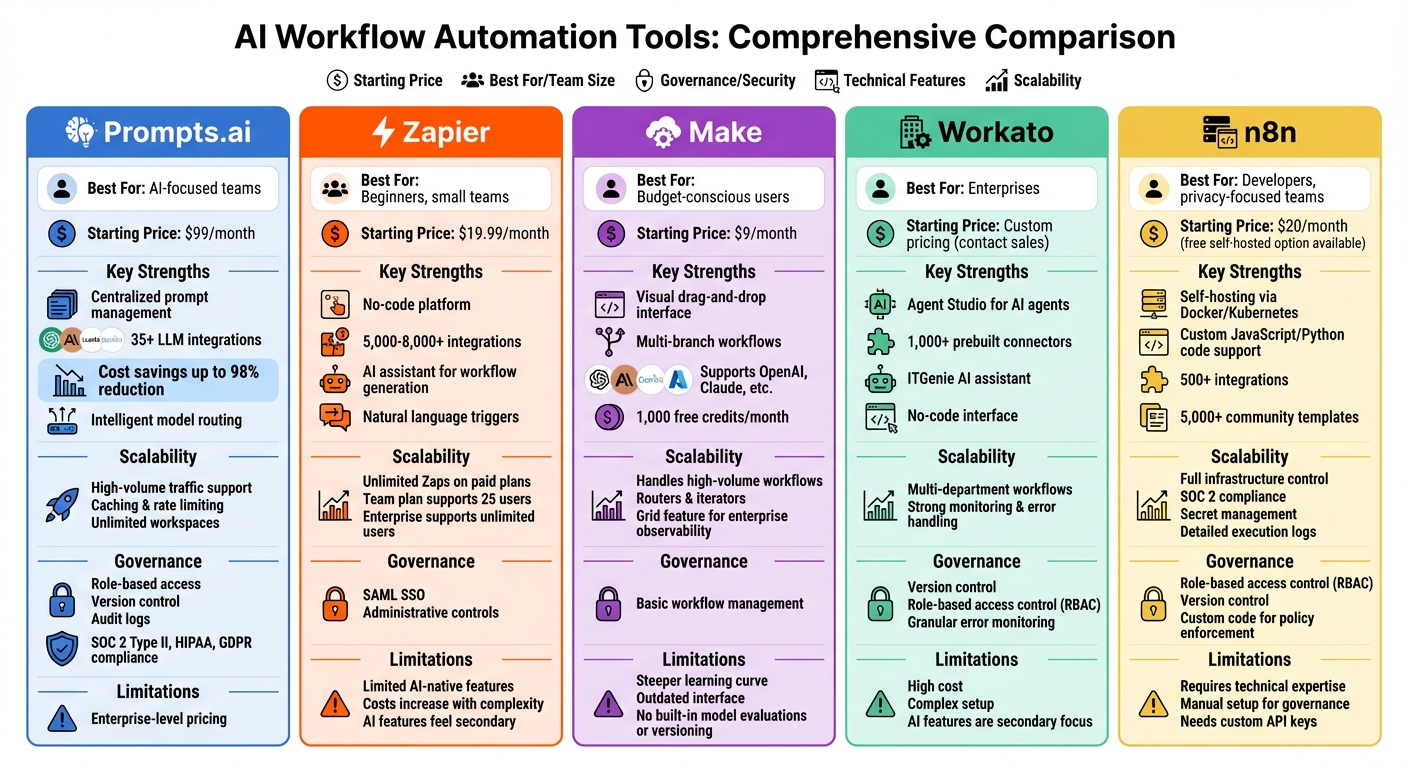
Comparison of 5 Best AI Workflow Automation Tools: Features, Pricing, and Capabilities
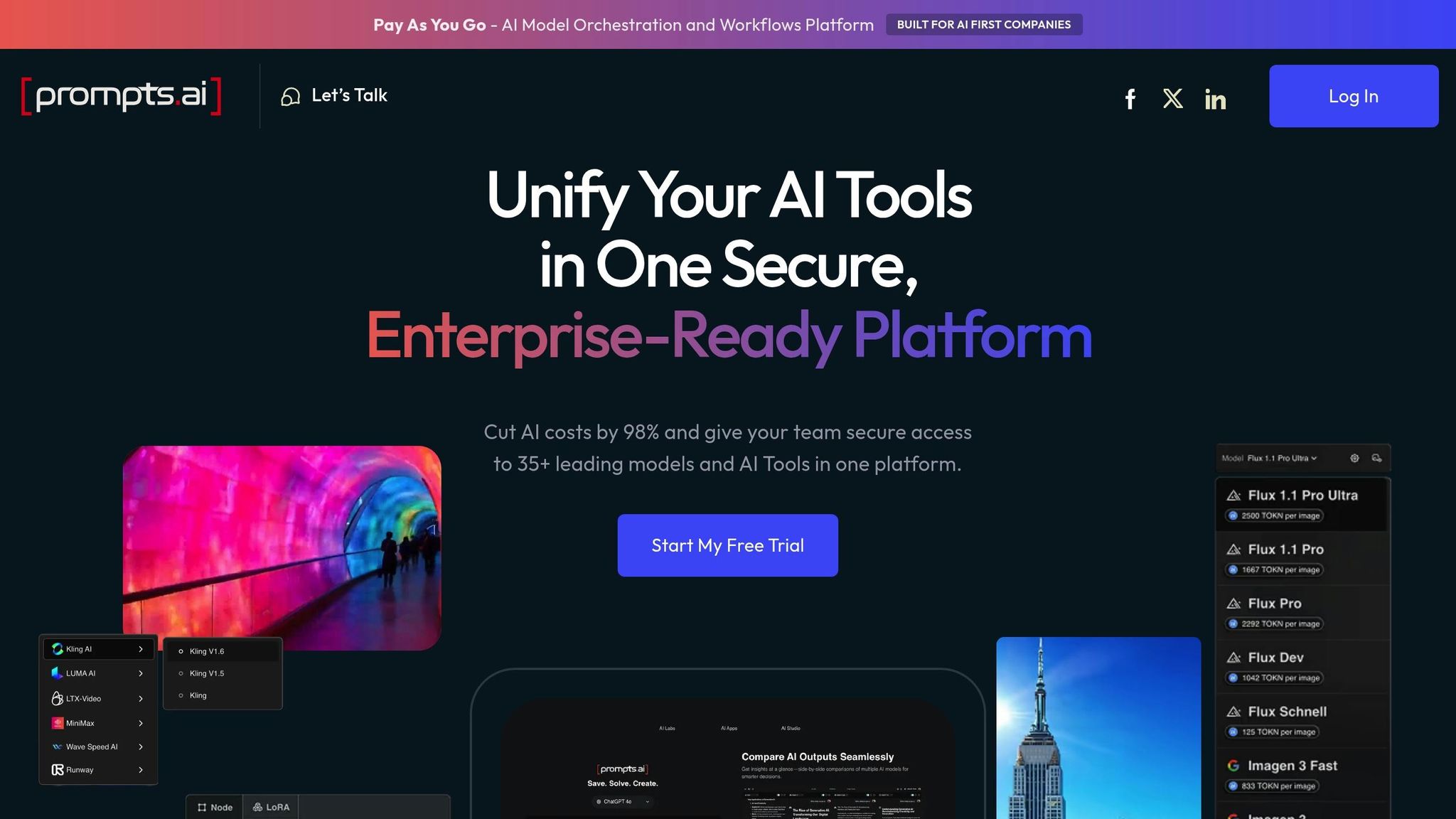
Prompts.ai streamlines the management of prompts for designing, testing, and coordinating LLM calls across various AI workflows. This approach ensures consistent and reliable AI behavior, even across dozens or hundreds of automated processes.
Prompts.ai connects to over 35 top-tier language models, including GPT, Claude, LLaMA, and Gemini, all through a single, unified interface. Teams can configure API keys and environment-specific settings to separate development, staging, and production workloads - an essential feature for U.S. organizations navigating compliance requirements. Instead of embedding prompts directly into automation tools, teams can integrate Prompts.ai as a centralized prompt service within their existing workflows. For instance, a product team might A/B test prompts between GPT-4o and a fine-tuned open-source model, tracking key metrics before rolling out to production. This setup allows for smarter, more cost-effective optimization.
By centralizing prompt management, Prompts.ai helps teams significantly lower monthly LLM expenses through smarter optimizations. Teams can streamline instructions, reuse prompts, and standardize parameters like temperature and max tokens to minimize token consumption and API costs. The platform also features intelligent model routing, which assigns low-risk tasks - such as basic text summarization - to cost-efficient models priced at around $0.003 per 1,000 tokens, while reserving premium models at $0.01 per 1,000 tokens for more complex cases. Built-in dashboards offer insights into token usage per prompt, helping teams identify and refine their most expensive prompts. Prompts.ai claims its TOKN credit system and unified model access can cut AI costs by up to 98%.
Efficient cost management lays the groundwork for scaling production AI workflows with reliability and organizational flexibility. Prompts.ai supports high-volume traffic with features like caching, rate limiting, and centralized retry logic to ensure production-grade performance. The platform also allows multiple departments to share and reuse approved prompt templates, reducing fragmentation as LLM usage expands. For example, a U.S. e-commerce company scaling from 1,000 to 100,000 AI-generated product descriptions daily can maintain consistent tone and performance by updating a single prompt configuration. These updates automatically propagate across all channels without requiring individual code changes. BusinessAI plans further support scalability with unlimited workspaces and collaborators, making it easy for small teams to grow into enterprise-scale operations.
For industries with strict regulations, governance is a top priority. Prompts.ai addresses this need with features like role-based access, version control, and approval workflows across different environments (dev → staging → prod). The platform also provides audit logs that track every prompt change, model selection, and override - critical tools for incident investigations and regulatory reviews in sectors such as healthcare, finance, and law. These governance tools ensure centralized oversight, detailed audit trails, and compliance support, meeting the demands of enterprise-level operations. Pricing starts at $99 per month for the Problem Solver plan, which includes 500,000 TOKN credits, and scales to BusinessAI plans at $99–$129 per member per month, with custom enterprise options available.
Zapier offers a straightforward, no-code platform for automating AI workflows, making it a user-friendly alternative to Prompts.ai's centralized prompt management. With features like AI Agents, AI automation steps, and an AI assistant, Zapier integrates AI into its automation tools to simplify workflow creation. It supports natural language triggers and AI actions, such as summarizing and classifying data, which can be seamlessly incorporated into existing Zaps. For those new to automation, the AI assistant can even generate complete workflows from plain language descriptions, removing technical hurdles. While Prompts.ai focuses on centralized management, Zapier prioritizes ease of use and code-free solutions.
Zapier integrates AI features into workflows using pre-built automation steps, allowing teams to add actions like summarization and classification without writing any code. Designed with non-technical users in mind, the platform offers an easy-to-navigate interface and starter templates to make AI-powered automation accessible to a broad audience. This simplicity allows teams to quickly implement AI into their workflows without specialized expertise.
As a no-code solution, Zapier significantly reduces the need for costly developer resources when building AI-driven workflows. Its extensive library of 5,000+ to 8,000+ integrations connects AI capabilities to a wide range of business tools like CRMs, email platforms, and databases, cutting down on custom development expenses. The platform's intuitive design and AI assistant further minimize the need for specialized training, making it a cost-effective choice for businesses.
Zapier’s tiered pricing plans are designed to grow with your organization, whether you're a small startup or a large enterprise. Paid plans include unlimited Zaps and support for multi-step workflows, enabling businesses to scale their automation efforts with ease. The Team plan accommodates up to 25 users with shared Zaps, folders, and SAML SSO, while Enterprise plans offer unlimited users and advanced administrative controls. This flexible structure allows businesses to start small and expand their automation capabilities as their needs evolve.
Make is a visual platform designed for creating AI workflows with ease, featuring a drag-and-drop interface. It utilizes goal-oriented AI agents powered by large language models, offering seamless integration with your preferred LLM providers. The platform is equipped to manage complex, high-volume workflows with multi-branch logic and data transformation capabilities.
Connecting to LLMs through Make is straightforward - simply choose a provider and input an API key. The platform supports a range of providers, including Anthropic Claude, Eden AI, OpenAI (ChatGPT, Sora, DALL-E, Whisper), Google Vertex AI (Gemini), and Azure. This versatility allows teams to run tailored prompts across multiple AI models while working within their existing tech ecosystems. However, it’s worth noting that Make does not include built-in tools for model evaluations or versioning.
Known for its affordability, Make is often described as a "super budget-friendly" option. The platform uses a credit-per-step pricing model, with a free plan offering 1,000 credits per month. Paid plans start at $9–$10.59 per month (billed annually) for 10,000 credits. Annual subscribers benefit from receiving their full year’s credits upfront. Since AI steps can consume multiple credits, designing workflows efficiently is crucial for keeping costs manageable. This pricing structure makes Make an attractive choice for teams looking to scale without breaking the bank.
Make is built to accommodate workflows of varying complexity, from simple processes to intricate, multi-branch systems that grow alongside your business. It excels in managing high-volume workflows with tools like routers, iterators, and advanced data transformation features. For enterprise users, Make offers a "Grid" feature, providing a comprehensive view of agents, apps, and workflows. This high-level overview enhances observability, streamlines performance, and simplifies debugging.
Workato serves as a powerful integration platform for organizations managing intricate AI workflows across various departments. Its Agent Studio lets users design AI agents capable of taking actionable steps, such as escalating decisions and triggering workflows. These agents operate within clearly defined business rules, offering complete control over logic, access rights, and escalation paths.
Workato seamlessly connects to large language models through its role-based AI agents, which integrate across your existing tech stack. A standout feature is ITGenie, an AI assistant tailored for internal operations. For example, ITGenie can access HR system data and role metadata to deliver personalized onboarding instructions via Slack. In another case, ITGenie efficiently managed a new hire's request for NetSuite access by verifying compliance policies, suggesting alternatives, and automating the creation of a Jira ticket to handle approvals and task assignments. The platform also includes an Agent Library with prebuilt Genies and a workflow-building assistant called AIRO, designed to simplify and enhance workflow creation.
Workato takes a tailored approach to pricing, requiring users to contact sales for quotes based on factors like task volume, advanced connector needs, and user count. While its pricing may lean toward the premium side, the platform offsets this by automating complex, labor-intensive tasks across departments. Its no-code interface and a vast library of over 1,000 prebuilt connectors accelerate development, reducing both manual effort and implementation expenses.
Workato is designed to handle workflows that span multiple tools, departments, and roles. Its ability to manage logical workflows across various applications - combined with strong monitoring, alerting, and error-handling capabilities - makes it an ideal choice for enterprises. These features allow AI workflows to scale efficiently, even in complex operational environments.
Governance is a key strength of Workato. The platform includes version control and role-based access control (RBAC), enabling effective collaboration across teams. Granular error monitoring and built-in role recognition further simplify processes like onboarding. These governance tools solidify Workato’s position as a reliable enterprise solution for orchestrating scalable and secure AI workflows.
n8n is designed for technical teams that demand complete control over their AI workflows. It combines a visual workflow builder with the capability to integrate custom JavaScript or Python code, allowing developers to fine-tune interactions with large language models (LLMs). This technical flexibility supports detailed customization, cost management, and strong oversight.
n8n offers built-in AI node support for widely used LLM tools such as OpenAI, Pinecone, and Hugging Face. Teams can create multi-step AI agents using drag-and-drop nodes while leveraging custom JavaScript or Python to refine logic and build advanced workflows with ease.
n8n’s pricing model is designed with execution efficiency in mind. It charges per workflow run, offering unlimited steps per execution. Cloud plans start at $20 per month (billed annually) for 2,500 workflow executions, and a free self-hosted option is available for those deploying via Docker or Kubernetes. Additionally, its extensive library of more than 5,000 community-created workflow templates and over 500 integrations can save significant development time.
For those needing complete infrastructure control, n8n supports deployment through Docker or Kubernetes, ensuring full data residency and customization. Its source-available code allows for auditing and deep technical adjustments. Enterprise features include SOC 2 compliance, secret management through platforms like AWS, GCP, Azure, or Vault, and detailed logging with searchable execution logs and custom filters to simplify debugging complex workflows. These capabilities make it well-suited for scaling workflows while maintaining operational control.
n8n incorporates role-based access control (RBAC) to manage team permissions across workflows. The platform supports programmatic triggers and conditional logic, enabling automations to respond to usage spikes or business-specific events. With version control and detailed execution logs, teams can maintain visibility as workflows grow. Custom code steps further enhance the enforcement of governance policies, ensuring workflows remain secure and compliant.
This section highlights the primary strengths and limitations of each tool, offering a quick overview of how they align with different technical needs, budgets, and AI objectives.
Zapier is known for its ease of use and broad app integrations. Its no-code builder is perfect for small teams, starting at $19.99/month (billed annually). However, its AI capabilities feel secondary, and costs can rise significantly as workflows increase in complexity.
Make provides a visual interface that appeals to users without technical backgrounds, with plans beginning at $9/month. On the downside, its interface can feel outdated and overwhelming, requiring a steeper learning curve. Additionally, it lacks built-in evaluations or model versioning.
Workato is designed for enterprises, offering advanced governance, role-based access controls, and scalability for heavy workloads. However, its premium pricing and complexity make it less practical for small teams or startups. While it includes AI features, they are not the platform's primary focus.
n8n is ideal for technical teams that need full control over their infrastructure. It supports self-hosting via Docker or Kubernetes, ensuring data privacy, with pricing starting at $20/month (billed annually). That said, it requires more technical expertise, custom LLM API keys, and manual setup for governance and monitoring.
Below is a comparison table summarizing the scalability, usability, and AI integration strengths and challenges for each tool:
| Tool | Scalability Strengths | Scalability Weaknesses | Ease of Use Strengths | Ease of Use Weaknesses | LLM Integration Strengths | LLM Integration Weaknesses |
|---|---|---|---|---|---|---|
| Zapier | Works for startups to enterprises; strong security | Costs grow with usage; sluggish dashboard for many workflows | Beginner-friendly; no-code builder | AI features feel secondary; not suited for agent workflows | AI-powered builder; automates IT tasks | Lacks AI-native features; no model evaluations |
| Make | Cost-effective for high-volume tasks | High prices for smaller teams; not ideal for large businesses | Budget-friendly; visual interface for non-technical users | Outdated design; steep learning curve | Supports OpenAI; generates tasks from text | Limited AI capabilities; lacks agentic features |
| Workato | Scales for large workloads; robust governance tools | Expensive for small teams; high complexity | User-friendly for businesses; no-code interface | Complexity can overwhelm smaller teams | Custom AI assistants and agents | AI features are secondary to the platform |
| n8n | Flexible hosting options; strong data privacy | No free workflow plan; high costs at scale | Visual builder; low-code environment | Requires technical expertise; not beginner-friendly | Supports OpenAI, Pinecone, Hugging Face | Needs custom API keys; lacks built-in memory |
This table provides a clear snapshot of each tool's strengths and challenges, helping users match their needs to the right platform.
Selecting the right automation tool for AI workflows boils down to three key factors: cost efficiency, scalability, and governance. Prompts.ai excels in all three areas, offering a platform specifically designed for AI-focused teams.
Cost efficiency is immediate and measurable. By consolidating access to over 35 top-tier models - including GPT, Claude, LLaMA, and Gemini - Prompts.ai eliminates the hassle of juggling multiple subscriptions and API keys, slashing AI costs by up to 98%. Business plans start at just $99 per member per month, including 250,000 TOKN credits, providing straightforward and predictable pricing in U.S. dollars. This affordability creates a strong foundation for scaling AI operations.
Scalability is seamlessly integrated into the platform. Teams can automate workflows across various departments, quickly add new models, users, and teams, and turn fixed costs into flexible efficiencies. Prompts.ai also allows direct comparisons of language models, enhancing productivity by turning irregular tasks into streamlined, repeatable processes.
Governance is a top priority, ensuring full transparency and control over all AI interactions. The platform incorporates robust compliance measures, adhering to SOC 2 Type II, HIPAA, and GDPR standards. With its SOC 2 Type II audit process set to begin on June 19, 2025, Prompts.ai delivers enterprise-grade governance tools in every business plan, offering centralized oversight without unnecessary complexity.
For teams looking for a secure, unified, and cost-effective way to manage AI workflows, Prompts.ai offers the perfect balance of governance, affordability, and scalability. Designed to simplify and centralize AI orchestration, it provides the tools necessary to meet the demands of modern enterprises. Recognized as a leading platform for AI-driven automation, Prompts.ai is the comprehensive solution teams need to streamline their operations.
Prompts.ai slashes AI workflow costs by as much as 98%, offering a smarter way to manage resources. With access to more than 35 leading AI models and tools in one place, it eliminates the hassle of juggling multiple platforms, simplifying processes and cutting down on inefficiencies.
By bringing everything together, Prompts.ai doesn’t just curb tool overload - it also enhances scalability and boosts operational efficiency. It’s a practical choice for professionals aiming to manage AI workflows without breaking the bank.
Prompts.ai brings simplicity and scalability to AI workflows by uniting over 35 top AI models and tools within a single, secure platform built for enterprise needs. This solution enables organizations to cut AI expenses by as much as 98%, all while offering smooth access, robust governance, and automation tailored for large-scale operations.
By prioritizing compatibility and operational efficiency, Prompts.ai allows businesses to optimize their AI processes without losing out on performance or growth potential.
Prompts.ai is built to prioritize security and compliance, offering a suite of governance tools to keep your AI workflows safe and reliable. Features like enterprise-level security measures, stringent compliance protocols, and flexible access controls work together to protect sensitive data and uphold operational standards.
These safeguards empower you to manage AI workflows with confidence, ensuring adherence to industry regulations while protecting your organization's critical information.