Pay As You Go - AI Model Orchestration and Workflows Platform



AI tools are transforming businesses by automating repetitive tasks, saving time, and boosting productivity. Employees spend 41% of their time on low-value activities like data entry and email management, but AI-powered platforms are helping cut this time significantly. Currently, 83% of U.S. enterprises use at least one AI tool, saving 40-60 minutes daily per employee and delivering faster, higher-quality results.
Here’s a quick overview of 8 leading platforms reshaping business workflows:
These platforms tackle inefficiencies, improve workflows, and help businesses stay competitive. Whether you're a startup or an enterprise, choosing the right tool depends on your needs, budget, and technical expertise.
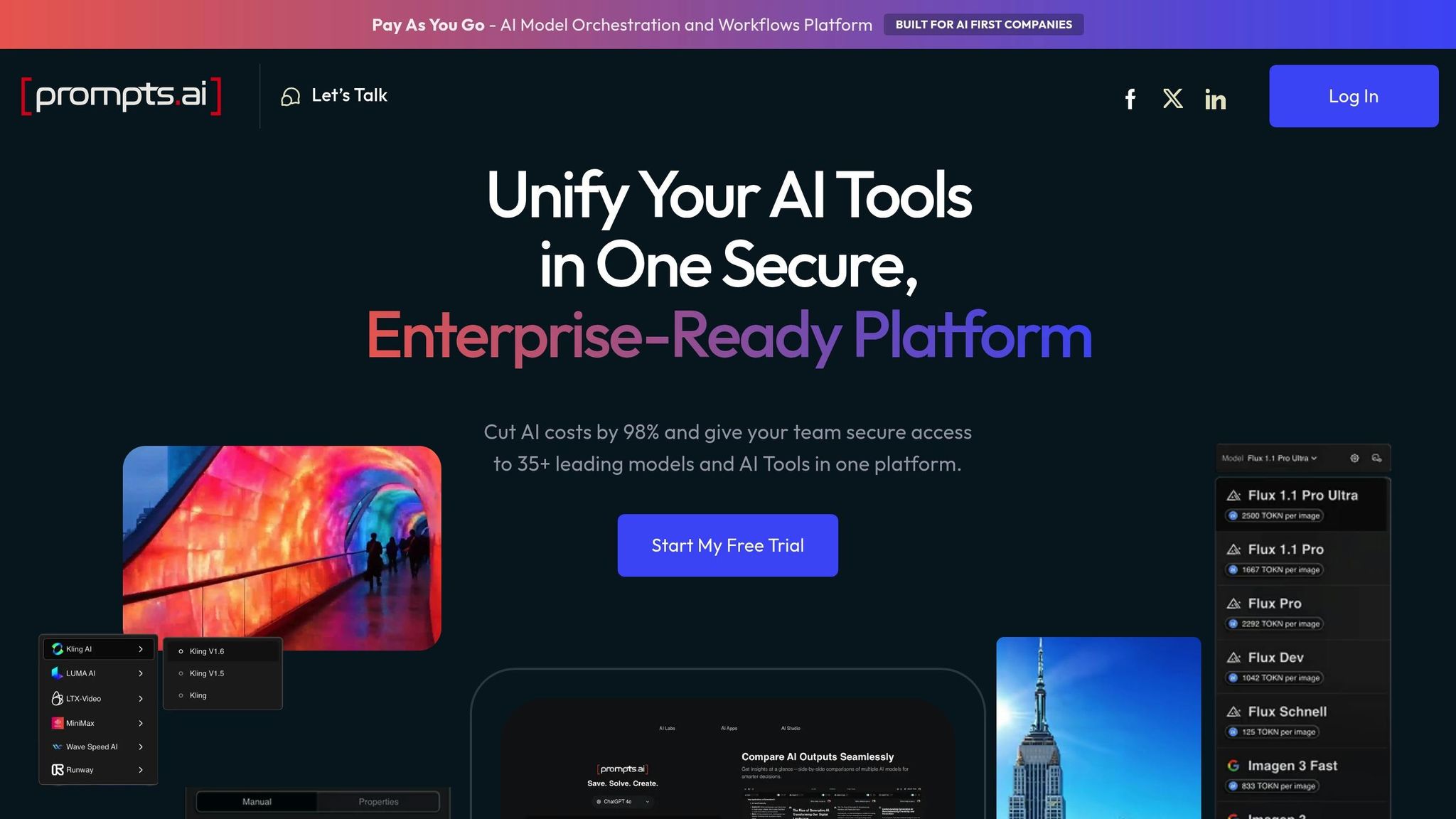
Prompts.ai is an AI orchestration platform that brings together 35 large language models - including GPT-5, Claude, LLaMA, and Gemini - into a single, secure interface. Developed by Emmy Award-winning Steven P. Simmons, the platform simplifies AI management by centralizing tools, reducing software costs by up to 98%, and streamlining both workflows and cost controls. This approach eliminates the challenges of juggling multiple AI tools while providing complete visibility into all AI-driven interactions. Below, we’ll explore its key features, integration capabilities, scalability, and pricing.
Prompts.ai turns scattered AI experiments into structured, repeatable processes. It offers tools for prompt engineering, custom libraries, and workflow automation, delivering results that are 75% faster and of higher quality. For instance, a marketing agency used the platform to automate personalized email campaigns, cutting production time by 60% while increasing engagement rates. Similarly, a sales team leveraged it for lead qualification prompts, speeding up their bidding process dramatically. These features ensure smooth integration into existing workflows and improved efficiency.
The platform seamlessly connects with tools like Zapier, OpenAI APIs, and Google Workspace, allowing businesses to integrate it with their existing CRMs, document processors, and other enterprise tools. Setting it up is simple: sign up, import prompt templates, and use APIs or Zapier to integrate workflows instantly. This flexibility ensures businesses can quickly adapt the platform to their needs.
Prompts.ai is designed to grow with its users, whether they’re small teams or Fortune 500 companies. With tiered plans and collaborative prompt-sharing options, the platform keeps costs manageable while offering a built-in FinOps layer for transparency. It supports unlimited users and enterprise-level API rate limits, making it suitable for both small teams and large organizations with high-volume processing needs. As routine tasks are automated, teams can focus more on strategic initiatives.
Prompts.ai provides a range of pricing options to fit different needs. There’s a freemium tier, a Creator plan at $29/month, business plans starting at $99/member/month, a Pro plan at $119/user/month, and an Elite plan at $129/user/month. Custom enterprise pricing is also available. The pay-as-you-go TOKN credit system aligns costs with usage, offering strong returns on investment. For example, users have reported resolving issues 87% faster compared to similar AI tools, highlighting its efficiency benefits.
Zapier simplifies inter-app automation, connecting nearly 8,000 apps into one cohesive system to boost business productivity. By enabling seamless workflows, Zapier has powered over 350 million AI tasks and supports 3.4 million companies globally. Its "Zaps" - automated workflows based on a trigger-and-action model - allow users to move data and tasks across apps without needing coding skills.
Zapier's AI by Zapier integration brings AI capabilities directly into workflows for tasks like summarizing content, extracting data, and generating text - no additional API keys required. The platform also includes Zapier Agents, which act as AI-powered teammates trained on company data to handle complex tasks autonomously. For customer interactions, Zapier Chatbots can be tailored to specific knowledge sources, such as websites or data tables.
The Model Context Protocol (MCP) allows external AI tools like ChatGPT and Claude to execute over 30,000 actions within Zapier's ecosystem. Additionally, Zapier Copilot uses natural language prompts to help users create and troubleshoot workflows, while Zapier Canvas provides AI-driven visual diagrams for process mapping.
Real-world results highlight Zapier's impact. Vendasta's Jacob Sirrs automated processes that saved 282 days of manual work annually and recovered $1 million in potential revenue. Similarly, ActiveCampaign achieved a 440% boost in webinar attendance and reduced early churn by 15% using an AI-driven onboarding system powered by Zapier.
Zapier's extensive integration network includes nearly 500 AI-specific integrations and works with tools like Slack, Salesforce, Google Drive, Notion, and Microsoft Teams. For apps without native integrations, Zapier offers Webhooks for API connections and Code by Zapier steps for custom Python or JavaScript functions. The platform ensures reliability with 99.99% uptime and meets compliance standards such as SOC 2 (Type II), SOC 3, GDPR, and CCPA.
Additional features like Zapier Tables provide automation-friendly databases that don't count toward task limits, while Zapier Interfaces enable teams to create custom forms that trigger workflows instantly. These capabilities make Zapier adaptable for businesses of all sizes and needs.
Zapier caters to everyone from small startups to Fortune 500 companies. Its no-code tools are ideal for small teams, while enterprise-grade features like SAML-based SSO, SCIM provisioning, and role-based permissions ensure robust security and governance for larger organizations. Toyota of Orlando's Spencer Siviglia shared how Zapier Agents streamlined the management of over 30,000 lead records, saving the team 20 hours weekly:
"With Agents, I'm getting insights I didn't even know to look for. They flag when something's off, answer questions in plain language, and save me hours every week."
Zapier offers a free plan to help users get started, with Zapier Tables included in every tier. Actions performed within Tables don't count against task usage limits. Select AI models, such as GPT-4o mini and Gemini 2.0 Flash, are accessible at no cost through the AI by Zapier tool. A 14-day trial is available for premium features, while enterprise plans provide enhanced security and advanced administrative controls. For example, Popl saved $20,000 annually by using Zapier to manage daily form submissions and filter spam with OpenAI integrations.
Make provides a visual-first approach to automation, allowing teams to design workflows as interactive flowcharts instead of traditional linear sequences. With over 3,000 integrations and 30,000 actions, it supports more than 350,000 customers globally. Its drag-and-drop scenario builder offers real-time insights into data flow, making debugging and process adjustments easier. Below, we explore Make’s key features, integration options, scalability, and pricing.
Make’s Visual Workflow Builder and Make Grid simplify automation by enabling branching logic, conditional paths, and auto-generated maps of workflows. These tools make it easier to track dependencies and resolve issues quickly. The platform’s AI Agents, introduced in April 2025, set goals and make decisions autonomously, going beyond static rules. Additionally, the AI Content Extractor processes structured data from PDFs, images, and audio files (up to 500MB) without relying on third-party OCR tools.
For example, ChargeGuru uses Make Grid to manage over 500 scenarios, reducing debugging time by 60%. Similarly, Wemolo achieved a sevenfold improvement in project management efficiency by automating internal processes through Make’s visual tools.
Make offers seamless integration with AI platforms like OpenAI, Anthropic, Google Gemini, and Perplexity AI. For tools not included in its library, the HTTP/Webhook module enables connections to any public API or external service. Its cloud-hosted Model Context Protocol (MCP) server ensures users can access and manage automation scenarios from any AI interface without handling infrastructure. This broad compatibility boosts workflow continuity, a critical need for today’s businesses. Notably, the platform saw a fourfold increase in AI usage throughout 2024, highlighting its growing role in AI-powered workflows.
Whether for freelancers or large enterprises, Make is built to adapt to varying business needs. It supports workflows with over 100 steps and offers enterprise-level security, including SSO, SOC 2 Type II compliance, and ISO 27001 standards. Its tiered plans cater to different team sizes and complexity levels. Andreas Stryz, CTO & Co-founder at FINN, emphasized how Make scales across organizations:
"True citizen development in the entire company. Make is present in every department, empowering the company to offer a unique customer experience."
Make’s pricing structure includes options for all types of users:
Since August 27, 2025, AI modules consume credits based on the complexity of tasks, ensuring flexibility for diverse automation needs.
n8n combines visual workflow design with coding capabilities, offering a versatile tool for streamlining complex business processes. This open-source automation platform bridges the gap between drag-and-drop simplicity and the flexibility of coding in JavaScript or Python. With over 172,700 GitHub stars and a community of 200,000 members, n8n is ideal for businesses tackling advanced data transformations or custom API integrations.
n8n's visual drag-and-drop builder includes more than 400 pre-configured nodes, making it easy to create workflows. For scenarios requiring more customization, teams can add custom code nodes or use the HTTP Request node to connect with any REST API by pasting cURL commands. The platform also features built-in AI nodes for LangChain, enabling users to create multi-step AI agents, summarize documents, or build RAG (Retrieval-Augmented Generation) chatbots - all without external tools.
A key feature is data replay, which allows users to re-run specific workflow steps or test with mock data without affecting external systems. This significantly reduces debugging time. Nathaniel Gates, CEO of SanctifAI, highlighted the platform's efficiency, stating that n8n enabled workflows to be built 3X faster than coding Python controls for LangChain, with their first workflow operational in just two hours. This adaptability speeds up development and integrates seamlessly with external AI systems.
n8n excels in connecting external AI systems, allowing workflows to interact with other agents or even act as a server for them. The platform's Git-based source control supports version management across development, staging, and production environments. It handles up to 220 workflow executions per second on a single instance, with horizontal scaling available through Queue mode for high-demand operations.
StepStone’s Marketplace Tech Lead, Luka Pilic, shared how n8n transformed their workflow efficiency:
"We've sped up our integration of marketplace data sources by 25X. It takes me 2 hours max to connect up APIs and transform the data we need. You can't do this that fast in code."
This ability to integrate quickly and efficiently ensures n8n can keep up with growing business needs.
n8n offers flexibility in deployment, with both cloud-hosted and self-hosted options available through Docker or Kubernetes. Businesses can maintain full control over data residency. Enterprise features include SOC 2 compliance, role-based access control (RBAC), and encrypted secret management via AWS, Azure, Google Cloud, or HashiCorp Vault. Dennis Zahrt, Director of Global IT Service Delivery at Delivery Hero, reported saving 200 hours per month by using a single n8n workflow for user management.
n8n uses an execution-based pricing model, charging per workflow run rather than per step, which is budget-friendly for complex automations. The self-hosted community version is free for users managing their own infrastructure. Cloud plans begin at $20/month (billed annually) for 2,500 workflow executions with unlimited steps. Enterprise pricing is tailored to include advanced features like SSO (SAML/LDAP), log streaming, and enhanced RBAC. With a 4.9/5 star rating on G2, users frequently commend its balance of functionality and ease of use.
Gumloop helps non-technical teams create automations effortlessly through its drag-and-drop interface and AI assistant, Gummie. By embedding Gummie, the platform transforms natural language into actionable workflows, making even complex automations approachable. It simplifies access to premium AI models like OpenAI, Claude, and Gemini under a single subscription, removing the hassle of managing multiple API keys. With over 125 native integrations and its proprietary MCP server, Gumloop connects to more than 2,800 APIs, making it easier for non-technical users to integrate tools like Salesforce, HubSpot, Slack, and Gmail into their workflows.
Gumloop’s visual no-code builder allows users to connect app nodes, data, or AI models to create workflows. The AI assistant, Gummie, can brainstorm, design, and build automations based on natural language input. The platform separates workflows into "Flows" (structured, scheduled automations) and "Agents" (AI-driven assistants capable of handling open-ended tasks). Its AI Router enhances decision-making by dynamically selecting the best next steps.
For advanced workflows, users can organize processes into reusable subflows. The Resume button lets users skip directly to specific nodes during testing, saving time and credits. Instacart’s legal team, for instance, reduced their manual paperwork and email sorting by 80% using Gumloop. CEO Fidji Simo shared:
"Gumloop has been critical in helping all teams at Instacart - including those without technical skills - adopt AI and automate their workflows, which has greatly improved our operational efficiency."
These features integrate effortlessly with existing business tools.
Gumloop’s strength lies in its flexibility. Along with 125 native nodes, users can create custom nodes, use webhooks, or leverage a REST API for programmatic triggers. Its MCP server expands compatibility to over 10,000 tools. The platform’s model-agnostic design allows users to route requests across various LLMs or connect their own API keys via AI Proxy support. Bryant Chou, Co-Founder of Webflow, highlighted its impact:
"Gumloop wins time back across an org. It puts the tools into the hands of people who understand a task and lets them completely automate it away."
Gumloop supports users ranging from individuals to large enterprises with scalable infrastructure. Features like auto-scaling compute and parallelized execution let businesses handle growing demands. Large organizations can manage users centrally with the "Organizations" feature, which pools credits for teams under the same domain (e.g., @company.com). Meanwhile, "Workspaces" enable collaboration across departments like Sales, Operations, and Marketing. Enterprise-level features include SOC 2 and GDPR compliance, SSO/SAML/SCIM integration, audit logging, and VPC deployment options for enhanced data security.
Gumloop offers a Free plan with 2,000 credits per month. The Solo plan costs $37/month, providing 10,000+ credits, unlimited triggers, and webhooks. The Team plan is priced at $244/month, offering 60,000+ credits and 10 seats. For larger organizations, Enterprise pricing is tailored to include advanced security, admin controls, and premium 1-on-1 support. With a 4.9/5 star rating on G2, users frequently commend its all-in-one subscription model, which simplifies access to premium LLMs without the need for separate API management.
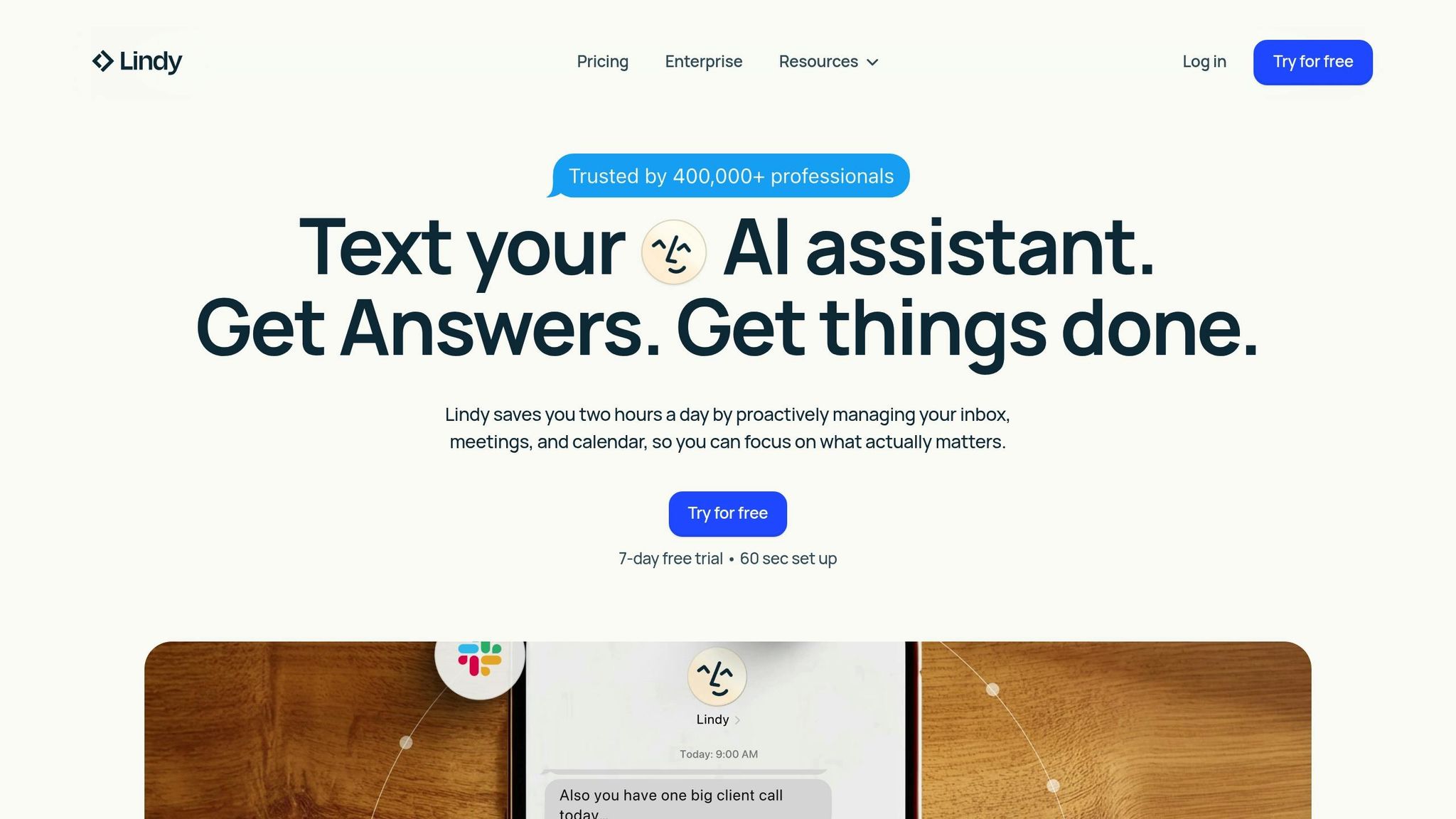
Lindy.ai introduces autonomous AI agents designed to enhance business workflows by going beyond traditional rule-based automation. These agents leverage large language models to understand context, process natural language, and make decisions without constant human supervision. Unlike older automation systems that falter when conditions change, Lindy’s agents handle unstructured data and adapt to edge cases while retaining memory across tasks and conversations. One user shared an impressive 400% productivity boost within 30 days, achieved by automating time-consuming administrative tasks.
Lindy.ai empowers users with a no-code visual builder, allowing non-technical individuals to create agents using simple English prompts. This approach, called "vibe coding", enables users to activate agents with natural language inputs. The platform also supports multi-agent coordination, enabling specialized agents to work together - for instance, one agent can research leads, another can draft emails, and a third can update the CRM. The Autopilot feature provides agents with dedicated cloud instances, enabling them to interact with tools and websites that lack APIs, such as sending LinkedIn messages or navigating specialized portals. For critical actions, the human-in-the-loop feature allows manual approval checkpoints. Highlighting its transformative capabilities, CEO Amelia Kao stated:
"Lindy was the first to turn raw conversations into structured, actionable CRM data."
Additionally, Lindy.ai includes AI voice capabilities for real-time inbound and outbound phone calls, supporting 30+ languages and functioning without human input.
Lindy.ai integrates seamlessly with over 7,000 tools across 1,600+ apps through native connectors and partnerships with platforms like Pipedream and Apify. Popular tools such as Gmail, Slack, HubSpot, Salesforce, Notion, and Google Calendar are fully supported. For tools without APIs, the Autopilot feature enables agents to operate like a human, controlling browsers to complete tasks. The platform also supports webhooks and APIs for custom integrations. By maintaining context as data flows between systems, Lindy ensures smooth transitions across apps. Considering that knowledge workers spend around 40% of their time on repetitive tasks, Lindy focuses on reclaiming that time by integrating with tools businesses already rely on.
Lindy.ai’s infrastructure caters to a wide range of users, from solo entrepreneurs to large enterprises. Startups can use the platform to automate tasks typically handled by virtual assistants, while enterprises benefit from features like SSO, SCIM provisioning, audit logs, and centralized governance. In November 2025, Lindy launched its Enterprise offering, which includes security measures compliant with SOC 2 Type II, GDPR, HIPAA, and PIPEDA standards. With over 400,000 professionals already using Lindy, the platform also offers 100+ pre-built templates to streamline adoption across various departments.
Lindy.ai offers flexible pricing plans to meet different needs:
Lindy’s flexible plans ensure businesses of all sizes can find a solution that fits their needs.
Workato is a robust integration and automation platform tailored for enterprise needs, connecting AI agents with various business tools through its Enterprise Model Context Protocol (MCP). It supports everything from straightforward integrations to intricate AI-driven workflows that demand precision and context across multiple systems. With over 1,200 pre-built connectors and recipes, Workato bridges modern cloud tools like Salesforce and Workday with legacy systems such as SAP and mainframes. Its aim is to simplify complex workflows and improve operational efficiency.
Workato offers a suite of standout features:
The platform also guarantees 99.9% uptime, ensuring it meets the reliability needs of mission-critical operations.
Workato's 1,200+ connectors include support for HTTP, OpenAPI, GraphQL, SOAP, and file-based formats like CSV, JSON, and XML. These connectors ensure that AI agents maintain proper task context across different systems. Its Model Context Protocol allows seamless interaction between AI agents and enterprise tools, preserving the accuracy required for complex tasks.
The platform also integrates with data warehouses like Snowflake and Redshift without duplicating data. Additionally, it can process unstructured data, such as contracts and invoices, making it versatile for various business needs. Notably, 44% of automated processes are created by non-IT teams, showcasing its accessibility and ease of use for business users.
Workato’s serverless cloud architecture is designed to scale effortlessly, accommodating businesses of all sizes - from startups to 50% of the Fortune 500. Its architecture adapts to surges in demand and supports global expansion, all while maintaining top-tier security standards, including SOC 2 Type II, ISO 27001, and GDPR compliance.
The platform has delivered impressive results for its clients:
Workato’s consistent performance has earned it recognition as a Leader in the 2025 Gartner® Magic Quadrant™ for iPaaS for the seventh year in a row.
Workato’s pricing model is designed to deliver strong returns on investment. Users report 53% lower operational costs compared to traditional solutions, along with development speeds up to 6X faster. Additionally, the platform boasts high customer satisfaction, with a 4.9/5 rating for product capabilities and a perfect 5/5 rating for deployment and support on Gartner Peer Insights. Pricing is tailored to each business’s specific needs, ensuring flexibility and value for organizations of all sizes.
Vellum AI is designed to help businesses transition AI projects from pilot stages to full-scale production. With 95% of generative AI pilots failing due to infrastructure or collaboration challenges, Vellum bridges these gaps. It combines a visual workflow builder with natural language prompts, allowing teams to describe their needs in plain English while the platform generates the corresponding AI workflows. This efficient process significantly improves deployment success rates.
Vellum AI offers a range of tools to simplify and enhance AI development:
Jordan Nemrow, Co-Founder & CTO of Woflow, shared his experience with Vellum AI:
"We sped up AI development by 50 percent and decoupled updates from releases with Vellum. This allowed us to fix errors instantly without worrying about infrastructure uptime or costs."
These features, combined with integration and scalability options, make Vellum a strong choice for businesses.
Vellum AI ensures smooth integration with existing systems, addressing the common challenges in moving from pilot to production. It supports Python and Node.js SDKs, enabling developers to invoke workflows via API and stream results into other applications. Its provider-agnostic design allows businesses to mix models from OpenAI, Anthropic, and Google within a single workflow. Custom nodes can be created using Python, TypeScript, or Docker images, offering flexibility for specialized business logic. Additionally, teams can link execution IDs to tools like Jira or Linear, simplifying debugging and tracking of AI decisions.
Vellum AI is built to support users ranging from individuals to large enterprises with its four-tier model. For example:
| Plan | Monthly Price | Credits | Concurrent Runs | Data Retention | Key Features |
|---|---|---|---|---|---|
| Free | $0 | 30 | 1 | 30 days | Basic workflows |
| Pro | $25 | 100 | 4 | 90 days | Multiple environments |
| Business | $50 | 100 | 12 | 1 year | Multiple workspaces, 5 users |
| Enterprise | Custom | Custom | Custom | Custom | VPC/on-prem, SSO, dedicated support |
Vellum AI offers a flexible pricing structure tailored to different needs. The free tier provides 30 credits per month, ideal for basic workflows. Paid plans start at $25/month for the Pro tier, which includes 100 credits and four concurrent workflow runs. The Business plan, priced at $50/month, adds features like multiple workspaces and extended data retention. For larger enterprises, custom pricing is available, offering tailored credit bundles, dedicated support, and deployment options such as VPC or on-prem solutions.
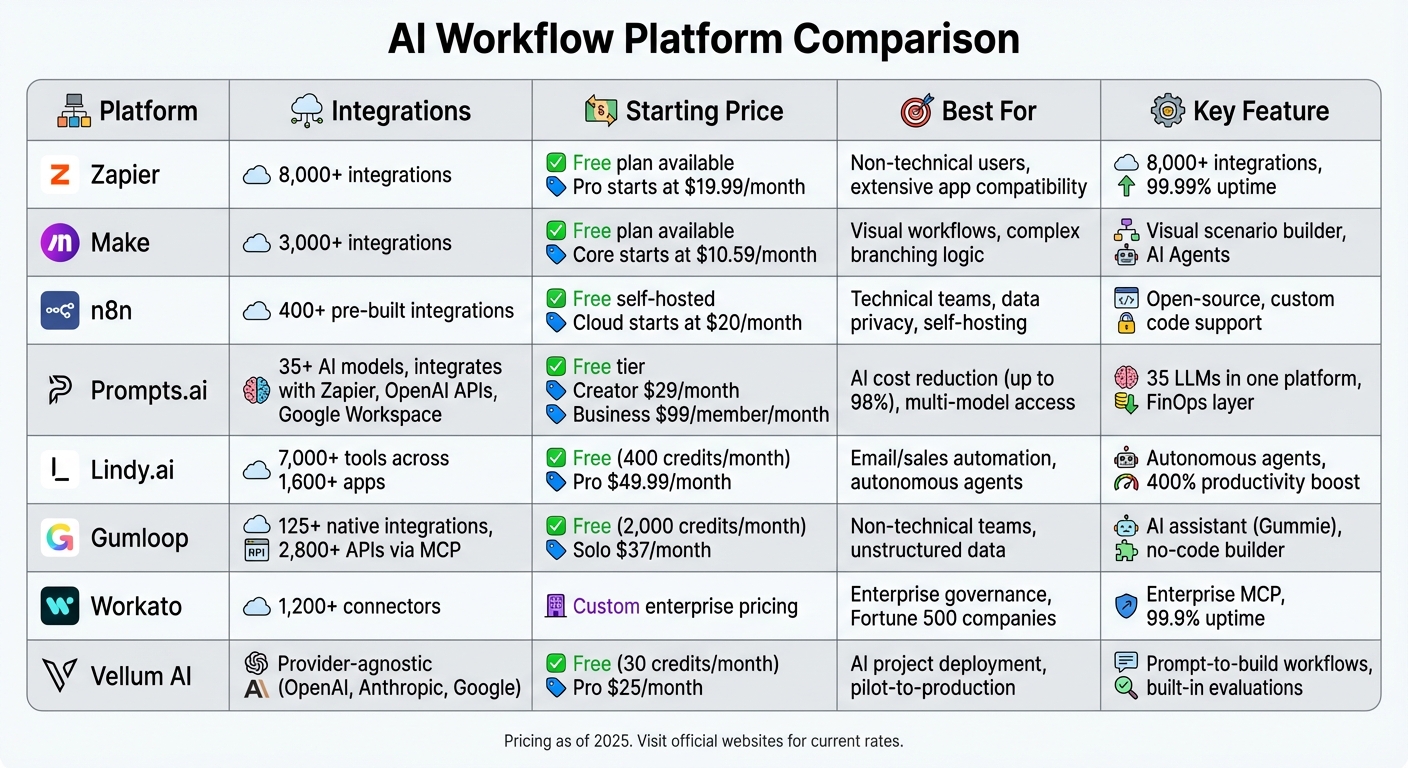
AI Workflow Platform Comparison: Features, Integrations, and Pricing
Choosing the right platform depends on your technical expertise, budget, and integration needs. Here’s a quick breakdown of platform features, integration capabilities, and pricing to help guide your decision.
Zapier stands out with over 8,000 integrations - more than twice as many as its nearest competitors. It’s ideal for teams seeking quick setup and extensive app compatibility. The Pro plan begins at $19.99/month, making it accessible for non-technical users.
Make offers a robust visual scenario editor, perfect for managing complex workflows with branching logic and advanced data transformation. Pricing starts at just $9/month, offering great value for those needing more intricate automation.
For teams focused on data privacy and technical control, n8n provides a free self-hosted option alongside cloud plans starting at $20/month. It includes over 400 pre-built integrations, catering to users who prefer more control over their automation.
Prompts.ai consolidates multiple large language models into one platform, integrating built-in FinOps tools to cut AI costs by up to 98%. It offers a flexible $0/month pay-as-you-go option for exploration, with the Creator plan at $29/month and the Core plan at $99 per member/month.
Lindy.ai specializes in email and sales task automation, offering over 4,000 integrations at $39.99/month. Meanwhile, Gumloop focuses on unstructured data processing with 100+ integrations, priced at $30/month.
For enterprise teams needing strong governance and cross-departmental automation, Workato provides 1,200+ integrations with custom pricing. Its focus on reliability and compliance makes it an excellent choice for larger organizations.
Market trends show a significant rise in spending on AI-native applications, with organizations averaging $400,000 annually by 2025, a 75.2% year-over-year increase. While consumption-based pricing has become the norm, 65% of IT leaders report unexpected costs. This highlights the importance of platforms offering transparent pricing and cost management tools, especially for budget-conscious teams navigating AI adoption.
Each platform offers unique strengths, whether it’s streamlining workflows, enhancing data management, or cutting costs. By aligning platform features with your business priorities, you can maximize efficiency and achieve meaningful results.
AI-powered workflow platforms have become a key part of streamlining business operations. The tools discussed here tackle real-world challenges, such as reducing manual data entry, speeding up response times, and managing support tasks more effectively. Many businesses have reported noticeable increases in productivity and significant time savings after adopting these solutions.
To make the most of these tools, it's essential to choose a platform that aligns with your specific needs. For teams handling repetitive tasks requiring context and reasoning - like sorting support tickets or directing leads - it’s a good idea to first evaluate where the most time is being spent on tedious processes. Research shows that teams with well-defined guidelines are six times more likely to succeed with AI, so establishing clear processes is a critical step before a full-scale rollout.
Keep in mind that 40% of initial automation efforts fail due to insufficient planning. Start small by focusing on a single, high-friction process. This allows you to identify potential challenges early, test with real-world inputs to uncover edge cases, and calculate the total cost of ownership. Beyond subscription fees, factor in setup time, training, and any additional costs that may arise as usage grows. A thoughtful approach like this sets the stage for a successful automation journey.
The shift from rigid, rule-based systems to AI-driven tools capable of reasoning is reshaping how businesses operate. With 80% of organizations already using intelligent automation and adoption rates climbing 35% annually, the focus is no longer on whether to implement these tools but on selecting the right ones. Consider your team’s technical capabilities, budget, and integration needs. Prioritize platforms that seamlessly work with your existing technology, offer clear pricing, and provide robust cost management features. As highlighted earlier, choosing a platform with these qualities will help ensure long-term success and scalability.
Automate routine, time-consuming tasks that are prone to errors to free up resources and improve efficiency. For instance, tasks like invoice processing, expense approvals, email categorization, lead evaluation, and scheduling payments are perfect candidates for automation. Similarly, workflows such as document processing, data reconciliation, and report generation can benefit from automation, enhancing both speed and accuracy. Focusing on these high-volume, low-complexity tasks not only delivers immediate productivity improvements but also sets the stage for adopting more advanced AI-driven automation solutions.
To reduce security and compliance risks, start by defining clear usage policies that guide employees on managing sensitive data responsibly. Opt for enterprise-level AI tools equipped with features like role-based access controls, audit logs, and data governance mechanisms to maintain robust oversight. Strengthen your defenses with technical safeguards such as trusted execution environments, and actively monitor AI integrations to identify and address any vulnerabilities. Regular security training for employees is essential to ensure adherence to best practices, minimizing risks associated with AI automation.
To get a clear picture of AI automation costs, it’s important to look beyond subscription fees. Additional expenses like integration, data preparation, workflow redesign, and ongoing maintenance can add 15–30% or more to your total costs. For larger projects, these costs can range from $10,000 to $200,000 per year. Accounting for these factors upfront will help you plan your budget more effectively and avoid surprises down the line.