Pay As You Go - AI Model Orchestration and Workflows Platform


AI prompt management is no longer optional for enterprises. Whether you're scaling AI workflows, controlling costs, or ensuring compliance, the right tools for testing and versioning prompts are essential. Poorly managed prompts can lead to inconsistent performance and skyrocketing expenses. This guide highlights seven platforms that simplify prompt testing, versioning, and governance, helping U.S. businesses achieve reliable, efficient, and compliant AI operations.
Let’s explore how these platforms can transform your AI workflows.
When selecting a platform for prompt testing and versioning, it’s essential to evaluate both technical capabilities and operational fit. The goal isn’t just to find a feature-rich tool but one that integrates smoothly with your existing systems while meeting the demands of U.S. business operations.
Model compatibility is a key factor. The platform should support multiple large language model providers, allowing you to test prompts across different models without rewriting code. Systems that enable side-by-side comparisons of the same prompt across models can save valuable development time and help identify the model that delivers the best results for your specific use case.
Version control capabilities are indispensable for managing prompt iterations. A robust platform keeps a detailed history of changes, including who made updates, when they occurred (MM/DD/YYYY), and the reasons behind them. This functionality not only aids in rolling back to previous versions but also provides the documentation often required for compliance reviews.
Testing methodologies set advanced platforms apart. Features like A/B testing allow you to compare multiple prompt versions against real user queries or benchmark datasets. Automated regression testing ensures new iterations are evaluated against historical test cases, while human review workflows help address edge cases or sensitive content before deployment.
Cost tracking and token management are crucial for managing budgets. The platform should monitor token usage, display costs in USD, and let you set spending limits. Alerts for approaching budget thresholds help prevent unexpected expenses and identify prompts that consume excessive tokens.
Compliance and security features are non-negotiable for U.S. enterprises, especially in regulated industries. As Alphabin noted in 2025, compliance-focused testing - covering SOC 2, GDPR, and HIPAA standards - has become essential in sectors like fintech, healthcare, and SaaS, where unsafe or biased AI outputs can lead to serious financial and reputational damage. A strong platform should offer access controls, detailed audit logs, and documentation to meet regulatory needs. For example, Alphabin’s case study on GDPR-compliant healthcare applications illustrates how prompt testing can ensure legal adherence and provide auditable evidence.
Integration capabilities determine how well the platform fits into your tech stack. Look for options that provide REST APIs, SDKs in common programming languages, and webhooks for triggering actions based on test results. The ability to export data in standard formats and integrate with CI/CD pipelines can make prompt testing a seamless part of your deployment process.
Performance analytics should go beyond basic success rates, offering insights like latency, token efficiency, semantic similarity scores, and user satisfaction ratings. The ability to filter results by date, model type, or prompt version, combined with exportable reports, ensures you can communicate performance metrics effectively to both technical and nontechnical stakeholders.
Collaboration tools are essential for teams working on prompt engineering. Features like commenting, change requests, and approval workflows reduce conflicts and ensure proper review before deployment. Support for separate development, staging, and production environments allows teams to experiment without risking live systems.
For U.S. businesses, localization details matter. Reports and dashboards should align with familiar conventions, such as using a 12-hour format with AM/PM, commas as thousand separators (e.g., 1,000), and currency formatted as $X,XXX.XX.

Prompts.ai is a versatile platform designed to test, version, and deploy prompts across more than 35 leading models - including GPT-5, Claude, LLaMA, and Gemini - all within a secure, unified dashboard. By bringing essential tools into one place, it streamlines AI workflows and tackles common challenges like reliability, cost management, and compliance.
Prompts.ai addresses interoperability issues by enabling simultaneous testing across multiple models through a single interface. Instead of juggling various vendor platforms with separate APIs, billing systems, and interfaces, users gain centralized access to all models in one dashboard.
A standout feature is the ability to compare outputs side by side. For instance, you can test the same prompt across GPT-5, Claude, and LLaMA simultaneously, making it easier to determine which model delivers the most accurate, relevant, or cost-efficient results for your needs. This eliminates the hassle of manually copying prompts between platforms, tracking results in spreadsheets, or writing custom code for multi-model testing.
Beyond text generation, the platform also supports tools for creating images and animations. This flexibility is especially useful for teams working on projects that require both written content and visuals, such as marketing campaigns that combine ad copy with graphics.
Interoperable workflows are built into every business plan. Users can create sequences that automatically test prompts across multiple models, collect performance data, and log results - all without manual effort.
Prompts.ai treats prompts like code, applying software development principles to manage them effectively. Each change creates a new version with a complete audit trail, documenting who made the change, when it occurred (MM/DD/YYYY), and what was modified. This is particularly valuable for compliance teams that need to trace AI outputs back to specific prompt versions.
The platform retains a full history of prompt iterations, allowing teams to easily revert to earlier versions if new changes cause unexpected issues. It also captures the reasoning behind modifications, helping teams understand not just what was altered but why. This level of documentation is especially helpful when onboarding new team members or analyzing performance across different departments.
Separate version histories are maintained for development, staging, and production environments, ensuring a clear and organized workflow.
Testing prompts at scale requires more than a few manual checks, and Prompts.ai delivers with structured evaluation tools that generate measurable metrics. These tools allow users to objectively compare prompt performance and track improvements over time.
The platform supports automated testing against benchmark datasets, making it possible to evaluate prompts across hundreds or thousands of test cases. This is particularly useful for regression testing, where you can ensure that updates intended to improve one area don’t negatively affect another. Test suites can automatically run whenever a prompt is updated, flagging any significant changes in accuracy, relevance, or other key metrics before deployment.
Performance metrics go beyond pass/fail results. The platform tracks details like latency (response time for each model), token efficiency (number of tokens used per query), and semantic similarity scores (how closely outputs align with expected results).
For prompts requiring human judgment - such as those generating customer-facing content or handling sensitive topics - the platform includes workflows for human review. Specific test cases can be routed to reviewers for feedback, combining qualitative insights with automated metrics.
These testing metrics integrate seamlessly with the platform’s broader tools, ensuring a cohesive workflow.
Prompts.ai integrates with the tools U.S. engineering teams already rely on, using REST APIs and SDKs to connect with CI/CD pipelines. This makes prompt testing a standard part of the deployment process.
Cost tracking is built into the platform through its FinOps layer, which monitors token usage in real time and displays costs in USD. Users can set spending limits at the team, project, or individual prompt level, with alerts to prevent overspending. By eliminating redundant tools and optimizing model selection based on performance and cost data, companies can reduce AI expenses by up to 98%.
For collaboration, the platform offers features like commenting, change requests, and approval workflows, mirroring familiar code review processes. A prompt engineer can propose updates, tag stakeholders for review, and secure approval from a product manager or compliance officer before changes are implemented.
The platform’s Pay-As-You-Go TOKN credits system aligns costs with actual usage, avoiding fixed monthly subscriptions. Pricing starts at $99 per member per month for the Core tier, $119 for Pro, and $129 for Elite, all of which include interoperable workflows and access to the full model library.
To help teams get started, Prompts.ai provides enterprise training and onboarding support. This includes hands-on sessions and a Prompt Engineer Certification program, equipping organizations with internal experts who can drive adoption and best practices.
For enterprises concerned about data security, the platform offers enterprise-grade governance controls and detailed audit trails, ensuring sensitive data stays protected. These features are particularly critical for industries like healthcare and finance, where compliance is non-negotiable.
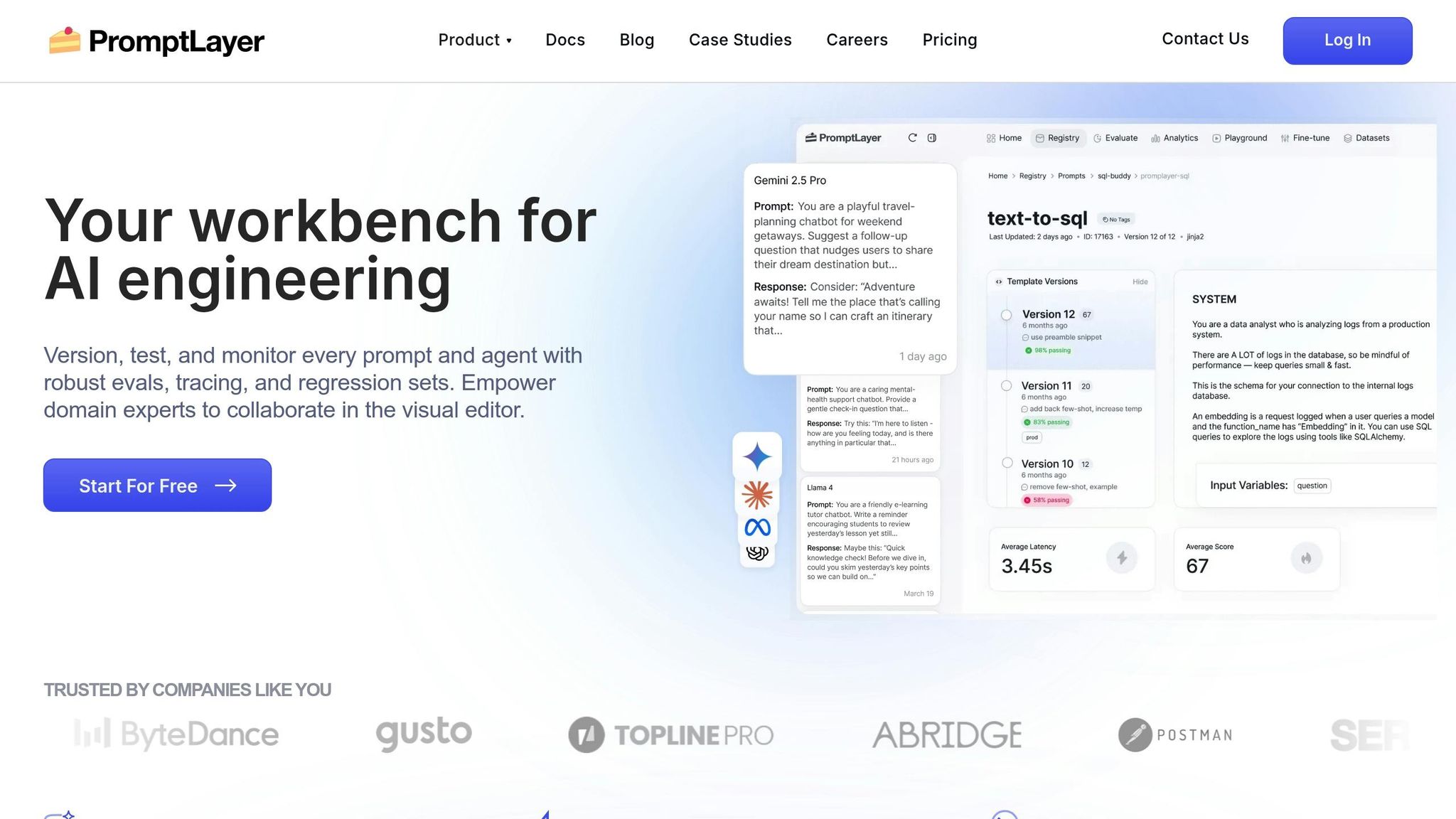
PromptLayer serves as a logging and observability tool that records every interaction between your application and language models. By integrating PromptLayer, development teams can automatically log prompts, responses, and metadata for later analysis. This allows teams to monitor how prompts perform in real-world settings and pinpoint areas for improvement.
PromptLayer provides a registry where teams can store and manage multiple versions of their prompts. Each prompt is assigned a unique identifier, making it easy to reference specific versions without embedding them directly into your code. This separation lets you update prompts without redeploying your application.
The platform keeps a detailed history of changes, tracking who modified a prompt and when. Teams can compare versions side by side to see how updates impact output quality. If a new version introduces problems, rolling back to an earlier version is as simple as updating the reference in your application.
Version control also applies to prompt templates with variables. For instance, a customer support prompt might include placeholders for the customer’s name, issue type, or conversation history. PromptLayer stores these templates and tracks changes, ensuring consistency while allowing for controlled experimentation.
PromptLayer offers tools to evaluate prompt performance using both automated metrics and human feedback. Logged requests from production can be tagged for review, creating a dataset of real-world examples. These examples help refine prompts based on actual usage patterns.
The platform supports A/B testing, enabling teams to run multiple prompt versions simultaneously and compare results. For example, you might test whether detailed instructions yield better outputs than simpler ones. PromptLayer tracks metrics like response time and token usage, helping you balance quality with cost efficiency.
For structured testing, PromptLayer integrates with frameworks that let you define expected behaviors and test prompts against specific cases. This is especially useful for regression testing, ensuring updates don’t disrupt existing functionality. Cost tracking is displayed in USD, making it easy to understand the financial impact of different prompt strategies.
These testing tools integrate seamlessly with your development pipeline, enabling smooth collaboration across teams.
PromptLayer simplifies integration with your existing workflows. Its Python and JavaScript SDKs wrap standard API calls to language models, requiring only a few lines of code to get started. This lightweight setup allows teams to begin logging interactions without overhauling their applications.
The platform integrates with popular development tools and CI/CD pipelines, making prompt testing a natural part of your deployment process. Automated workflows can test new prompt versions against historical data before they’re rolled out to production.
For collaboration, the web interface allows team members to review, comment on, and share logged interactions via quick links. Advanced filtering options - by date, model type, prompt version, or custom tags - make it easy to identify patterns. Product managers can review real user interactions without needing direct access to databases, while engineers can share specific cases for troubleshooting or iteration.
This functionality is particularly useful for analyzing edge cases or understanding how prompts perform across different user groups.
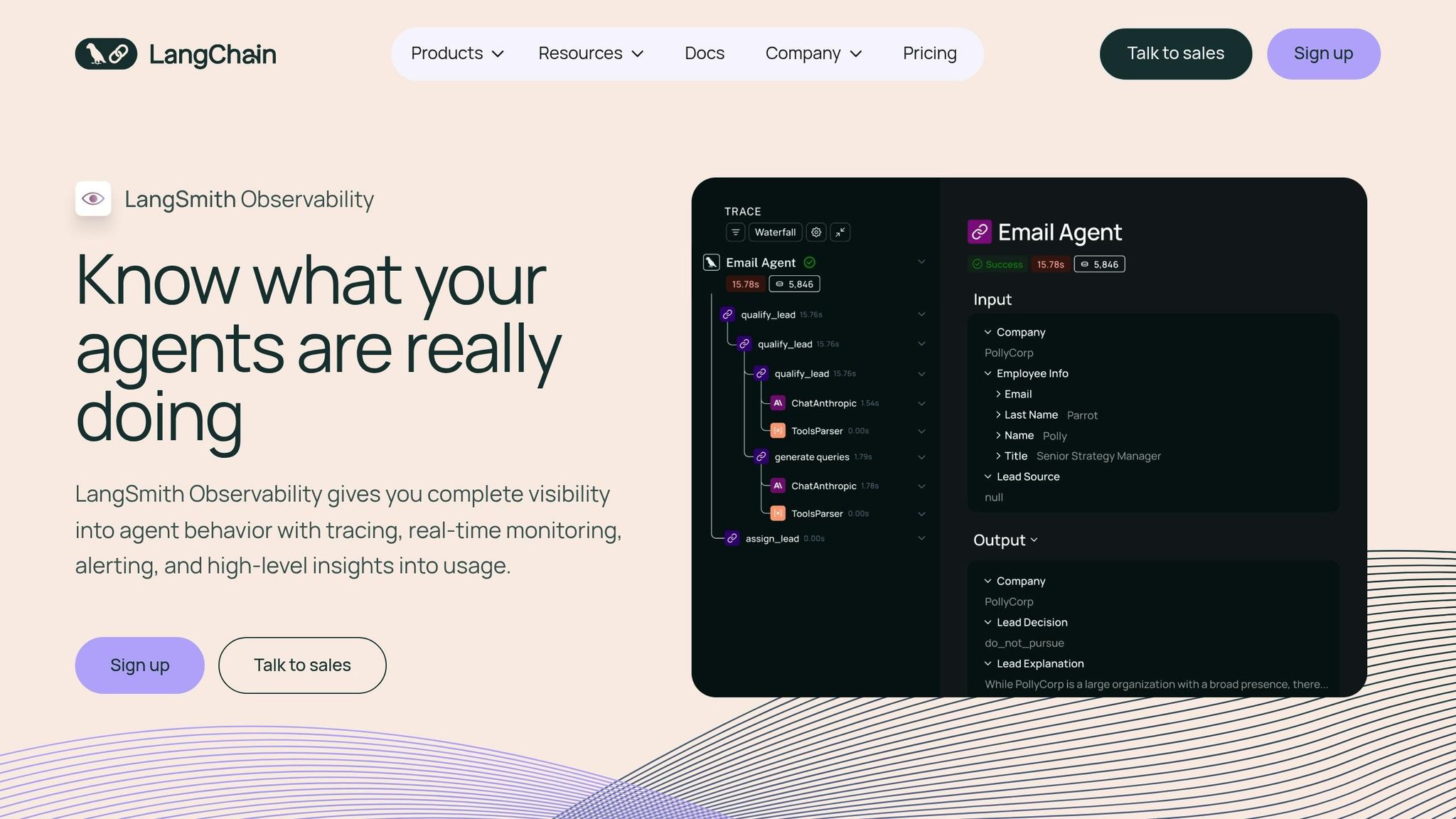
LangSmith is an observability platform designed on top of LangChain, offering built-in tools for prompt versioning, tracing, and debugging. With its seamless integration, LangChain users can access version tracking right out of the box, eliminating the need for additional setup. This creates a streamlined foundation for effective model interoperability.
LangSmith operates effortlessly within the LangChain ecosystem, enabling direct prompt loading from the LangSmith Hub into LangChain code with automatic version synchronization. This eliminates setup hassles for teams already using LangChain. However, teams working with alternative frameworks like LlamaIndex or Semantic Kernel will need to create custom integrations to benefit from LangSmith's version tracking capabilities.
LangSmith simplifies prompt management by automatically tracking changes and linking each version to execution logs as part of its tracing functionality. Through the Prompt Hub, teams can explore, fork, and reuse prompts from the community while maintaining a complete version history. Although the platform prioritizes observability, features like side-by-side comparisons and detailed change logs are less emphasized.
LangSmith combines prompt versioning with an evaluation framework that handles datasets and visualizes results. It traces not only final outputs but also intermediate steps, helping teams identify and address issues in prompts, inputs, or model behavior. The platform offers a free tier allowing up to 5,000 traces per month, while the Developer plan costs $39/month for 50,000 traces. Custom pricing options are available for Team or Enterprise plans. Note that staged deployments require manual configuration.
For LangChain users, LangSmith provides seamless integration with automatic synchronization of prompts and version tracking. Collaboration is supported through features like annotation queues and shared datasets via the Prompt Hub, which facilitates prompt discovery and reuse. However, real-time collaborative editing and detailed version comparisons are limited, and teams using frameworks outside of LangChain must implement their own integrations.

PromptFlow by Azure OpenAI is a dedicated enterprise tool within Azure, designed to simplify and optimize AI workflows driven by prompts. While public information on features like prompt versioning and testing is somewhat scarce, the platform is clearly tailored for teams already operating within the Microsoft Azure ecosystem. For a comprehensive breakdown of its capabilities, refer to Microsoft's official documentation. PromptFlow reflects the growing movement toward embedding prompt management tools within existing cloud infrastructures, aligning seamlessly with the more detailed solutions discussed later.
Weights & Biases has expanded its well-known machine learning experiment tracking platform into the realm of large language models (LLMs) with W&B Prompts. This new feature builds on its established tools for versioning and collaboration, now tailored to support workflows for prompt engineering and testing. For teams already working within the W&B ecosystem, this addition feels like a natural evolution, seamlessly integrating with their existing processes for traditional ML development.
At its core, the platform excels in unified workflow tracking. With W&B Prompts, you can manage prompt versions alongside model versions, training runs, hyperparameters, and evaluation metrics - all within a single interface. This comprehensive setup is particularly helpful when troubleshooting complex issues that arise from the interplay of prompts, model configurations, and data quality. Much like other top-tier platforms, W&B Prompts brings together versioning, evaluation, and collaboration into a cohesive system for managing prompts.
W&B Prompts supports a variety of LLM providers, ensuring flexibility without locking you into a single vendor. Its artifact tracking system goes beyond merely saving prompt text - it captures metadata such as hyperparameters, model selections, and related outputs, delivering a thorough record of each experiment.
The versioning system in W&B Prompts mirrors the platform's proven approach to experiment tracking. Every prompt iteration is logged with detailed metadata and contextual information. While this approach provides robust tracking capabilities, it does come with a learning curve. Users unfamiliar with W&B-specific terms like "runs", "artifacts", and "sweeps" may find the system less intuitive compared to platforms designed solely for prompt management.
Testing and evaluation are seamlessly integrated into the workspace. W&B Prompts allows you to compare prompt performance across versions, analyze outputs side-by-side, and monitor key metrics. The artifact tracking system saves not just the results but also the full context of each test, ensuring experiments are reproducible and changes can be clearly understood.
Collaboration is a strong focus of W&B Prompts. Shared workspaces enable team members to collaborate on projects, leave comments on specific prompt versions, and create reports summarizing experimental findings. Originally built for machine learning research, these tools translate effectively to LLM workflows, making teamwork more streamlined.
That said, there is a learning curve. Users new to W&B's experiment tracking concepts may require some time to get up to speed. Additionally, workflows specific to prompt engineering - like environment-based deployment, playground testing, and collaboration between product managers and engineers - are less developed compared to platforms designed exclusively for prompt management.
For pricing, W&B Prompts offers a free tier for individuals and small teams, making it accessible for initial testing. Team plans start at $200 per month for up to five seats, with custom enterprise pricing available for larger organizations. For teams juggling both traditional ML and LLM workflows, this pricing structure provides an efficient way to consolidate tools into a single platform.
The Eval Tool from OpenAI is designed to help developers assess the effectiveness of prompts. While it plays a role within the OpenAI ecosystem, information about its specific features, testing methods, and integration options is scarce. For a deeper understanding and insights into how it fits into practical workflows, consult the official OpenAI documentation.
Hugging Face's LLM Prompt Studio is part of the well-known Hugging Face ecosystem, celebrated for its extensive library of open-source models and its vibrant, collaborative community. However, publicly available information on the studio's specific features, such as testing, versioning, and collaboration tools, remains limited.
Although detailed descriptions of the LLM Prompt Studio’s features are scarce, Hugging Face's broader ecosystem provides access to a vast array of open-source models through the Hugging Face Hub. This access allows users to experiment with a variety of model architectures, making it a valuable resource for those seeking flexibility in testing and development. For the most up-to-date information, users should consult Hugging Face's official documentation. These capabilities tie into the platform's overall focus on interoperability and model evaluation.
While the studio is built on the foundation of Hugging Face's model access, specific evaluation tools within the LLM Prompt Studio are not well-documented. Users often rely on general tools and benchmarks provided by the community for testing purposes. Checking the latest Hugging Face documentation is recommended to stay informed about any updates or enhancements in this area.
Hugging Face is widely recognized for its robust community and efficient model-sharing infrastructure. However, details about specific integration and collaboration features within the LLM Prompt Studio are not readily available. Teams interested in leveraging these tools should explore the latest resources from Hugging Face to better understand the current capabilities and offerings.
When deciding on the right platform, it's essential to focus on the aspects that directly influence your workflow and costs. Here's how to break it down:
Model Compatibility
The first step is to confirm that the platform supports the models you already use. It should integrate seamlessly into your existing workflow without requiring significant adjustments. Additionally, consider how the platform handles production monitoring and manages changes to prompts.
Production Monitoring and Governance
For platforms intended for production use, prioritize features like real-time tracking and tools for managing governance. Strong governance capabilities - such as version control, branching, and access permissions - are vital for scaling your operations efficiently.
Cost Transparency
Understanding the cost structure is crucial. AI model pricing typically depends on the number of tokens processed, with rates in USD per million tokens for both input and output. Some platforms may also charge for cached data, storage, or other services. Keep in mind that more advanced models generally come with higher per-token fees. Benchmarking costs against performance and reliability is essential to find the right balance for your production needs.
Organizing Your Evaluation
To simplify your comparison, consider creating a table that highlights key features:
Be cautious of hidden costs. Some platforms may charge separately for API calls, compute resources, storage, or premium support, while others offer bundled pricing. To get a realistic cost estimate, calculate your expected monthly token usage, apply the per-token rate, and include any fixed fees.
Testing and Team Considerations
Take advantage of free trials or sandbox environments to test features and ensure they align with your team's technical skills. Platforms that require complex setup can hinder your team's flexibility. Choose a platform based on your team's expertise - those with advanced API access and customization options are ideal for experienced ML engineers, whereas a user-friendly interface with clear visualizations might be better when non-technical stakeholders are involved.
After evaluating and comparing leading platforms, it’s clear that choosing the right prompt testing and versioning solution is more than a technical decision - it’s a strategic move that can elevate your AI operations. For teams deploying large language models at scale, the right tools can transform disorganized experimentation into structured, measurable progress.
By centralizing prompt management, productivity improves significantly. Streamlining prompt versioning and testing minimizes tool-related inefficiencies, shortens development cycles, and reduces the mental strain on teams.
Governance becomes far simpler with features like version control and detailed audit trails. These capabilities ensure compliance with industry standards and prevent unauthorized changes from disrupting production systems.
As AI adoption expands across departments, cost management becomes critical. Optimizing prompts helps reduce token waste, keeping costs under control and preventing inefficiencies from snowballing into significant expenses over time.
When selecting a platform, prioritize one that matches your team’s expertise and production needs. Take advantage of free trials to assess user experience and measure token costs, ensuring the platform supports long-term, scalable AI operations. Aligning with these priorities will set the stage for efficient, compliant, and cost-conscious workflows.
When selecting a platform to test and manage prompt versions, it’s essential to prioritize features that enhance efficiency and team collaboration. Here’s what to keep in mind:
By focusing on these elements, you can fine-tune your prompts for better performance and maintain consistent outcomes in your AI projects.
Prompt testing platforms are essential for ensuring adherence to regulations such as GDPR and HIPAA, thanks to their strong focus on security and data management. These platforms often come equipped with features like data encryption, access controls, and secure communication channels, all designed to safeguard sensitive information.
Many platforms also include tools for data de-identification, audit trails, and reporting, which help promote transparency and accountability. For industries with strict regulatory requirements, such as healthcare and finance, some platforms even integrate with EHR systems and support the signing of Business Associate Agreements (BAAs), making them a reliable choice for managing compliance.
Integrating a platform that works effortlessly with your current tech stack can make managing AI workflows far more efficient. By consolidating tasks like prompt management, testing, and versioning into one unified environment, you eliminate the hassle of jumping between different tools. This not only saves time but also reduces the likelihood of errors.
Such smooth integration also ensures your systems work in harmony, allowing for quicker deployments and improved team collaboration. The result? A more consistent workflow and an easier path to refining AI-powered applications.